
Table or view in SQL Server? Ask OBJECTPROPERTY. The function answers with a 1, a 0 or a NULL, and each answer means something different. It is the quickest way to settle the question when a name gives no clue.

Table or View in SQL Server: Why a Name Is Not Enough
In a health check, I meet objects I have never seen before. Some teams put a prefix on every view, such as vw_, and a prefix helps. It is still only a habit. Nothing stops anyone from creating a table named vw_Customers. The catalog knows the truth, and OBJECTPROPERTY reads it.
The demo database ObjectKindDemo holds four kinds of objects: a table, a view, a synonym and a procedure. It also holds a table with a misleading name. The cleanup at the end drops the database.
IF DB_ID(N'ObjectKindDemo') IS NULL CREATE DATABASE ObjectKindDemo;
GO
USE ObjectKindDemo;
GO
DROP VIEW IF EXISTS dbo.OpenOrders;
DROP SYNONYM IF EXISTS dbo.OrdersAlias;
DROP PROCEDURE IF EXISTS dbo.ShowOrders;
DROP TABLE IF EXISTS dbo.vw_Customers;
DROP TABLE IF EXISTS dbo.Orders;
CREATE TABLE dbo.Orders (OrderID int CONSTRAINT PK_Orders PRIMARY KEY, Status nvarchar(10) NOT NULL);
CREATE TABLE dbo.vw_Customers (CustomerID int NOT NULL, FullName nvarchar(60) NOT NULL);
GO
CREATE VIEW dbo.OpenOrders AS SELECT OrderID FROM dbo.Orders WHERE Status = N'Open';
GO
CREATE SYNONYM dbo.OrdersAlias FOR dbo.Orders;
GO
CREATE PROCEDURE dbo.ShowOrders AS SELECT OrderID FROM dbo.Orders;
Ask OBJECTPROPERTY
OBJECTPROPERTY takes an object ID and the name of a property. OBJECT_ID turns a name into the ID. The properties IsTable and IsView return 1 when the answer is yes and 0 when it is no. The query below asks about five names, including one that does not exist.
SELECT v.ObjectName,
       OBJECTPROPERTY(OBJECT_ID(v.ObjectName), 'IsTable') AS IsTable,
       OBJECTPROPERTY(OBJECT_ID(v.ObjectName), 'IsView') AS IsView
FROM (VALUES (N'dbo.Orders'), (N'dbo.vw_Customers'), (N'dbo.OpenOrders'),
             (N'dbo.OrdersAlias'), (N'dbo.NoSuchObject')) AS v(ObjectName);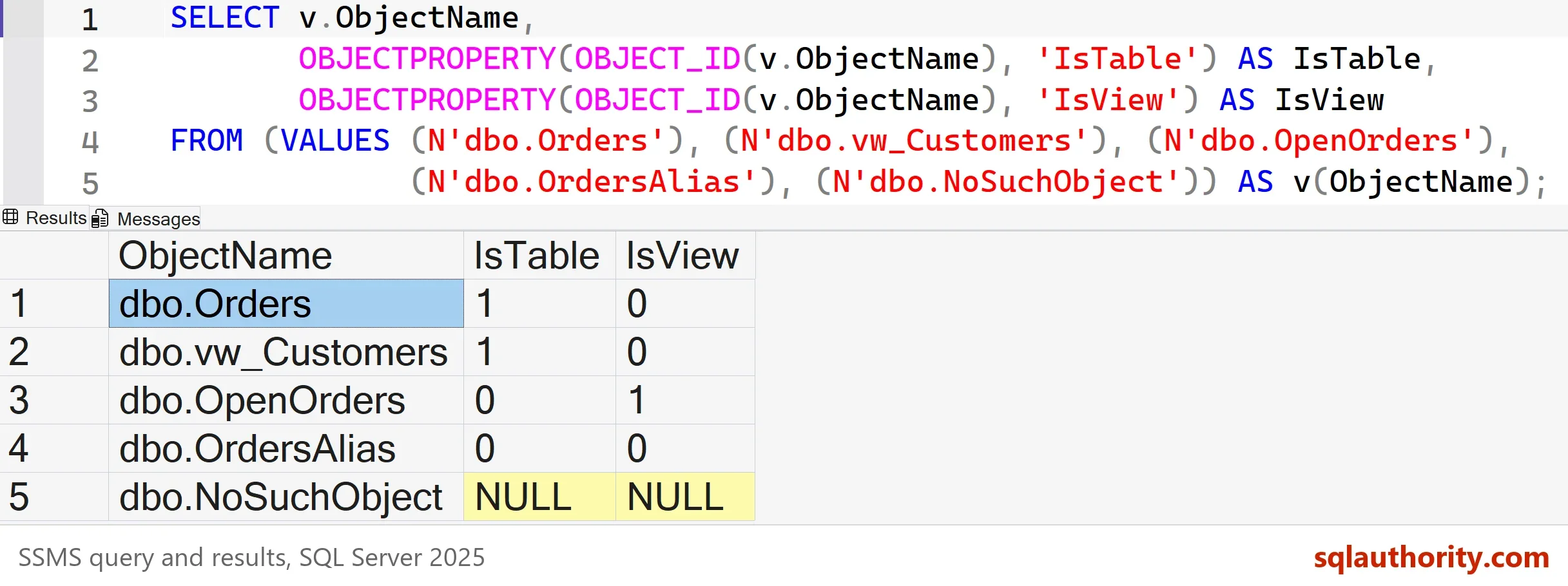
Orders is a table, and OpenOrders is a view. The table named vw_Customers is still a table, so the prefix told nothing. The synonym returns 0 for both questions, because a synonym is neither. The name that does not exist returns NULL. A NULL means the function found nothing, or the caller cannot see the object.
Other Properties Worth Knowing
The same function answers many other questions. IsUserTable separates your tables from system tables. IsProcedure finds stored procedures. IsMSShipped returns 1 for an object that SQL Server created itself. The next query asks all three about a table, a procedure and the view sys.objects.
SELECT v.ObjectName,
       OBJECTPROPERTY(OBJECT_ID(v.ObjectName), 'IsUserTable') AS IsUserTable,
       OBJECTPROPERTY(OBJECT_ID(v.ObjectName), 'IsProcedure') AS IsProcedure,
       OBJECTPROPERTY(OBJECT_ID(v.ObjectName), 'IsMSShipped') AS IsMSShipped
FROM (VALUES (N'dbo.Orders'), (N'dbo.ShowOrders'), (N'sys.objects')) AS v(ObjectName);| ObjectName | IsUserTable | IsProcedure | IsMSShipped |
|---|---|---|---|
| dbo.Orders | 1 | 0 | 0 |
| dbo.ShowOrders | 0 | 1 | 0 |
| sys.objects | 0 | 0 | 1 |
Read the Type for Every Object at Once
OBJECTPROPERTY answers one question about one object. To see every object and its kind, read sys.objects. The column type_desc names the kind in words. The filter is_ms_shipped = 0 hides the system objects that SQL Server creates in every database.
SELECT name, type, type_desc
FROM sys.objects
WHERE is_ms_shipped = 0
ORDER BY name;
| name | type | type_desc |
|---|---|---|
| OpenOrders | V | VIEW |
| Orders | U | USER_TABLE |
| OrdersAlias | SN | SYNONYM |
| PK_Orders | PK | PRIMARY_KEY_CONSTRAINT |
| ShowOrders | P | SQL_STORED_PROCEDURE |
| vw_Customers | U | USER_TABLE |
The synonym shows up as SN, and the key constraint is listed as an object too. When you only need to test one name, OBJECT_ID accepts a type as a second argument. It returns the ID when the object has that type, and NULL when it does not.
SELECT OBJECT_ID(N'dbo.Orders', N'U') AS AsTable,
       OBJECT_ID(N'dbo.Orders', N'V') AS AsView;
The first column holds the ID of the table. The second is NULL, because Orders is not a view.
Use the Answer Before a DROP
The practical use is a guard in a script. A script that drops an object should check its kind first. DROP TABLE on a view fails with Msg 3705, which tells you to use DROP VIEW. The guard keeps a cleanup script from stopping halfway.
IF OBJECTPROPERTY(OBJECT_ID(N'dbo.OpenOrders'), 'IsView') = 1
    DROP VIEW dbo.OpenOrders;
IF OBJECTPROPERTY(OBJECT_ID(N'dbo.vw_Customers'), 'IsTable') = 1
    DROP TABLE dbo.vw_Customers;
The Function Looks in the Current Database
OBJECT_ID accepts a three-part name, so it can find an object in another database. OBJECTPROPERTY does not follow it there. It looks up the ID in the database where the query runs. From master, the next query gets a valid ID for Orders and still returns NULL.
USE master;
GO
SELECT OBJECT_ID(N'ObjectKindDemo.dbo.Orders') AS ObjectIdFound,
       OBJECTPROPERTY(OBJECT_ID(N'ObjectKindDemo.dbo.Orders'), 'IsTable') AS IsTable;
The ID comes back, and IsTable is NULL. Worse, the ID can match a different object in the current database. Run the check inside the right database, or read that database’s catalog directly.
SELECT o.name, o.type_desc
FROM ObjectKindDemo.sys.objects AS o
WHERE o.object_id = OBJECT_ID(N'ObjectKindDemo.dbo.Orders');
| name | type_desc |
|---|---|
| Orders | USER_TABLE |
Temporary tables follow the same rule. They live in tempdb, so ask from tempdb. As an example, the next batch creates one and gets a 1. The same name asked from master returns NULL.
USE tempdb;
GO
CREATE TABLE #Probe (ProbeID int);
SELECT OBJECTPROPERTY(OBJECT_ID(N'tempdb..#Probe'), 'IsTable') AS IsTable;
Is OBJECTPROPERTY the Best Tool?
You could argue that sys.objects is simpler for the table or view in SQL Server question. One query shows everything. For a list, it is. For a single name inside an IF, OBJECTPROPERTY reads better, and it returns one value you can test. I use both. The function is for the quick question, and the catalog view is for the survey.
Naming conventions still deserve a place. A prefix such as vw_ for views tells a reader the kind at a glance. It works as long as everyone follows it. OBJECTPROPERTY is the check for the day someone does not, and the demo table named vw_Customers shows that day.
What to Remember
Ask OBJECTPROPERTY for IsTable and IsView when the name gives no clue. That is how you tell a table or view in SQL Server apart. A 1 is yes, a 0 is no, and a NULL means not found or not visible. A synonym is neither a table nor a view. Run the check in the database that owns the object. Clean up when you finish.
USE master;
GO
IF DB_ID(N'ObjectKindDemo') IS NOT NULL
BEGIN
    ALTER DATABASE ObjectKindDemo SET SINGLE_USER WITH ROLLBACK IMMEDIATE;
    DROP DATABASE ObjectKindDemo;
END;
A name is not a type, it is a label that anyone can get wrong.
Published by Pinal Dave on SQLAuthority. More of my work at pinaldave.com.
Discover more from SQL Authority with Pinal Dave
Subscribe to get the latest posts sent to your email.



1 Comment. Leave new
I like this trick! It’s too bad that people don’t learn to use simple prefix naming conventions, such as “vw_” for views, or “usp_” for user stored procedures. I came from working with Microsoft Access, where it is very common to adopt naming conventions, at least for people who are not absolute newbies.