
The number of rows read tells you how many rows an operator touched. It can be far larger than the number of rows the operator returned. Management Studio shows both numbers in an actual execution plan. The gap between them is a clue about wasted work.

Two Numbers in the Plan
Every scan and seek in an actual plan has two row counts. Actual Number of Rows for All Executions is what the operator passed to the next step. Number of Rows Read is how many rows it looked at to find them. When the operator has no filter of its own, the two numbers are equal. When it filters rows after reading them, the second number is the larger one.
To see them, run the query with the actual plan turned on. Press Ctrl+M and run the query. Click the scan or seek in the plan, then open the Properties window with F4. Both values are in the list. The same numbers are in the plan XML that SET STATISTICS XML ON returns. The number of rows read exists in SQL Server 2016 SP1 and later.
Build the Demo
The demo database is named RowsReadDemo, so run the script on a test server. It builds an orders table with 200,000 rows. Every 97th order has the status Held, and the rest are Shipped. Two nonclustered indexes start with the customer column. One holds the status as an included column. The other holds the status in its key.
IF DB_ID(N'RowsReadDemo') IS NULL CREATE DATABASE RowsReadDemo;
GO
USE RowsReadDemo;
GO
DROP TABLE IF EXISTS dbo.Orders;
CREATE TABLE dbo.Orders (OrderID int NOT NULL PRIMARY KEY CLUSTERED, CustomerID int NOT NULL, Status varchar(10) NOT NULL, Total decimal(9,2) NOT NULL);
GO
INSERT dbo.Orders (OrderID, CustomerID, Status, Total)
SELECT n, n % 500, CASE WHEN n % 97 = 0 THEN 'Held' ELSE 'Shipped' END, 10 + n % 90
FROM (SELECT TOP (200000) ROW_NUMBER() OVER (ORDER BY (SELECT NULL)) AS n FROM sys.all_objects AS a CROSS JOIN sys.all_objects AS b) AS t;
CREATE INDEX IX_Orders_Customer ON dbo.Orders (CustomerID) INCLUDE (Status);
CREATE INDEX IX_Orders_CustomerStatus ON dbo.Orders (CustomerID, Status);
A Scan That Reads Everything
The first query counts the Held orders. No index starts with the status, so SQL Server scans the clustered index. It reads every row and keeps the ones that pass the filter. The script also turns on STATISTICS IO, so the Messages tab shows the page reads.
SET STATISTICS IO ON;
SELECT COUNT(*) AS HeldOrders FROM dbo.Orders WHERE Status = 'Held' AND Total > 0;
The query returns 2,061 rows in the count. The scan read 200,000 rows to find them, and it needed 821 logical reads. In the plan, the scan shows Actual Number of Rows 2,061 and Number of Rows Read 200,000. The filter appears as a Predicate in the properties, because the scan applies it row by row.
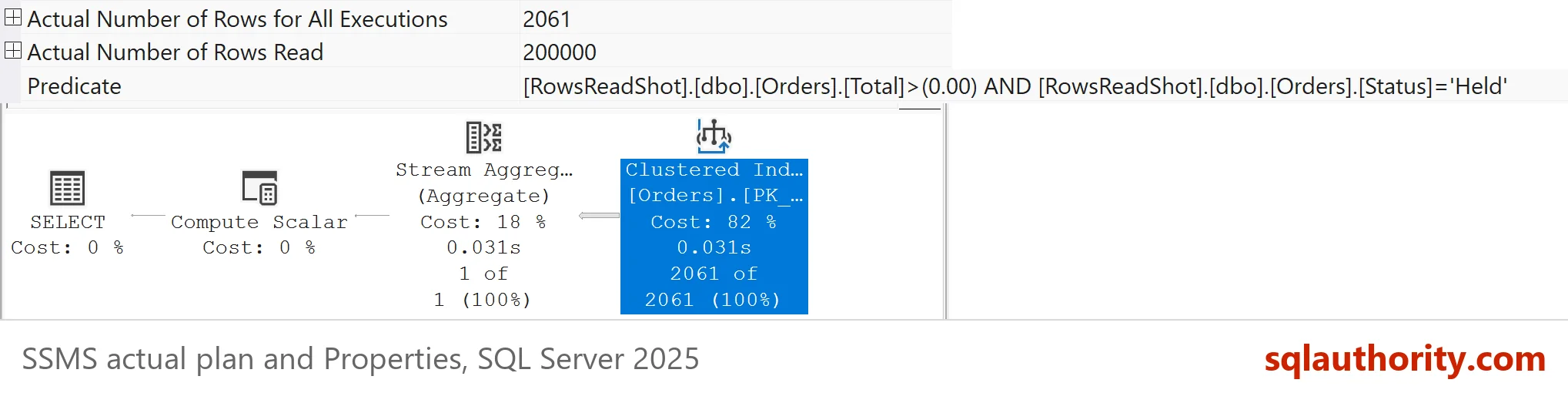
A Seek That Still Reads Too Many Rows
A seek sounds cheaper, and it is. It still has a gap of its own. The next two queries ask for the Held orders of one customer. The first forces the index that has the customer as its key and the status as an included column. The second forces the index that has both columns in its key.
SELECT COUNT(*) AS HeldForCustomer FROM dbo.Orders WITH (INDEX(IX_Orders_Customer)) WHERE CustomerID = 250 AND Status = 'Held';

SELECT COUNT(*) AS HeldForCustomer FROM dbo.Orders WITH (INDEX(IX_Orders_CustomerStatus)) WHERE CustomerID = 250 AND Status = 'Held';
SET STATISTICS IO OFF;
| Index used | Operator | Rows read | Actual rows | Logical reads |
|---|---|---|---|---|
| Clustered primary key | Clustered Index Scan | 200,000 | 2,061 | 821 |
| IX_Orders_Customer | Index Seek | 400 | 4 | 4 |
| IX_Orders_CustomerStatus | Index Seek | 4 | 4 | 3 |
The first seek read 400 rows and kept 4. It found all the rows of the customer with the seek predicate on CustomerID. Then it checked the status of each one as a residual predicate. The status was only an included column, so it could not narrow the seek. The second seek used both columns as seek predicates, read 4 rows and kept 4. Both plans are seeks. Only one of them wastes work.
These numbers come from my test server. A second server read 6 pages for the first seek instead of 4.
The properties window shows the difference in two lists. Seek Predicates lists the conditions that locate rows in the index. Predicate lists the conditions that SQL Server applies afterwards, row by row. In the demo, the wide gaps came with a Predicate list. The wide scan had no Seek Predicates at all.
Does a Scan Mean Trouble?
A scan that reads 200,000 rows to return 2,061 is not wrong. The table has no better index for that filter. The cost is 821 reads. That is acceptable for a report that runs once a day. It is expensive for a query that runs a thousand times a minute. Do not judge a plan by the word scan or seek. Judge it by the work and by how many times it repeats.
When a query is slow, I look for a scan or seek with a large Number of Rows Read. A gap of a few rows means nothing. A gap of hundreds of thousands points to an index that does not match the filter.
What Closes the Gap
Add the filter column to the index key, right after the seek column, as the second query did. A column used for equality goes before a column used for a range. An included column helps with covering a query, but it never narrows the rows read.
Updating statistics is the common advice for a large gap. I do not expect it to fix one on its own. Statistics change the estimates, and the estimates choose the plan. The gap comes from the shape of the index and the query, which an update does not change. Check the predicates first.
You could argue that elapsed time is the only number that matters, and that rows read is noise. For a query that runs once, that is right. A query that runs 10,000 times a day wastes almost four million row reads with that gap of 396. The number is a clue, not a verdict.
What to Remember
Compare Number of Rows Read with Actual Number of Rows. A large gap means a filter runs after the rows are read. Read the Seek Predicates and the Predicate lists to find which column is filtered late. Move that column into the index key, and measure the reads again.
When you finish testing, remove the example database.
USE master;
GO
IF DB_ID(N'RowsReadDemo') IS NOT NULL
BEGIN
    ALTER DATABASE RowsReadDemo SET SINGLE_USER WITH ROLLBACK IMMEDIATE;
    DROP DATABASE RowsReadDemo;
END;
A plan is not a verdict, it is a record of how much work each step did.
Published by Pinal Dave on SQLAuthority. More of my work at pinaldave.com.
Discover more from SQL Authority with Pinal Dave
Subscribe to get the latest posts sent to your email.




1 Comment. Leave new
In execution plan the index was in Seek mode still Number of rows read Actual Number of rows for All execution.
Number of Rows Read 2070610.
Actual Number of rows for All execution=897.
Can you please help me out why there is lot of difference?
Query 1st
—===========================================
SELECT
invoice.companyid,
Invoice.InvoiceID,
services.IsRecurring,
services.IsUnlimited,
CategoryID,
ISNULL(ServiceStatus,’ServiceStatus’) AS ServiceStatus,
ISNULL(services.ModiyFromDailyTransactionRpt,0) AS ModiyFromDailyTransactionRpt,
Invoice.[status]
–INTO #Temp_WashInvoiceExtra
FROM Wash services WITH(NOLOCK)
JOIN Company service WITH(NOLOCK) on services.ExtraWashId=service.ServiceId
JOIN WashInv invoice WITH(NOLOCK) on services.invoiceId=invoice.invoiceId
LEFT JOIN #Temp_Location TL ON TL.LocationID=invoice.LocationId
WHERE Invoice.WashDate>=@StartDate AND Invoice.WashDate=@StartDate AND Invoice.WashDate<=@EndDate
and invoice.companyid=@companyId AND
invoice.[Status] IN( 'Completed' ,'PartiallyRefunded','PartiallyRefunded')
AND
Invoice.LocationId IN (0,@locationId).
so when it's means Second query is efficient compare to 1st query.
but number of row read is very high in second query.
so sir please help me out which one is better