To disable row goal for one query, add OPTION (USE HINT (‘DISABLE_OPTIMIZER_ROWGOAL’)) to it. The hint removes one assumption from the optimizer, and for the right query it removes an expensive plan. For the wrong query it makes things worse, so test both versions.

What a Row Goal Is
A row goal is a target the optimizer sets when a query wants only a few rows. TOP is the best known source. EXISTS, IN and the FAST n hint create goals too. The optimizer asks how fast it can find the first rows, not how fast it can find all of them. That changes the cost of every plan, because a plan that starts quickly and stops early looks cheap.
The estimate rests on an assumption. The optimizer assumes the rows you want are spread evenly through the data. Then a scan that stops at the first match reads only a small part of the table. If the matching rows all sit at the far end, the same scan reads almost everything. For the plan estimates behind a row goal, read DISABLE_OPTIMIZER_ROWGOAL: How a Row Goal Changes the Plan.
The hint is also the reason many people search for this topic. In a health check, a client’s query ran slower after an upgrade to SQL Server 2019. The hint fixed that one query.
A Table Where the Goal Fails
The demo database is named RowGoalOffDemo, so run the script on a test server. It builds two tables with 1,000,000 rows each. In the first, only the last 50,000 orders have an amount above 990. In the second, every 20th order does, so those rows are spread through the table. Each table has a nonclustered index on the amount. The load takes about twenty seconds.
IF DB_ID(N'RowGoalOffDemo') IS NULL CREATE DATABASE RowGoalOffDemo;
GO
USE RowGoalOffDemo;
GO
DROP TABLE IF EXISTS dbo.Orders, dbo.OrdersSpread;
CREATE TABLE dbo.Orders (OrderID int NOT NULL PRIMARY KEY CLUSTERED, Amount int NOT NULL, Note char(60) NOT NULL DEFAULT 'n');
CREATE TABLE dbo.OrdersSpread (OrderID int NOT NULL PRIMARY KEY CLUSTERED, Amount int NOT NULL, Note char(60) NOT NULL DEFAULT 'n');
GO
INSERT dbo.Orders (OrderID, Amount)
SELECT n, CASE WHEN n > 950000 THEN 991 + n % 10 ELSE 1 + n % 990 END
FROM (SELECT TOP (1000000) ROW_NUMBER() OVER (ORDER BY (SELECT NULL)) AS n FROM sys.all_objects AS a CROSS JOIN sys.all_objects AS b) AS t;
INSERT dbo.OrdersSpread (OrderID, Amount)
SELECT n, CASE WHEN n % 20 = 0 THEN 991 + n % 10 ELSE 1 + n % 990 END
FROM (SELECT TOP (1000000) ROW_NUMBER() OVER (ORDER BY (SELECT NULL)) AS n FROM sys.all_objects AS a CROSS JOIN sys.all_objects AS b) AS t;
CREATE INDEX IX_Orders_Amount ON dbo.Orders (Amount);
CREATE INDEX IX_OrdersSpread_Amount ON dbo.OrdersSpread (Amount);
The query asks for the first order, in key order, with an amount above 990. With the row goal, the optimizer expects to find one quickly. The second statement runs the same query with the hint. STATISTICS IO prints the page reads for each.
SET STATISTICS IO ON;
SELECT TOP (1) OrderID, Amount FROM dbo.Orders WHERE Amount > 990 ORDER BY OrderID;

SELECT TOP (1) OrderID, Amount FROM dbo.Orders WHERE Amount > 990 ORDER BY OrderID
OPTION (USE HINT ('DISABLE_OPTIMIZER_ROWGOAL'));| Version | Plan | Rows read | Logical reads |
|---|---|---|---|
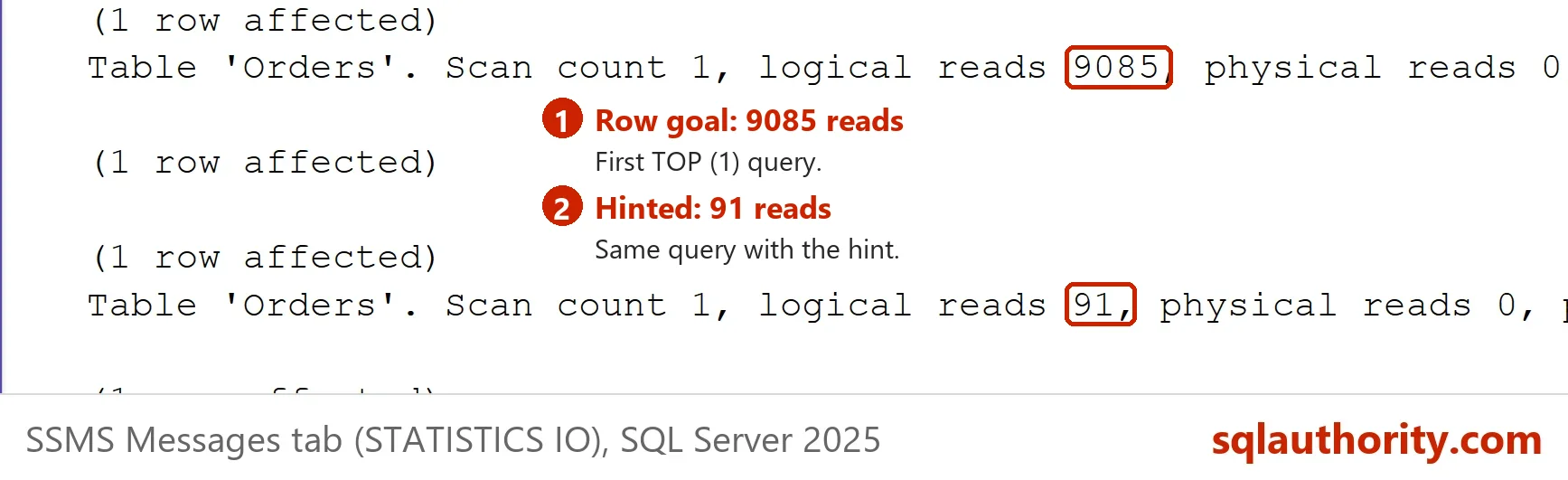
| Default, with the row goal | Clustered Index Scan, then Top | 950,001 | 9,085 |
| With DISABLE_OPTIMIZER_ROWGOAL | Index Seek on IX_Orders_Amount, then Sort | 50,000 | 91 |
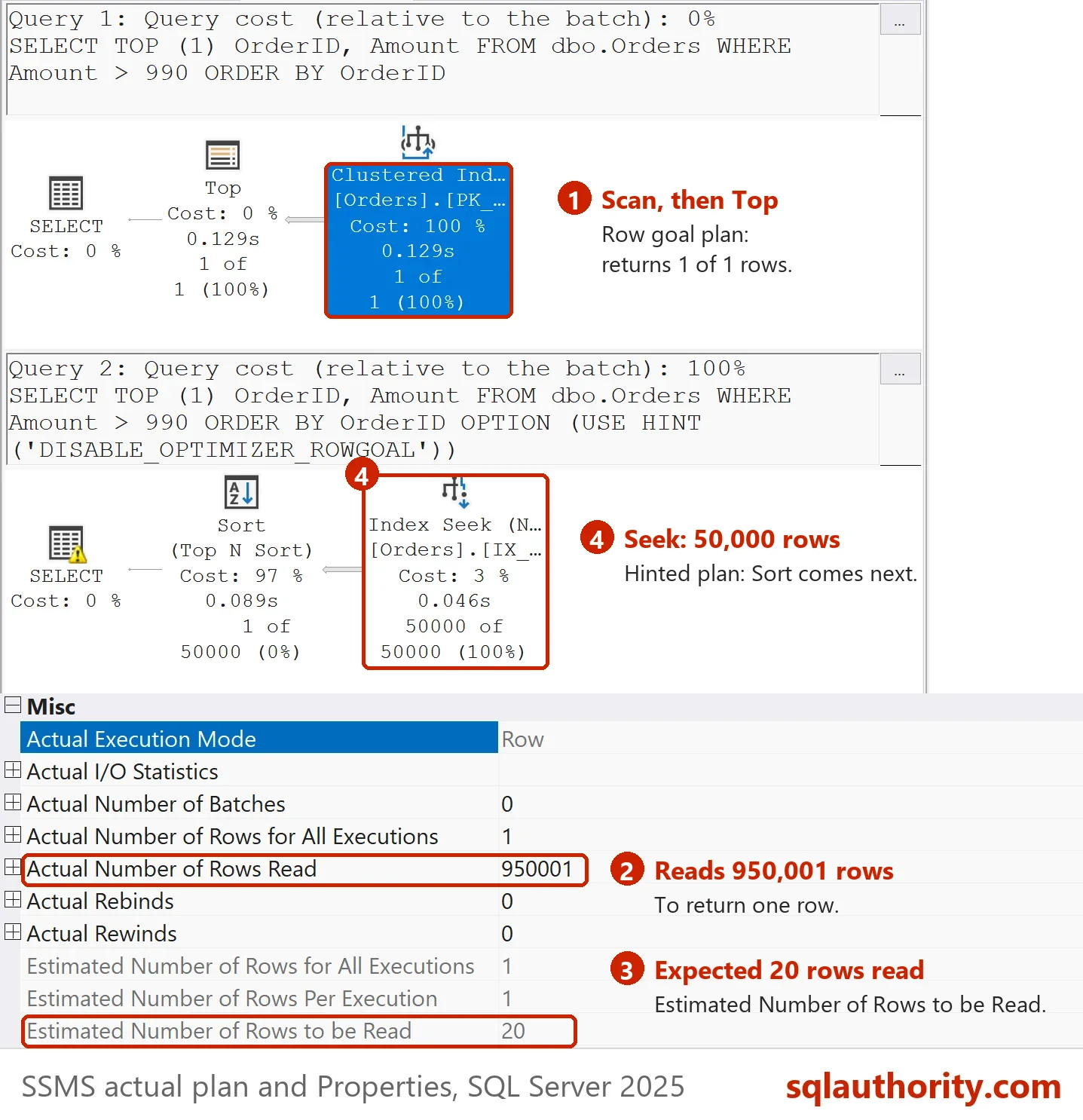
The default plan scans the clustered index in key order and stops at the first match. The first match is at order 950,001, so the scan reads 9,085 pages. The plan XML shows why the optimizer chose it. It estimates one row for the scan. Without the row goal it would estimate 50,000.
The hinted plan seeks the index on the amount, reads the 50,000 qualifying rows and sorts them. It sounds like more work, and it needs 91 reads. The hint wins by a factor of one hundred on this data.
A Table Where the Goal Wins
Run the same pair of queries against the second table. Now the matching rows are everywhere, so the scan finds one within the first few pages.
SELECT TOP (1) OrderID, Amount FROM dbo.OrdersSpread WHERE Amount > 990 ORDER BY OrderID;

SELECT TOP (1) OrderID, Amount FROM dbo.OrdersSpread WHERE Amount > 990 ORDER BY OrderID
OPTION (USE HINT ('DISABLE_OPTIMIZER_ROWGOAL'));
SET STATISTICS IO OFF;| Version | Logical reads |
|---|---|
| Default, with the row goal | 3 |
| With DISABLE_OPTIMIZER_ROWGOAL | 91 |
The result flips. The row goal plan needs 3 reads. The hinted plan needs 91, because it still reads and sorts the whole range. The optimizer was right about this table. The same hint that fixed the first query makes the second one thirty times worse.
How to Decide
Treat the choice to disable row goal as a last step. First check the query and the index design. When the plan still scans far more rows than it returns, compare the two versions with STATISTICS IO, as above. Keep the hint only when it wins on your real data.
Watch the data too. The hint locks in one plan shape. If the matching rows later spread through the table, the default plan would have been the better one. A hint that was right last year can be wrong after the next load.
The hint works for one query. Two broader switches exist. Trace flag 4138 can disable row goal logic for a whole instance or session. That is a heavy hammer for one bad plan. Query Store hints, on SQL Server 2022 and later, add the same hint without a change to the query text. USE HINT needs SQL Server 2016 SP1 or later.
You could argue that the optimizer should never guess wrong, so the hint is a bug report in disguise. Row goals are a bet on how data is spread, and any bet can lose. The hint is the supported way to take the bet back for one query.
What to Remember
A row goal makes the optimizer plan for the first rows instead of all rows. It wins when matching rows are spread evenly and loses when they sit at the far end. To disable row goal for one query, add the USE HINT option. Measure both versions before you keep it.
When you finish testing, remove the example database.
USE master;
GO
IF DB_ID(N'RowGoalOffDemo') IS NOT NULL
BEGIN
    ALTER DATABASE RowGoalOffDemo SET SINGLE_USER WITH ROLLBACK IMMEDIATE;
    DROP DATABASE RowGoalOffDemo;
END;
A row goal is not a bug, it is a bet on how your data is spread.
Published by Pinal Dave on SQLAuthority. More of my work at pinaldave.com.
Discover more from SQL Authority with Pinal Dave
Subscribe to get the latest posts sent to your email.