Scan count zero in STATISTICS IO is not an error and not a free read. It means SQL Server looked up one key in a unique index without starting a scan. The pages it touched still show up as logical reads.

What the Scan Count Counts
SET STATISTICS IO ON prints one line for each table or index a query touches. Two numbers on that line matter here. The scan count is how many seeks or scans SQL Server started. The logical reads are the pages it read from memory.
The scan count is easy to mistake for a cost. It is a count of starts. A query that starts once and reads many pages shows 1. A query that finds one row by a unique key shows 0. A popular rule says that scan count zero means a seek on the primary key. The tests below show that the rule is about the kind of lookup, not about the key.
Set Up the Demo
The demo database is ScanCountDemo. It has a shelves table and an items table with 20,000 rows. The items table has a clustered primary key, an index on ShelfID, and a unique index on Sku. Run it on a test server.
IF DB_ID(N'ScanCountDemo') IS NULL CREATE DATABASE ScanCountDemo;
GO
USE ScanCountDemo;
GO
DROP TABLE IF EXISTS dbo.ShelfItems;
DROP TABLE IF EXISTS dbo.Shelves;
CREATE TABLE dbo.Shelves (
    ShelfID int NOT NULL CONSTRAINT PK_Shelves PRIMARY KEY,
    Aisle   char(1) NOT NULL
);
CREATE TABLE dbo.ShelfItems (
    ItemID   int NOT NULL CONSTRAINT PK_ShelfItems PRIMARY KEY,
    ShelfID  int NOT NULL,
    Sku      varchar(12) NOT NULL,
    ItemName varchar(30) NOT NULL,
    Notes    char(100) NOT NULL DEFAULT 'x'
);
INSERT INTO dbo.Shelves (ShelfID, Aisle)
SELECT TOP (2000) ROW_NUMBER() OVER (ORDER BY (SELECT NULL)),
       CHAR(65 + ROW_NUMBER() OVER (ORDER BY (SELECT NULL)) % 5)
FROM sys.all_objects AS a CROSS JOIN sys.all_objects AS b;
INSERT INTO dbo.ShelfItems (ItemID, ShelfID, Sku, ItemName)
SELECT n, n % 2000 + 1, 'SKU' + CAST(n AS varchar(10)), 'Item ' + CAST(n AS varchar(10))
FROM (SELECT TOP (20000) ROW_NUMBER() OVER (ORDER BY (SELECT NULL)) AS n
      FROM sys.all_objects AS a CROSS JOIN sys.all_objects AS b) AS x;
CREATE INDEX IX_ShelfItems_ShelfID ON dbo.ShelfItems (ShelfID);
CREATE UNIQUE INDEX UX_ShelfItems_Sku ON dbo.ShelfItems (Sku);
Eight Queries, Eight Counts
Each query below assigns its result to a variable. That keeps the Results tab empty, so the Messages tab shows only the I/O lines. The PRINT line before each query names it. The last query forces a nested loop join, so that every shelf is probed one row at a time.
SET STATISTICS IO ON;
DECLARE @n varchar(30);
PRINT 'A key equality'; SELECT @n = ItemName FROM dbo.ShelfItems WHERE ItemID = 500;
PRINT 'B key equality, no such row'; SELECT @n = ItemName FROM dbo.ShelfItems WHERE ItemID = 999999;
PRINT 'C unique index equality'; SELECT @n = ItemName FROM dbo.ShelfItems WHERE Sku = 'SKU500';
PRINT 'D key range'; SELECT @n = ItemName FROM dbo.ShelfItems WHERE ItemID BETWEEN 500 AND 510;
PRINT 'E non-unique index equality'; SELECT @n = ItemName FROM dbo.ShelfItems WHERE ShelfID = 7;
PRINT 'F full scan'; SELECT @n = ItemName FROM dbo.ShelfItems WHERE ItemName = 'Item 77';
PRINT 'G two key values'; SELECT @n = ItemName FROM dbo.ShelfItems WHERE ItemID IN (500, 501);
PRINT 'H probe Shelves 100 times'; SELECT @n = s.Aisle FROM dbo.ShelfItems AS i JOIN dbo.Shelves AS s ON s.ShelfID = i.ShelfID WHERE i.ItemID <= 100 OPTION (LOOP JOIN);
SET STATISTICS IO OFF;
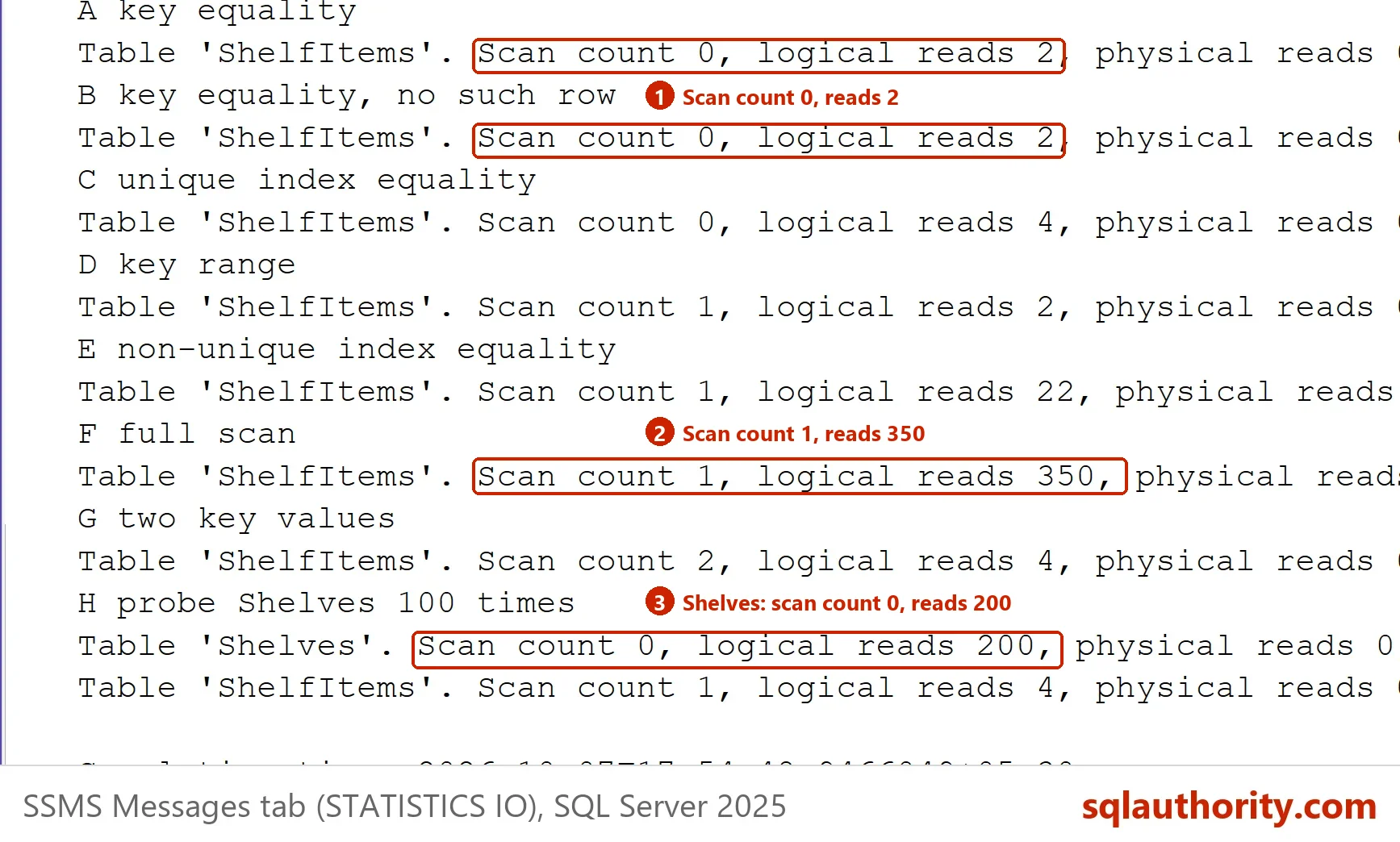
Each line of the Messages tab reads like this: Table ‘ShelfItems’. Scan count 0, logical reads 2, followed by a longer list of zero counters. This is what the first two numbers of each query said.
| Query | Table | Scan count | Logical reads |
|---|---|---|---|
| A key equality | ShelfItems | 0 | 2 |
| B key equality, no such row | ShelfItems | 0 | 2 |
| C unique index equality | ShelfItems | 0 | 4 |
| D key range | ShelfItems | 1 | 2 |
| E non-unique index equality | ShelfItems | 1 | 22 |
| F full scan | ShelfItems | 1 | 350 |
| G two key values | ShelfItems | 2 | 4 |
| H probe Shelves 100 times | Shelves | 0 | 200 |
| H probe Shelves 100 times | ShelfItems | 1 | 4 |
How to Read the Counts
Queries A, B and C show scan count zero. Query H shows it on Shelves. Each one looks up a single row by a unique key. Query B finds no row and still reads two pages, one index page and one data page. Query C uses a unique nonclustered index, not the primary key, and it also shows zero. The reads are 4 because SQL Server then fetches the row from the clustered index.
Query D reads the same two pages as A, yet it shows 1. A range can return many rows, so SQL Server starts a range scan even when only one page is needed. Query E returns 10 rows through a non-unique index and shows 1. Query F reads every page and also shows 1. The scan count cannot tell a 2-page range from a 350-page table scan.
Query G shows 2, because each value in the list is a separate seek.
Zero Can Hide the Work
Query H is the one to remember. It probes Shelves once per item row, 100 times, and still reports scan count zero for that table. The logical reads are 200. Each probe is a single-row lookup by a unique key, so none of them counts. If you judged this query by its scan count, you would call it free.
If the inner table is probed through a non-unique index, each probe counts. This variant makes the items table the inner side. With 100 shelves, ShelfItems shows a scan count of 100 and 231 logical reads.
SET STATISTICS IO ON;
DECLARE @n char(1);
SELECT @n = s.Aisle FROM dbo.Shelves AS s
JOIN dbo.ShelfItems AS i WITH (INDEX(IX_ShelfItems_ShelfID)) ON i.ShelfID = s.ShelfID
WHERE s.ShelfID <= 100
OPTION (LOOP JOIN, FORCE ORDER, MAXDOP 1);
SET STATISTICS IO OFF;
That is why logical reads are the number to compare. Run the same query before and after a change, and look at the reads.
Parallel Plans Add Threads
A parallel plan reports a higher scan count. This query forces a parallel scan with four threads. The scan count it reports is 5, which is the number of threads plus one. With MAXDOP 2 it reports 3, and with MAXDOP 1 it reports 1.
SET STATISTICS IO ON;
DECLARE @n varchar(30);
SELECT @n = ItemName FROM dbo.ShelfItems WHERE ItemName = 'Item 77'
OPTION (USE HINT('ENABLE_PARALLEL_PLAN_PREFERENCE'), MAXDOP 4);
SET STATISTICS IO OFF;
So a scan count of 5 does not mean five seeks. The logical reads of this run were also higher than the 350 of the single-thread scan, 1,045 in this test. The reads of a parallel scan can exceed the pages of the table, and they differ by server. Check the plan before you decide what a number means.
What to Remember
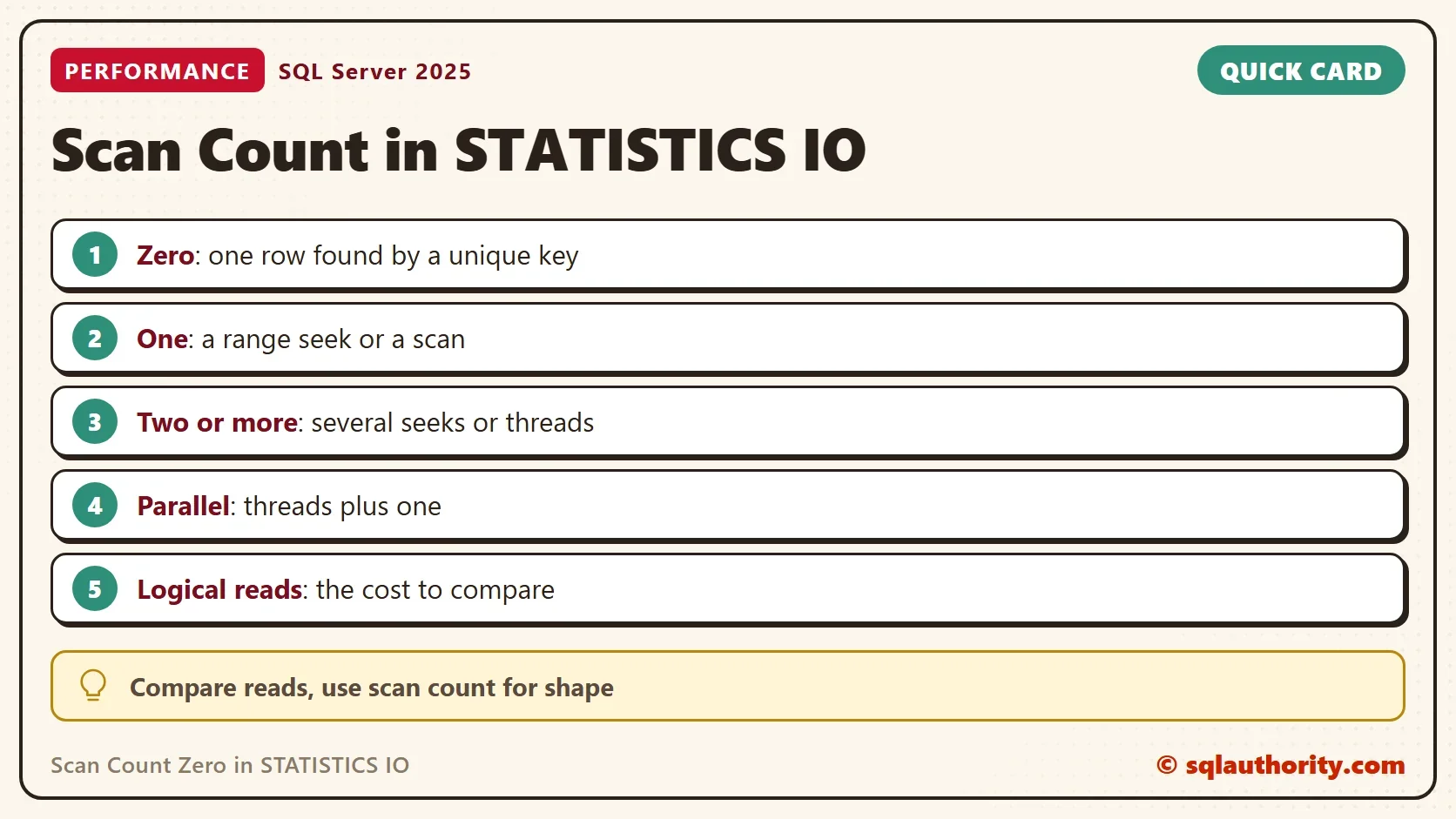
Use the scan count to learn the shape of a plan. Zero means single-row lookups by a unique key. One means a range or a scan. Higher numbers mean several seeks or several threads. Use the logical reads to compare cost. For more on the Messages tab output, see STATISTICS TIME and IO: Turn Them On for Every SSMS Query.
You could argue that none of this matters, since the optimizer picks the plan. It matters when a plan changes. A query can move from scan count zero to a scan count of 1 and read ten times the pages. It has lost its lookup, and the Messages tab shows that first.
When you finish the demo, drop the database.
USE master;
GO
DROP DATABASE ScanCountDemo;
A scan count is not a cost, it is a count of how many times SQL Server started looking.
Published by Pinal Dave on SQLAuthority. More of my work at pinaldave.com.
Discover more from SQL Authority with Pinal Dave
Subscribe to get the latest posts sent to your email.