Stop chasing every seek, because a table scan is the right plan when your query needs most of the table. Chasing every seek can make a query slower, not faster. Let me prove it with a small table and the reads behind each plan.

The scan that looked like a problem
A junior DBA opens an execution plan and sees Clustered Index Scan. “That is the problem,” they say. “Let’s force an index seek.” It sounds sensible. Seeks are fast and scans are slow, right?
Not when the query wants nearly every row. The index can find the matching keys quickly, but it does not hold the Payload column. For every key, SQL Server then jumps to the clustered index to fetch it. That jump is called a key lookup, and it is not free.
Build a table where most rows match
The table has 5,000 rows. Category 1 has 4,500 of them. An index on Category exists, but it does not include Payload.
SET NOCOUNT ON;
DROP TABLE IF EXISTS #ScanDemo;
CREATE TABLE #ScanDemo (Id int PRIMARY KEY CLUSTERED, Category int NOT NULL, Payload char(200));
INSERT #ScanDemo
SELECT value, CASE WHEN value <= 4500 THEN 1 ELSE 2 END, 'sample'
FROM GENERATE_SERIES(1, 5000);
CREATE INDEX IX_ScanDemo_Category ON #ScanDemo (Category);
Compare the three plans
Press Ctrl+M in SSMS to include the actual execution plan, then run this block. The first query forces the nonclustered route. The second forces the clustered scan. The third lets the optimizer decide. The hints are for experiments only. Do not ship them.
SELECT Id, Payload FROM #ScanDemo
WITH (INDEX(IX_ScanDemo_Category), FORCESEEK) WHERE Category = 1;

SELECT Id, Payload FROM #ScanDemo
WITH (INDEX(1), FORCESCAN) WHERE Category = 1;

SELECT Id, Payload FROM #ScanDemo WHERE Category = 1;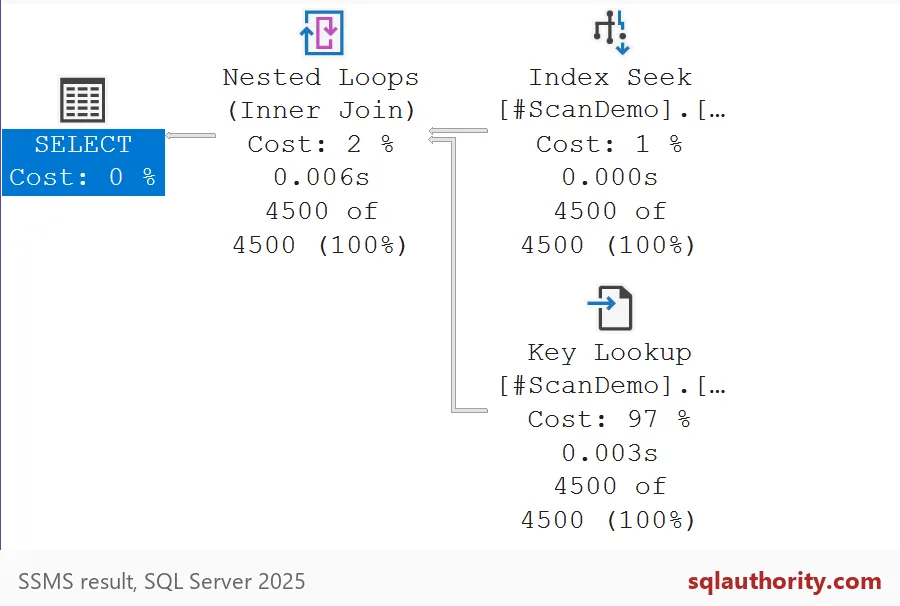
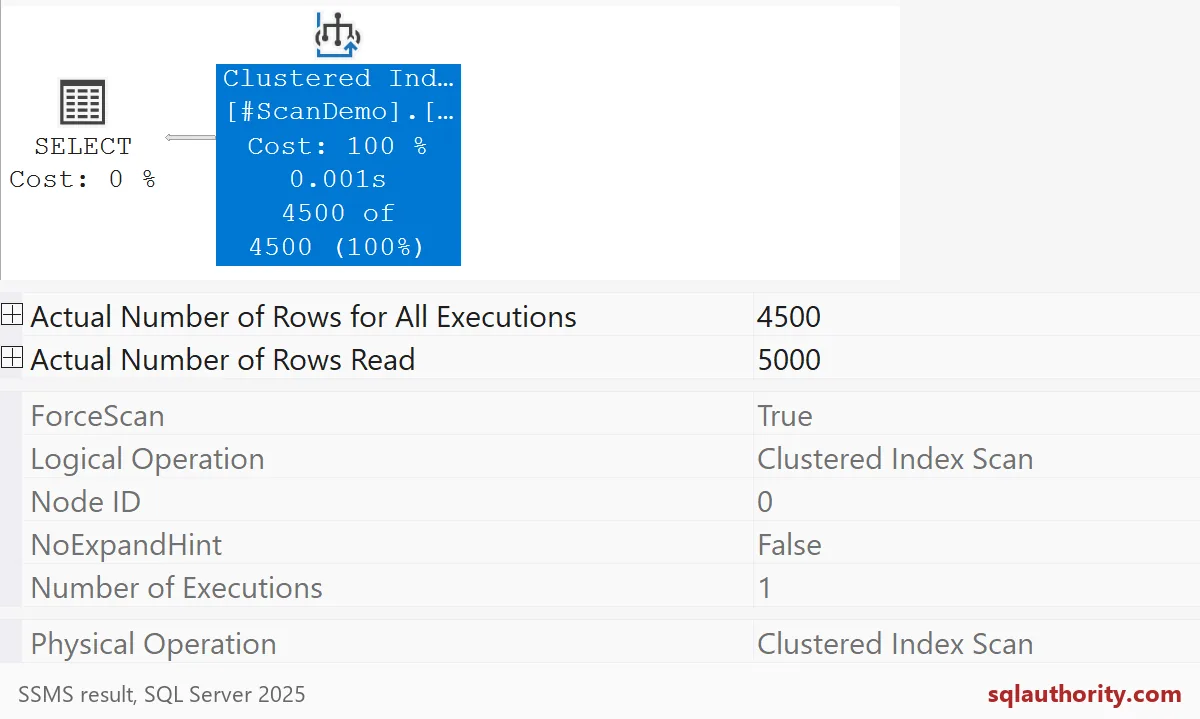
All three queries return the same 4,500 rows. In the seek plan, the Key Lookup carries 97 percent of the cost. In the scan plan, one operator reads 5,000 rows and keeps 4,500. That is a little wasteful, but it happens in one pass.
Count the reads
A plan picture hides the size of the work, so count pages instead. This block assigns the rows to variables, so no grid fills your screen, and prints logical reads for each query.
DECLARE @id int, @payload char(200);
SET STATISTICS IO ON;

SELECT @id = Id, @payload = Payload FROM #ScanDemo
WITH (INDEX(IX_ScanDemo_Category), FORCESEEK) WHERE Category = 1;

SELECT @id = Id, @payload = Payload FROM #ScanDemo
WITH (INDEX(1), FORCESCAN) WHERE Category = 1;

SELECT @id = Id, @payload = Payload FROM #ScanDemo WHERE Category = 1;

SET STATISTICS IO OFF;
The forced seek takes 9300 logical reads. The forced scan takes 137. The optimizer’s own choice also takes 137, so it picked the scan by itself. The seek is about 68 times more work, all of it spent on lookups.
Even a small slice can lose
You might think the seek wins once fewer rows match. Category 2 holds only 500 rows, a tenth of the table. Let me test that.
DECLARE @id int, @payload char(200);
SET STATISTICS IO ON;

SELECT @id = Id, @payload = Payload FROM #ScanDemo
WITH (INDEX(IX_ScanDemo_Category), FORCESEEK) WHERE Category = 2;

SELECT @id = Id, @payload = Payload FROM #ScanDemo
WITH (INDEX(1), FORCESCAN) WHERE Category = 2;

SET STATISTICS IO OFF;
The forced seek still costs 1044 reads against 137 for the scan. Ten percent of the table is already enough to make lookups lose. So when does the seek win? When the query is truly selective. Add three rare rows and ask for them with no hints.
INSERT #ScanDemo (Id, Category, Payload)
VALUES (5001, 3, 'rare'), (5002, 3, 'rare'), (5003, 3, 'rare');

DECLARE @id int, @payload char(200);
SET STATISTICS IO ON;

SELECT @id = Id, @payload = Payload FROM #ScanDemo WHERE Category = 3;

SELECT @id = Id, @payload = Payload FROM #ScanDemo
WITH (INDEX(1), FORCESCAN) WHERE Category = 3;

SET STATISTICS IO OFF;
Now the optimizer’s choice reads just 8 pages, and the forced scan still reads 137. Same table, same index, opposite answer. The best access path depends on how many rows you want, not on how the operator sounds.

Clean up and what to do instead
DROP TABLE IF EXISTS #ScanDemo;If a scan really hurts, look at the reads first. A covering index that includes Payload can avoid the lookups, but it costs storage and slows writes. Parameter values, row width and estimates also change the plan. Diagnose the whole request before you erase a scan.
Compare the total work before you change the access path.
A scan is not a failure, it is the right access path when you need most rows.
Published by Pinal Dave on SQLAuthority. More of my work at pinaldave.com.
Discover more from SQL Authority with Pinal Dave
Subscribe to get the latest posts sent to your email.