
Question: How do I add a constraint without validating existing rows? Use WITH NOCHECK when adding a CHECK or FOREIGN KEY constraint. New relevant writes are checked, but the constraint is untrusted until the old data is validated. This option does not bypass PRIMARY KEY or UNIQUE validation.

An Oracle-using client asked this during a Comprehensive Database Performance Health Check. They wanted a rule for new data while dealing with older violations separately. SQL Server uses WITH NOCHECK for that task, not Oracle’s NOVALIDATE spelling; the two products’ detailed constraint semantics should not be assumed identical.
Keep the original rule, make the state visible
The original example inserted IDs 1 through 10, then tried a CHECK requiring ID greater than 5. Normal ADD validation correctly failed. The following private temporary table keeps that exact rule and legacy data, while also testing new writes and the later validation:
IF OBJECT_ID('tempdb..#ConstraintDemo') IS NOT NULL
    THROW 50001, 'The demonstration table already exists.', 1;
CREATE TABLE #ConstraintDemo (ID int NOT NULL, Cols varchar(100));
INSERT #ConstraintDemo(ID,Cols)
VALUES(1,'RandomValues'),(2,'RandomValues'),(3,'RandomValues'),
      (4,'RandomValues'),(5,'RandomValues'),(6,'RandomValues'),
      (7,'RandomValues'),(8,'RandomValues'),(9,'RandomValues'),(10,'RandomValues');
BEGIN TRY
 EXEC sys.sp_executesql N'ALTER TABLE #ConstraintDemo
 ADD CONSTRAINT CHECKID CHECK (ID > 5);';
END TRY
BEGIN CATCH
 SELECT ERROR_NUMBER() AS InitialValidationError;
END CATCH;
ALTER TABLE #ConstraintDemo WITH NOCHECK
ADD CONSTRAINT CHECKID CHECK (ID > 5);
SELECT name,is_disabled,is_not_trusted FROM tempdb.sys.check_constraints
WHERE parent_object_id=OBJECT_ID('tempdb..#ConstraintDemo');
BEGIN TRY
 INSERT #ConstraintDemo(ID,Cols) VALUES(0,'New invalid row');
END TRY
BEGIN CATCH
 SELECT ERROR_NUMBER() AS NewRowError;
END CATCH;
INSERT #ConstraintDemo(ID,Cols) VALUES(11,'New valid row');
-- Only this owned demonstration's five legacy violations are removed.
DELETE #ConstraintDemo WHERE ID <= 5;
ALTER TABLE #ConstraintDemo WITH CHECK CHECK CONSTRAINT CHECKID;
SELECT name,is_disabled,is_not_trusted FROM tempdb.sys.check_constraints
WHERE parent_object_id=OBJECT_ID('tempdb..#ConstraintDemo');
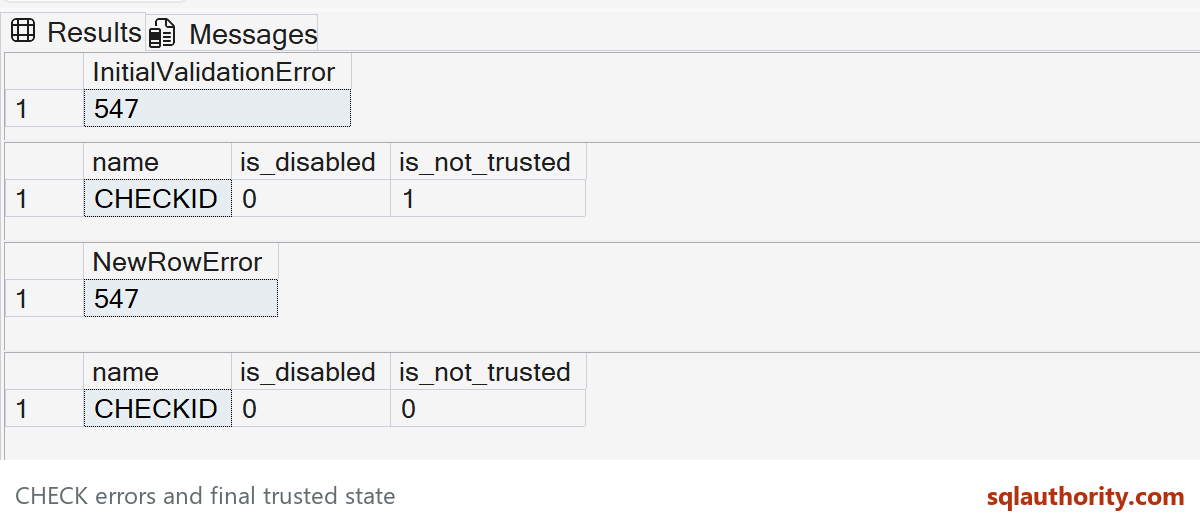
Both rejected operations report error 547. After WITH NOCHECK ADD, CHECKID is enabled (is_disabled = 0) but untrusted (is_not_trusted = 1). ID 0 cannot be inserted, even though old IDs 1 through 5 remain.
Only in this disposable demonstration do we remove those five old violations. In a business table, decide how to correct or preserve that historical data rather than copying this DELETE blindly. WITH CHECK CHECK then validates the remaining rows, and the trusted flag becomes 0.
NOCHECK has two different positions
WITH NOCHECK ADD skips the existing-data validation when creating the rule. NOCHECK CONSTRAINT disables an existing rule for subsequent changes. Confusing the two can leave new data unprotected.
An enabled but untrusted constraint is also not available for the same optimizer reasoning as a trusted one. Keep a deliberate plan to resolve old violations and validate it. The original identity and constraint example provides the background.
The constraint reference explains why this exception does not apply to PRIMARY KEY and UNIQUE.
Published by Pinal Dave on SQLAuthority. More of my work at pinaldave.com.
Discover more from SQL Authority with Pinal Dave
Subscribe to get the latest posts sent to your email.




1 Comment. Leave new
I tried it with
ALTER TABLE myTable
WITH NOCHECK
ADD CONSTRAINT UQ_COLUMN
UNIQUE (COLUMN)
and it gave error with NULL duplicate