
Question: Can one database have two files whose names end in .mdf? Yes. That does not give it two primary data files. The file’s role and its filename extension are different things.

If you answered yes, you already have the short answer. If you answered no, I can see why: we usually teach .mdf for the primary data file, .ndf for a secondary data file and .ldf for a transaction log. Those conventions are good practice. They aren’t what decides which file is primary.
Try it in a separate lab database
The following deliberately names both data files with the .mdf extension. It guards against an existing database of the same name, and doesn’t rename or modify files of another database. Adjust the dedicated lab folder before running it:
USE master;
IF DB_ID(N'InterviewMdfExtensionDemo') IS NOT NULL
    THROW 50001, 'The example database already exists.', 1;
-- Create D:\SQLLabs first; SQL Server needs write access there.
CREATE DATABASE InterviewMdfExtensionDemo
ON PRIMARY
(NAME = N'InterviewMdfExtensionDemo',
 FILENAME = N'D:\SQLLabs\InterviewMdfExtensionDemo.mdf', SIZE = 8MB),
(NAME = N'InterviewMdfExtensionDemo_Secondary',
 FILENAME = N'D:\SQLLabs\InterviewMdfExtensionDemo_Secondary.mdf', SIZE = 8MB)
LOG ON
(NAME = N'InterviewMdfExtensionDemo_Log',
 FILENAME = N'D:\SQLLabs\InterviewMdfExtensionDemo_Log.ldf', SIZE = 8MB);
GO
USE InterviewMdfExtensionDemo;
SELECT file_id, name, type_desc, physical_name
FROM sys.database_files
ORDER BY file_id;
-- The demonstration leaves its uniquely named database in place.
-- Remove it through your normal lab cleanup only when finished.
You should see two ROWS files and one LOG file. File 1 is the primary data file; the other data file is secondary even though its name also ends in .mdf. Both data files in this example belong to the PRIMARY filegroup. A primary filegroup can contain secondary files.
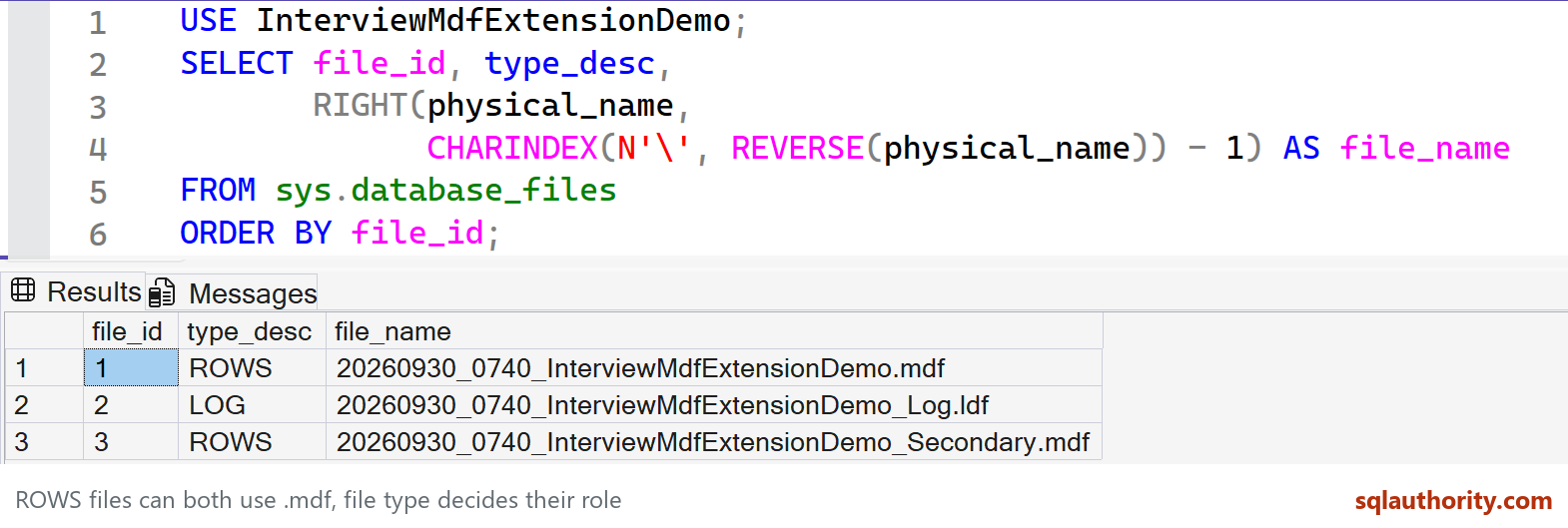
This SQL Server 2025 lab uses newly created files. The compact screenshot query extracts only the filename from physical_name; the full setup above returns complete paths. Both views show the same two ROWS files and one LOG file. Long file names are fully visible.
Keep the naming convention anyway
The first data file specified becomes the primary file. Every database has one primary data file. SQL Server reads the file format and metadata rather than treating a filename suffix as its role.
The same general distinction explains why a backup doesn’t become invalid simply because its filename doesn’t end in .bak. Conversely, giving an ordinary document an .mdf suffix doesn’t turn it into a database.
Possible isn’t always helpful. Unusual extensions can confuse the next DBA, backup automation and file inventories. I would use .mdf, .ndf and .ldf consistently in a real deployment, then inspect catalog metadata when I need to know the actual roles.
Related file-management questions:
- How to Move Log File or MDF File in SQL Server? – Interview Question of the Week #208
- SQL SERVER – Move Database Files MDF and LDF to Another Location
- SQL SERVER – How to Rename Extention of MDF File? – A Simple Tutorial
- How to Attach MDF Data File Without LDF Log File – Interview Question of the Week #078
- How to Move SQL Server MDF and LDF Files? – Interview Question of the Week #189
- SQL SERVER – Multiple Log Files to Your Databases – Not Needed
- SQL SERVER – Attach mdf file without ldf file in Database
- SQL SERVER – Can Database Primary File Have Any Other Extention Than MDF
Published by Pinal Dave on SQLAuthority. More of my work at pinaldave.com.
Discover more from SQL Authority with Pinal Dave
Subscribe to get the latest posts sent to your email.



2 Comments. Leave new
Something to add to this – you can actually have a database with 0 MDF files too. It is just a file name convention, but SQL Server doesn’t require you to put a file extension on the data files.
I would not recommend doing this, but you CAN do it.
This all makes sense, but one thing I can’t find an answer too… how do you identify which is the primary data file if, like me, you inherit a database with multiple mdf files?