
Metadata contention in TempDB is the pile-up of sessions that create and drop temporary tables at the same moment. SQL Server 2019 can keep part of that metadata in memory. The setting helps only when your waits match this problem.

What TempDB Metadata Is
Every temporary table is an object, and SQL Server records objects in system tables. Creating a temporary table adds rows to those system tables in TempDB. Dropping it removes them. A client ran thousands of small transactions every second. Each one created a table in TempDB and dropped it at the end.
At that rate, many sessions touch the same few pages of the same system tables. They queue for a latch on each page. That queue is metadata contention in TempDB. It slows the work that needs no more than a small temporary table.
See the Cost of One Small Query
A catalog query shows which system tables are involved. The next statement counts the tables in TempDB and prints the page reads for each system table it touches. The numbers are one reading from a shared test server. They change with the temporary tables that exist at that moment.
SET STATISTICS IO ON;
SELECT COUNT(*) AS TempTables FROM tempdb.sys.tables;
SET STATISTICS IO OFF;
The Messages tab lists sysschobjs with 55 logical reads. With temporary tables in TempDB it also lists syssingleobjrefs and sysidxstats. On a quiet server only sysschobjs appears. A one-line query reads those tables, and every create and drop of a temporary table writes to them. With memory-optimized metadata the client saw the list shrink. Only syspalnames and syspalvalues stayed in the output.
Read the Waits Before You Change Anything
The setting targets metadata contention in TempDB, which shows as latch waits on tempdb pages. Check for them first. The cumulative view counts waits since the last restart. It shows the habit of the server, not one bad minute.
SELECT wait_type, waiting_tasks_count, wait_time_ms, signal_wait_time_ms
FROM sys.dm_os_wait_stats
WHERE wait_type LIKE N'PAGELATCH[_]%' OR wait_type = N'RESOURCE_SEMAPHORE'
ORDER BY wait_time_ms DESC;
| wait_type | waiting_tasks_count | wait_time_ms | signal_wait_time_ms |
|---|---|---|---|
| PAGELATCH_EX | 7329360 | 5549555 | 366731 |
| PAGELATCH_SH | 759020 | 361793 | 37926 |
| PAGELATCH_UP | 560 | 5020 | 59 |
| RESOURCE_SEMAPHORE | 0 | 0 | 0 |
The table shows four of the seven rows the query returns. The other three show zero. The counts grow all day, so yours will differ. On this test server the page latch waits are large and RESOURCE_SEMAPHORE is zero. That picture fits metadata contention.
A page latch wait alone proves nothing, because the pages can sit in a user database. The wait resource tells you more. The form 2:1:128 means database 2, file 1, page 128, and database 2 is TempDB. The next query lists tasks that wait on such pages right now.
SELECT wt.wait_type, wt.resource_description, COUNT(*) AS Tasks
FROM sys.dm_os_waiting_tasks AS wt
WHERE wt.wait_type LIKE N'PAGELATCH[_]%' AND wt.resource_description LIKE N'2:%'
GROUP BY wt.wait_type, wt.resource_description;
On a quiet moment it returns no rows, as it did here. Run it several times while the problem is happening. The same system table pages appearing again and again point to metadata contention. Reading it needs the VIEW SERVER STATE permission, or VIEW SERVER PERFORMANCE STATE on SQL Server 2022 and later.
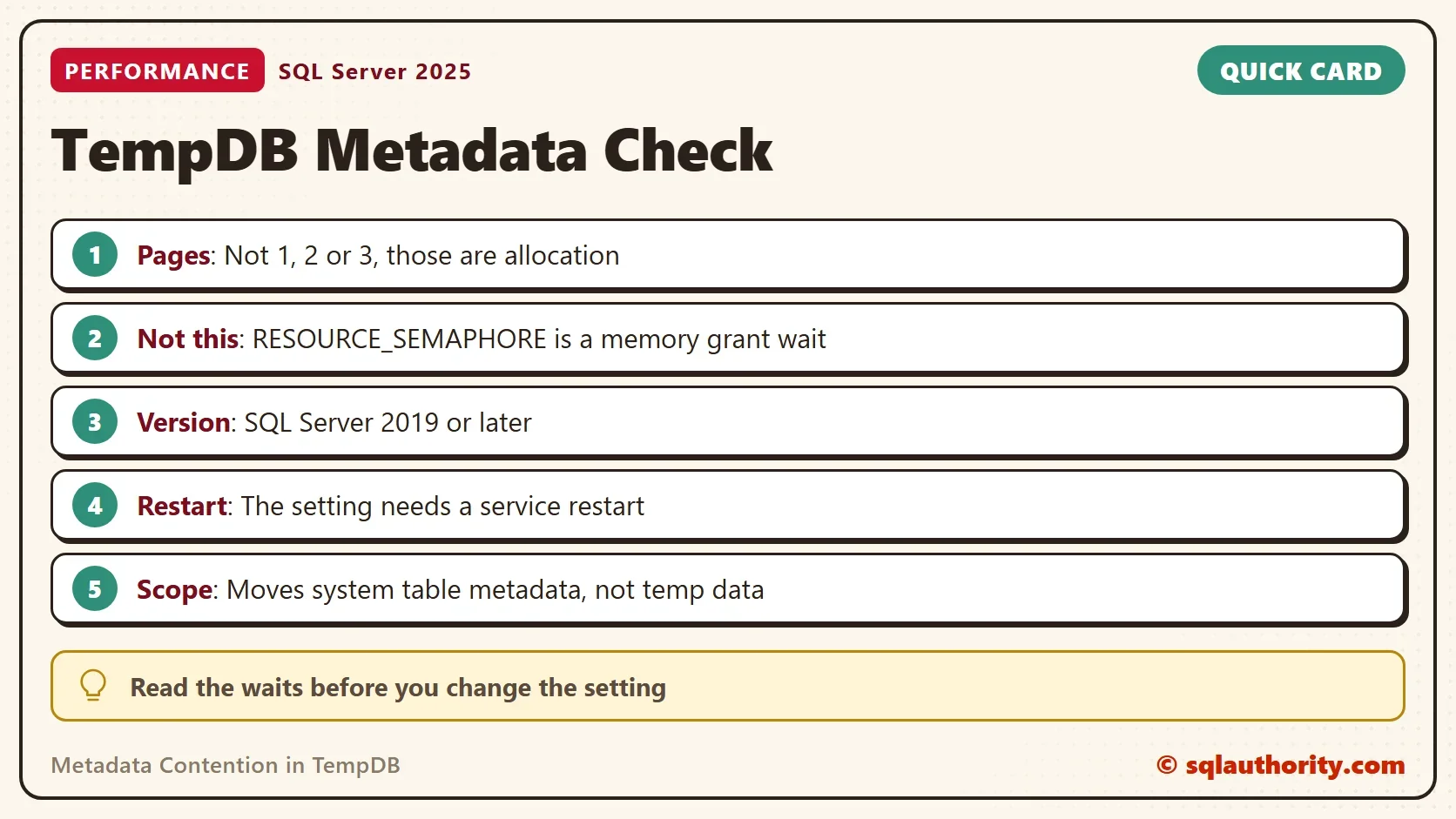
Read the page number before you decide. A wait on page 1, 2 or 3 of a file is allocation contention. Those pages are 2:1:1, 2:1:2 and 2:1:3 for file 1, and more data files help there. The next query returns the page type for a wait resource. Put the file and page from the resource into it.
SELECT page_type_desc FROM sys.dm_db_page_info(2, 1, 1, N'DETAILED');
Page 1 returns PFS_PAGE, page 2 of the same file returns GAM_PAGE and page 3 returns SGAM_PAGE. These are allocation pages, and a setting for metadata does nothing for them. Waits on other pages that belong to system tables are the metadata contention that this setting targets.
RESOURCE_SEMAPHORE Is a Different Wait
RESOURCE_SEMAPHORE means a query waits for a memory grant before it can start. The server has no memory to give it at that moment. Common causes are large sorts and hashes, a few big queries that hold the grants, and too little memory.
The client in this story saw both. The RESOURCE_SEMAPHORE waits stopped when the heavy TempDB transactions stopped. After the setting was enabled, the waits were much reduced and performance improved. Treat that as the client’s observation. Memory-optimized metadata is documented for latch contention, not for memory grants. Test it on your own workload before you rely on it.
Turn It On on a Test Server
The feature needs SQL Server 2019 or later. It keeps the system table metadata of TempDB in memory. The data in your temporary tables stays where it was. The statement below changes a server setting, so the demo does not run it. The change takes effect at the next restart of the service. Write down the state first, and keep the undo.
-- Check the state first: SELECT name, value_in_use FROM sys.configurations WHERE name = N'tempdb metadata memory-optimized';
ALTER SERVER CONFIGURATION SET MEMORY_OPTIMIZED TEMPDB_METADATA = ON;
-- Restart the SQL Server service. The setting takes effect at the next start.
-- Undo: ALTER SERVER CONFIGURATION SET MEMORY_OPTIMIZED TEMPDB_METADATA = OFF; then restart the service again.
Questions From Readers
One reader runs SQL Server 2016 Standard and creates more than 100 temporary tables a second. The feature does not exist there. Look at the allocation pages of TempDB and at the number of data files. Reuse one temporary table inside a procedure. A cached temporary table avoids the metadata writes of a new create and drop.
Another reader asks why the setting is not on by default. On SQL Server 2025 it is still off, and the value is 0 on the test instance. A restart and a list of limits come with it. The limits are in Memory-Optimized TempDB Tables: List Them and Check Status. Memory-optimized tables also use memory, so a server short of memory has a second reason to wait.
Is the Engine the Right Place to Fix This?
You could argue that code is the better fix. A procedure that reuses one temporary table needs no engine setting. That is true when you own the code. Many servers run vendor code that creates and drops tables at will. There the setting is one of the few levers you have.
What to Remember
Read the waits before you change anything. Page latch waits on database 2 point to TempDB contention. Pages 1, 2 and 3 of a file are allocation pages. Other pages of system tables are metadata contention in TempDB. RESOURCE_SEMAPHORE points to memory grants. Enable the setting on a test server, restart, and compare the same waits again.
A wait is not a diagnosis, it is a question about the page you are waiting for.
Published by Pinal Dave on SQLAuthority. More of my work at pinaldave.com.
Discover more from SQL Authority with Pinal Dave
Subscribe to get the latest posts sent to your email.



2 Comments. Leave new
What about earlier versions? I mean is there something for SQL Server 2016 Standard Edition (64-bit).
In our application also create more than 100 temp (#) tables per second and data will be huge. When I run the query “SELECT * FROM tempdb.sys.tables” execution plan was similar to this.
Thanks,
Mayura.
Hi Pinal, Thank you for this important topic.
I’m wondering why MS doesn’t enable this feature to on by default? Is there any disadvantage?
Many Thanks and kind regards,