Question: How do you solve a full transaction log error? First find why the log cannot reuse space, and whether it can grow. Error 9002 has several causes, so there isn’t one cleanup command that fixes every case.

A client asked me this during a Comprehensive Database Performance Health Check. I demonstrated it with an 8 MB log that wasn’t allowed to grow. A large insert exhausted that space.
Read the reason before choosing a remedy
Run these read-only checks in the affected database. Keep the error’s full text as well; the reason can change after the failed statement rolls back.
SELECT name, recovery_model_desc, log_reuse_wait_desc
FROM sys.databases
WHERE database_id = DB_ID();

SELECT name, size * 8.0 / 1024 AS size_MB,
       max_size, growth, is_percent_growth
FROM sys.database_files
WHERE type_desc = 'LOG';
LOG_BACKUP calls for checking the log-backup process in FULL or BULK_LOGGED recovery. ACTIVE_TRANSACTION calls for identifying the active transaction. A log backup cannot release records still needed by that transaction. Availability replicas or replication can hold the log for different reasons.
Also check free space on the log volume, autogrowth and the file’s maximum size. These tell you whether the file can provide more capacity while you resolve the reuse problem.
The deliberately small lab
This keeps my original FirstIndex example and its Bob, Brown, Houston rows. It creates a separate scratch database and uses deliberately chosen lab paths. It is not a script to run against a production database.
-- Scratch instance only. Create D:\SQLLabs first and grant the SQL service access.
USE master;
IF DB_ID(N'InterviewLogFullLab') IS NOT NULL
    THROW 50001, 'The lab database already exists. Stop and inspect it.', 1;
GO
CREATE DATABASE InterviewLogFullLab
ON PRIMARY (NAME = N'InterviewLogFullLab',
    FILENAME = N'D:\SQLLabs\InterviewLogFullLab.mdf',
    SIZE = 64MB, MAXSIZE = 256MB, FILEGROWTH = 64MB)
LOG ON (NAME = N'InterviewLogFullLab_log',
    FILENAME = N'D:\SQLLabs\InterviewLogFullLab.ldf',
    SIZE = 8MB, MAXSIZE = 8MB, FILEGROWTH = 8MB);
GO
USE InterviewLogFullLab;
CREATE TABLE dbo.FirstIndex
    (ID int, FirstName varchar(100), LastName varchar(100), City varchar(100));
GO
INSERT dbo.FirstIndex (ID, FirstName, LastName, City)
SELECT TOP (1000000) 1, 'Bob', 'Brown', 'Houston'
FROM sys.all_objects AS a CROSS JOIN sys.all_objects AS b;
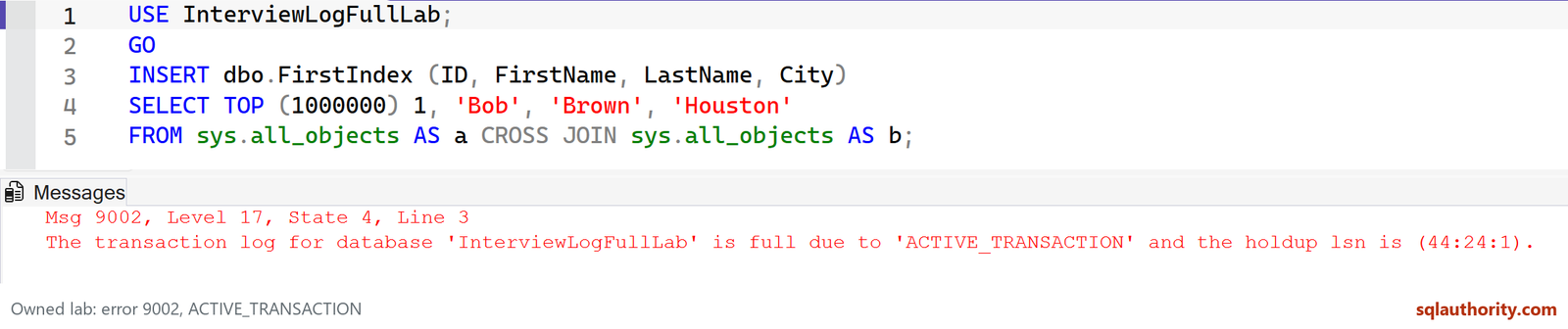
The insert should encounter error 9002 because the log is capped at 8 MB. In the original run, the reason was ACTIVE_TRANSACTION. The table’s data bytes and required log bytes are different measurements; the active operation needs sufficient log capacity.
Choose the remedy that matches the cause
- If capacity is the immediate constraint, provide suitable disk space and increase the log’s permitted size after checking the workload.
- If inactive log awaits a backup, restore the scheduled log-backup process. Truncation permits reuse inside the file; it doesn’t make the physical .ldf smaller.
- If an active transaction is holding the log, investigate with its owner. Completion, rollback or smaller committed batches may be appropriate. Shrinking does not release its active log.
- An additional log file on another volume can provide emergency capacity. It is not a normal way to improve log performance; see why multiple log files are usually unnecessary.
I wouldn’t switch a production database to SIMPLE just to silence the error. That changes the recovery strategy and still doesn’t make one oversized active transaction fit into an undersized log. Resolve the cause and size the log for the operation.
Published by Pinal Dave on SQLAuthority. More of my work at pinaldave.com.
Discover more from SQL Authority with Pinal Dave
Subscribe to get the latest posts sent to your email.