
The reasons for slow performance in SQL Server fall into five groups. They are schema design, T-SQL code, indexing, server deployment and hardware. The list came from a public question about what slows a server down and from the emails that followed. This post tests two groups on a demo database and checks a third with a query.

Reason 1: Schema Design
A schema is easy to change in week one and hard to change in year five. The usual mistakes are flat wide tables, redundant data, missing keys and constraints, and wide composite primary keys. Over-normalizing belongs on the list, too. A reader doubted that it exists. Normal forms don’t set a number of tables. Still, a design that needs eight joins for every common query pays in every plan.
The wide key shows up in a size you can measure. Every nonclustered index carries the clustering key. The demo builds the same 50,000 rows twice. One table clusters on a long name, a date and a number. The other clusters on an integer. Each gets an index on a small column.
IF DB_ID(N'SlowCausesDemo') IS NULL CREATE DATABASE SlowCausesDemo;
GO
USE SlowCausesDemo;
GO
DROP TABLE IF EXISTS dbo.AccountsWide;
DROP TABLE IF EXISTS dbo.AccountsNarrow;
DROP TABLE IF EXISTS dbo.Orders;
CREATE TABLE dbo.AccountsWide (
    CustomerName nvarchar(100) NOT NULL, CreatedOn datetime2 NOT NULL, AccountNo int NOT NULL, Region tinyint NOT NULL,
    CONSTRAINT PK_AccountsWide PRIMARY KEY (CustomerName, CreatedOn, AccountNo));
CREATE TABLE dbo.AccountsNarrow (
    AccountID int IDENTITY(1,1) NOT NULL CONSTRAINT PK_AccountsNarrow PRIMARY KEY,
    CustomerName nvarchar(100) NOT NULL, CreatedOn datetime2 NOT NULL, AccountNo int NOT NULL, Region tinyint NOT NULL);
INSERT INTO dbo.AccountsWide (CustomerName, CreatedOn, AccountNo, Region)
SELECT TOP (50000) CONCAT(N'Customer name number ', n), DATEADD(MINUTE, n, '2026-01-01'), n, n % 8
FROM (SELECT ROW_NUMBER() OVER (ORDER BY (SELECT NULL)) AS n
      FROM sys.all_columns AS a CROSS JOIN sys.all_columns AS b) AS x;
INSERT INTO dbo.AccountsNarrow (CustomerName, CreatedOn, AccountNo, Region)
SELECT CustomerName, CreatedOn, AccountNo, Region FROM dbo.AccountsWide;
CREATE INDEX IX_AccountsWide_Region ON dbo.AccountsWide (Region);
CREATE INDEX IX_AccountsNarrow_Region ON dbo.AccountsNarrow (Region);
SELECT i.name AS IndexName, ps.in_row_data_page_count AS Pages
FROM sys.indexes AS i
INNER JOIN sys.dm_db_partition_stats AS ps ON ps.object_id = i.object_id AND ps.index_id = i.index_id
WHERE i.name LIKE N'IX_Accounts%'
ORDER BY i.name;| IndexName | Pages |
|---|---|
| IX_AccountsNarrow_Region | 68 |
| IX_AccountsWide_Region | 462 |
The same one byte column costs 462 pages with the wide key and 68 with the integer key. Every index on the wide table is bigger, and every read of them moves more pages.
Reason 2: Inefficient T-SQL
Code mistakes are the second group. Examples are a function on an indexed column, a mismatched data type and a cursor where one statement would do. SELECT * and NOT IN where NOT EXISTS fits belong here too. The first two defeat an index quietly. This table has an index on the date and one on a text account code, and both include the amount.
CREATE TABLE dbo.Orders (
    OrderID int NOT NULL CONSTRAINT PK_Orders PRIMARY KEY,
    OrderDate date NOT NULL, AccountCode varchar(12) NOT NULL, Amount decimal(10,2) NOT NULL);
INSERT INTO dbo.Orders (OrderID, OrderDate, AccountCode, Amount)
SELECT TOP (100000) n, DATEADD(DAY, n % 730, '2025-01-01'), CONCAT('AC', RIGHT(CONCAT('000000', n % 20000), 6)), n % 90 + 10
FROM (SELECT ROW_NUMBER() OVER (ORDER BY (SELECT NULL)) AS n
      FROM sys.all_columns AS a CROSS JOIN sys.all_columns AS b) AS x;
CREATE INDEX IX_Orders_OrderDate ON dbo.Orders (OrderDate) INCLUDE (Amount);
CREATE INDEX IX_Orders_AccountCode ON dbo.Orders (AccountCode) INCLUDE (Amount);
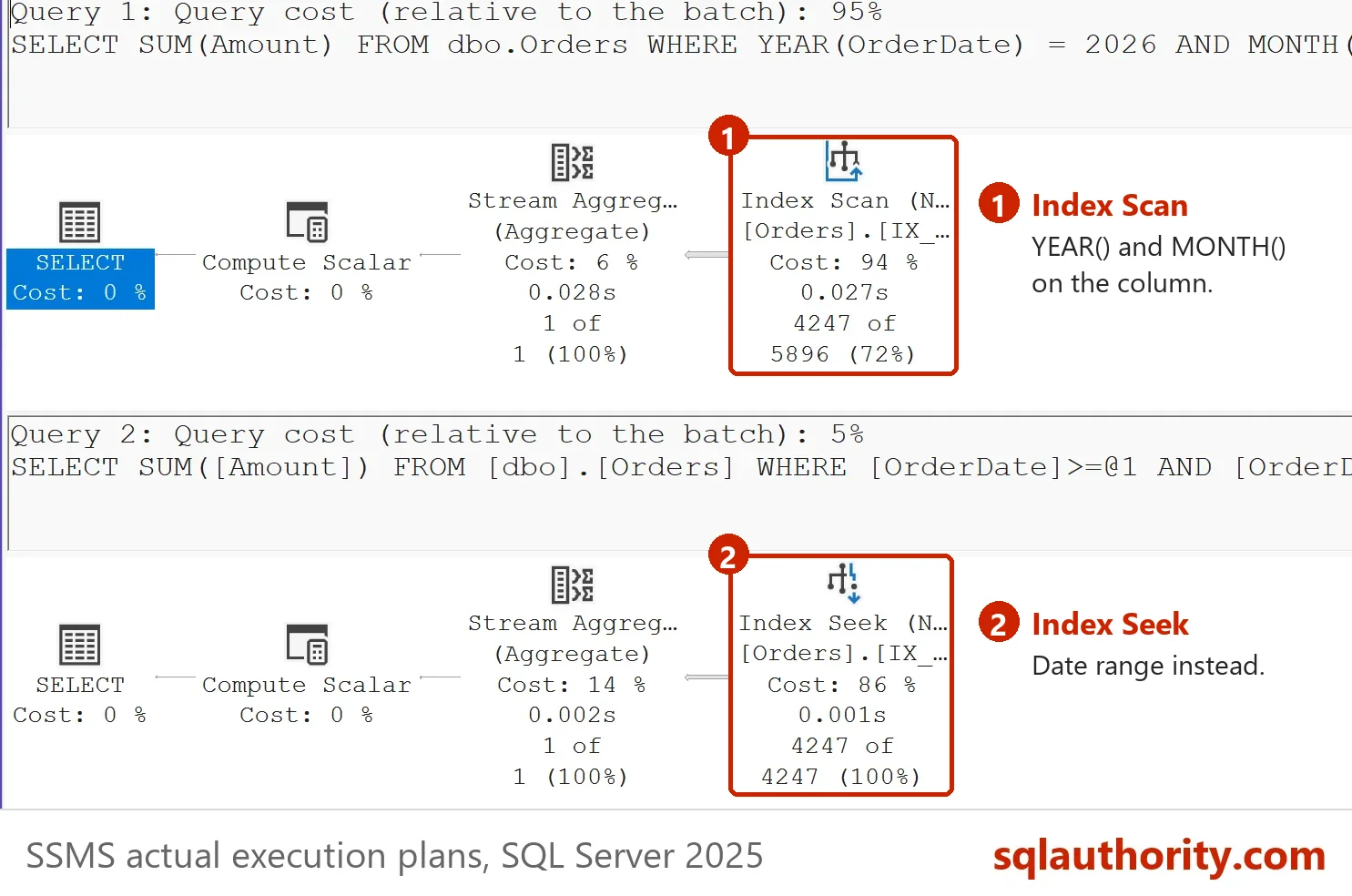
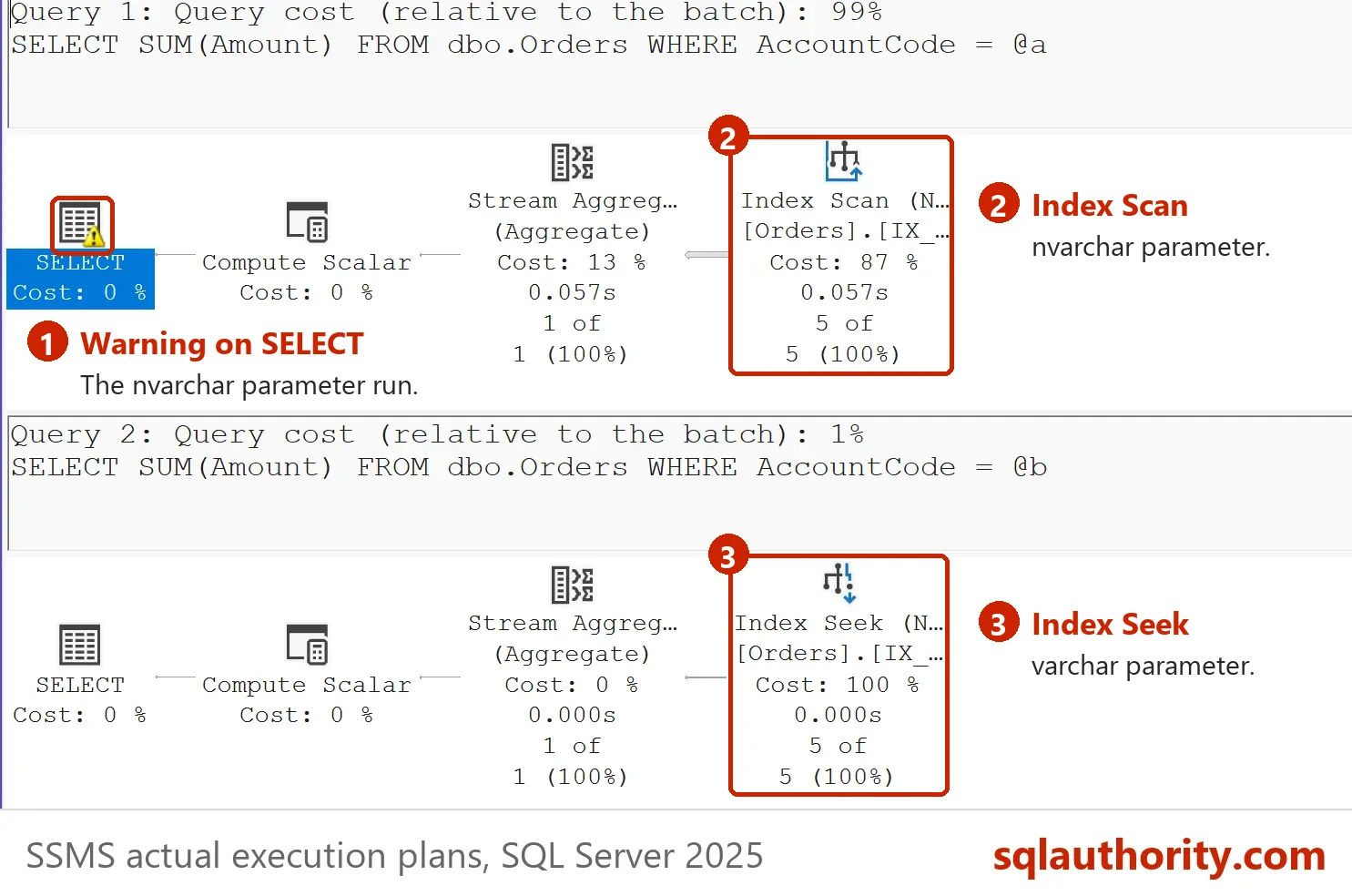
The next script asks for the sales of March 2026 two ways, and for one account two ways. STATISTICS IO reports the logical reads of each statement.
SET STATISTICS IO ON;
SELECT SUM(Amount) FROM dbo.Orders WHERE YEAR(OrderDate) = 2026 AND MONTH(OrderDate) = 3;
SELECT SUM(Amount) FROM dbo.Orders WHERE OrderDate >= '2026-03-01' AND OrderDate < '2026-04-01';
DECLARE @a nvarchar(12) = N'AC000042';
SELECT SUM(Amount) FROM dbo.Orders WHERE AccountCode = @a;
DECLARE @b varchar(12) = 'AC000042';
SELECT SUM(Amount) FROM dbo.Orders WHERE AccountCode = @b;
SET STATISTICS IO OFF;
| Statement | Logical reads |
|---|---|
| YEAR() and MONTH() on the column | 274 |
| Date range on the column | 15 |
| nvarchar parameter, varchar column | 388 |
| varchar parameter, varchar column | 3 |
Each pair returns the same answer. The functions force a scan, because SQL Server can’t seek on a value it has to compute for every row. The mismatched type does the same under a SQL collation, because the column is converted row by row. Windows collations convert the parameter instead, so check your own server. A reader argued that indexing solves everything. These two cases show an index that exists and doesn’t help.
Reason 3: Poor Indexing
Indexing is the tool people reach for first, and it fails in both directions. Too many indexes slow every write, and too few leave scans. The common mistakes are an index on every column and many single column indexes. A heap where a clustered index belongs is another. So is an index that nobody maintains. The follow-up post Index Design Rules: Ten Don’ts and Where They Break turns those mistakes into queries.
Read Missing Index Script: Read the Suggestions Before You Create for the missing ones. Read Unused Index Script: Find Indexes That Only Cost You Writes for the unused ones.
Reason 4: Server Deployment
This group covers the choices made when SQL Server was installed. Examples are parallelism left at its default and one tempdb file. Data and log files can share one drive. An antivirus can scan database files. A memory cap can stay unset. One query lists four of those settings next to their defaults.
SELECT s.name AS Setting, s.value_in_use AS CurrentValue, d.DefaultValue,
       CASE WHEN s.value_in_use = d.DefaultValue THEN N'Default, review it' ELSE N'Changed' END AS Verdict
FROM sys.configurations AS s
INNER JOIN (VALUES (N'max degree of parallelism', 0), (N'cost threshold for parallelism', 5),
                   (N'max server memory (MB)', 2147483647), (N'optimize for ad hoc workloads', 0)) AS d(Setting, DefaultValue)
        ON d.Setting = s.name
ORDER BY s.name;| Setting | CurrentValue | DefaultValue | Verdict |
|---|---|---|---|
| cost threshold for parallelism | 50 | 5 | Changed |
| max degree of parallelism | 2 | 0 | Changed |
| max server memory (MB) | 2147483647 | 2147483647 | Default, review it |
| optimize for ad hoc workloads | 0 | 0 | Default, review it |
The test server has a higher threshold and a capped degree of parallelism. Your values will differ. Its memory cap is still the default. A reader noted that many people debate MAXDOP 0. The default lets one query use every CPU, so a few heavy queries can fill the server. Read the setting before you argue about it.
Reason 5: Hardware
Hardware comes last among the reasons for slow performance, on purpose. In health checks, hardware was the answer in about 3 of 100 tuning cases. The usual questions are about CPU at 100 percent, memory that looks full and a long disk queue. Each has a cause to find first. One reader added RAM and CPU to a slow virtual machine, and nothing changed. An admin later traced it to a problem with the network card the virtual machine used.
What to Remember
Work through the reasons for slow performance in order. Check the schema and the code before you add an index. Check the settings before you buy hardware. Measure each change in reads or time. Run the cleanup when you finish the demo.
You could argue that hardware is the cheapest fix of all the reasons for slow performance. It is the cheapest to order and the hardest to undo.
USE master;
GO
IF DB_ID(N'SlowCausesDemo') IS NOT NULL
BEGIN
    ALTER DATABASE SlowCausesDemo SET SINGLE_USER WITH ROLLBACK IMMEDIATE;
    DROP DATABASE SlowCausesDemo;
END;
A slow server is not a hardware problem, it is a list of choices you can read.
Published by Pinal Dave on SQLAuthority. More of my work at pinaldave.com.
Discover more from SQL Authority with Pinal Dave
Subscribe to get the latest posts sent to your email.




4 Comments. Leave new
Actually last week I had a massive perfomance problem which also impacted the Windows itself. The whole vm was lacking everything. I tried adding RAM and CPU, but nothing helped. So I moved it to a different host which solved the problem and THEN one of the other admin told me, that there was a problem with that specific NIC the vm had used on the original server. So just assigning a diffenrent NIC to the vm on it’s original server would also have solved the problem.
boo for over-normalization. there is no such thing, is there? one can only break things down until they can be broken down no more – and that is the goal of “proper” data design is it not?
These are interesting thoughts Redundant data in databases
Bad referential integrity (foreign keys and constraints)
Wide composite primary keys (and clustered indexes)
In the end, there are three things that will help performance. Indexing, Indexing, and Indexing. Properly performed these are keys to performance.
It has been true for years and remains true today.
Sure schema plays a role, yes, when do you use a cursor (NEVER unless its absolutely necessary). SQL is a SET BASED LANGUAGE you return a result (SET). So avoid the programmers mindset and stop the looping unless its absolutely necessary.
Design the schema to be efficient and return result sets efficiently and give that query engine every opportunity to be successful in chosing an optimised plan quickly and efficiently, and most important create the best indexes for the use of your database (Transactional or reporting).
There are differences and thus the need for a warehouse to optimize analytical queries using a slightly different approach and indexing scheme than the transactional.
There is a happy medium and it does not mandate huge costs or expenses, only a correct architecture and approach.
Very interesting article. Just about every high severity incident i have find my self, these items are always are contributing causes. Specially, not many DBAs understand “Maximum Degree of Parallelism to 0” its still heavily debated with infrastructure engineers, developers and DBAs. I wish MS would actually change the default setting.