
Question: How does GOTO work in SQL Server? It jumps unconditionally to a named label in the same batch. Statements between the jump and its destination are skipped.

I am not a great fan of GOTO, but the original procedure is a useful way to see exactly what it does. This version keeps the four inputs and three destinations, using a connection-local temporary procedure so it doesn’t replace an application procedure named MySP.
CREATE PROCEDURE #InterviewGoto190057 (@Param int)
AS
BEGIN
    IF @Param IS NULL OR @Param < 0
        THROW 50103, 'This demonstration accepts nonnegative integers only.', 1;
    IF @Param > 100 GOTO OVER100;
    IF @Param > 10 GOTO OVER10;
    IF @Param = 0 GOTO ZERO;
    SELECT 'Value is between 1 and 10' AS Result;
    RETURN;
OVER100:
    SELECT 'Value is over 100' AS Result;
    RETURN;
OVER10:
    SELECT 'Value is between 11 and 100' AS Result;
    RETURN;
ZERO:
    RETURN;
END;
GO
EXEC #InterviewGoto190057 101;
EXEC #InterviewGoto190057 11;
EXEC #InterviewGoto190057 1;
EXEC #InterviewGoto190057 0;
GO
DROP PROCEDURE #InterviewGoto190057;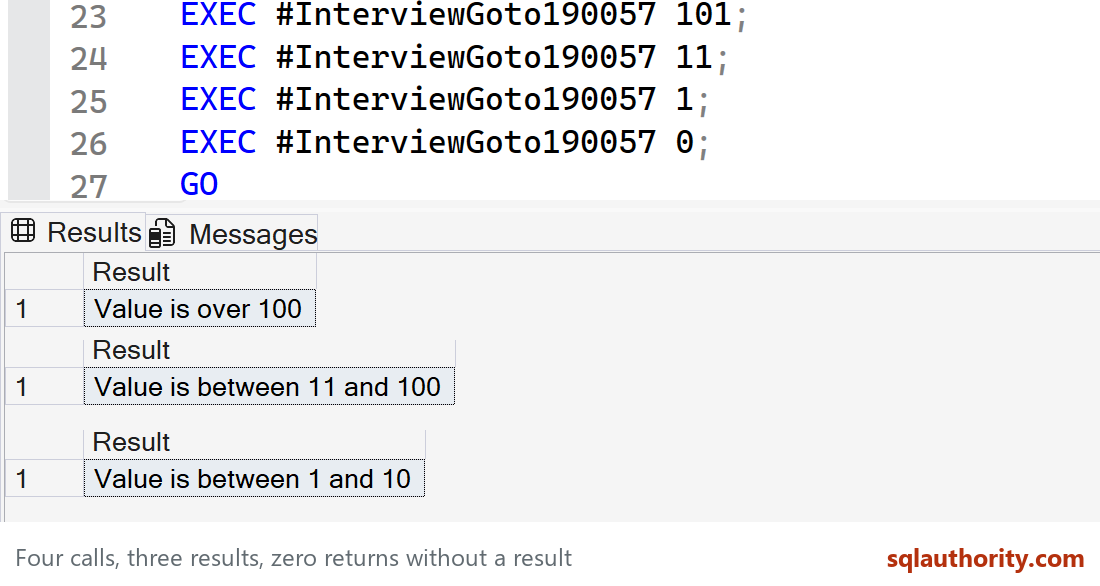
101 jumps to OVER100 and returns “Value is over 100.” 11 jumps to OVER10 and returns “Value is between 11 and 100.” 1 reaches the normal path and returns “Value is between 1 and 10.” Zero jumps to ZERO and returns without a result set. It does not return a fourth empty grid.
RETURN is important here. Without it, execution can fall through from one label’s code into the next. A label doesn’t create an isolated block by itself.
The original “single digit” wording also included 10, and it accidentally included negative values and NULL. I corrected the label and made the accepted input range explicit rather than silently teaching those edge cases as single digits.
An IF/ELSE structure would be clearer for this small branching problem. CASE can choose a displayed value, but it isn’t a replacement for every control-of-flow operation, and a CASE-based SELECT for zero would not preserve this procedure’s no-result-set behavior.
Related: my earlier GOTO example and RETURN in a stored procedure.
Published by Pinal Dave on SQLAuthority. More of my work at pinaldave.com.
Discover more from SQL Authority with Pinal Dave
Subscribe to get the latest posts sent to your email.




1 Comment. Leave new
Your unsubscribe options do not work Please check with your vendor. You are good but I do not need this feed and cannot turn it off.