
Question: Can T-SQL write a text file that survives a transaction rollback? Yes, a Windows OLE Automation file write is outside the SQL transaction. It can survive rollback, but it can also fail independently.

The real question came from work with a bank in the USA during a performance health check. A critical procedure rolled back when unsuccessful. We wanted timestamps around a suspected slow section, but timestamp rows inserted in that same transaction rolled back too.
That distinction was the point: we needed diagnostic evidence independent of the business transaction. It was not impossible to log to a table in another connection; an insert in the same transaction simply didn’t meet the requirement.
The original Windows file method
-- Reviewed demonstration only. This script changes no server options.
DECLARE @AllowFileWrite bit = 0;
IF @AllowFileWrite = 0
    THROW 50001, 'Review the server path and permissions before allowing a file write.', 1;
IF NOT EXISTS (SELECT 1 FROM sys.configurations
               WHERE name = N'Ole Automation Procedures' AND value_in_use = 1)
    THROW 50002, 'OLE Automation is not enabled. This script does not enable it.', 1;
DECLARE @OLE int = NULL, @FileID int = NULL, @hr int;
BEGIN TRY
    EXEC @hr = sys.sp_OACreate 'Scripting.FileSystemObject', @OLE OUT;
    IF @hr <> 0 THROW 50003, 'sp_OACreate failed.', 1;
    EXEC @hr = sys.sp_OAMethod @OLE, 'OpenTextFile', @FileID OUT,
         'D:\Data\sqltotext.text', 8, 1;
    IF @hr <> 0 THROW 50004, 'OpenTextFile failed.', 1;
    EXEC @hr = sys.sp_OAMethod @FileID, 'WriteLine', NULL, 'Today is wonderful day';
    IF @hr <> 0 THROW 50005, 'WriteLine failed.', 1;
    EXEC @hr = sys.sp_OAMethod @FileID, 'Close';
    IF @hr <> 0 THROW 50006, 'Close failed.', 1;
    EXEC sys.sp_OADestroy @FileID;
    SET @FileID = NULL;
    EXEC sys.sp_OADestroy @OLE;
    SET @OLE = NULL;
END TRY
BEGIN CATCH
    IF @FileID IS NOT NULL EXEC sys.sp_OADestroy @FileID;
    IF @OLE IS NOT NULL EXEC sys.sp_OADestroy @OLE;
    THROW;
END CATCH;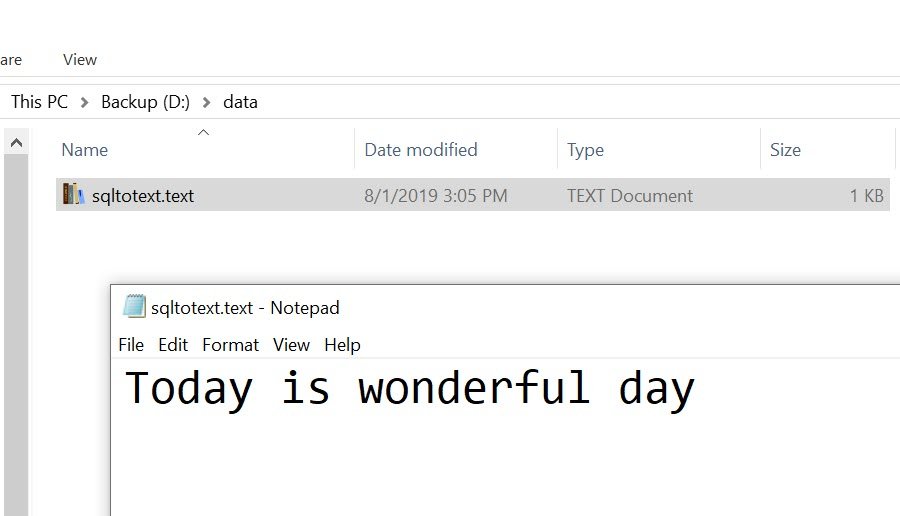
Mode 8 appends; the following 1 permits creating the file. The folder is on the SQL Server machine, and Windows permissions apply to the execution identity used by the OLE component. Opening it in SSMS on another computer does not change where the path points.
The revised sample checks each HRESULT and destroys its object handles on failure. It starts with a deliberate stop and never turns on server options. OLE Automation is disabled by default. Enabling it is a separately reviewed administrative choice, not part of an ordinary application transaction. If temporarily changed, restore the prior settings, including advanced-option visibility, rather than assuming their prior values were zero.
For performance diagnostics, I would first consider an Extended Events file target or an external application logger. They avoid putting synchronous general-purpose COM file work in the critical path. None of these mechanisms makes a text file a transactional or guaranteed audit trail: account for failures, concurrent writers, retention and access.
Published by Pinal Dave on SQLAuthority. More of my work at pinaldave.com.
Discover more from SQL Authority with Pinal Dave
Subscribe to get the latest posts sent to your email.



11 Comments. Leave new
Write to a table variable which will retain its values after the transaction rolls back, then insert the table variable rows into a real table you can query at your leisure.
No need to bring the file system into it.
Yeah that was my immediate thought. This seems an overly complicated work around for something already easily doable.
Would it seem reasonable to use this approach for logging various tasks?
In the query you said “Today is a wonderful day” but the file reads “Today is wonderful day”… The article “a” disappeared.. Why?
My editor seems to have fixed the grammar issue. I have reverted it back.
Great question.
Hi Pinal,
I just encountered a very strange/interesting “feature” on this page. If I double click on the code mentioned in First Step, Second Step or Third Step, they turn all in black fonts (not in SQL style text code color) and I can delete the texts, although, of course, they are not saved! so if I refresh the page again, I can see the original post. But still worth checking the page code behind it in case someone finds it how to even modify it!
Thanks Priyanka, I know what you are talking about very interesting. I have already put the fix for the same behind the scene.
Why in my SQL Server 2016 I can’t find sp_configure or sp_OAMethod Procedure?
Thank You
can we write to excel file?
great work. how would one clear that same text file before starting to write something new to it? the above solution keeps appending.
can this code be placed into a stored procecure to be executed only when a certain condition occurs? I’m trying to do that now but am getting syntax errors. I’m not sure if it’s because all of the “GO” statements. Are those required?