A msdb upgrade error stops SQL Server at the last step of an upgrade. The cause can be as small as the owner of msdb, and the fix takes one statement.
What Failed
After SQL Server 2008 and 2008 R2 went out of support, several clients asked for help with failed upgrades. One failure stood out. The upgrade started and failed at the end, and the SQL Server service then refused to start. This msdb upgrade error is a script level upgrade failure.
The ERRORLOG holds the answer. These lines, shortened, come right before the shutdown. The account name is a placeholder, because the real name belongs to the client.
Error: 916, Severity: 14, State: 1.
The server principal "DOMAIN\OldOwner" is not able to access the database "msdb" under the current security context.
The failed batch of t-sql statements:
EXEC sp_syscollector_disable_collector
Error: 912, Severity: 21, State: 2.
Script level upgrade for database 'master' failed because upgrade step 'msdb110_upgrade.sql' encountered error 916, state 1, severity 14.
Error: 3417, Severity: 21, State: 3.
Cannot recover the master database. SQL Server is unable to run.
Read the lines from the top. Error 916 fired while the upgrade script ran a data collector procedure in msdb. Error 912 says the script level upgrade failed. Error 3417 follows because master could not finish its upgrade, and SQL Server shuts down. The first line names the principal that failed.
Why the Owner Matters
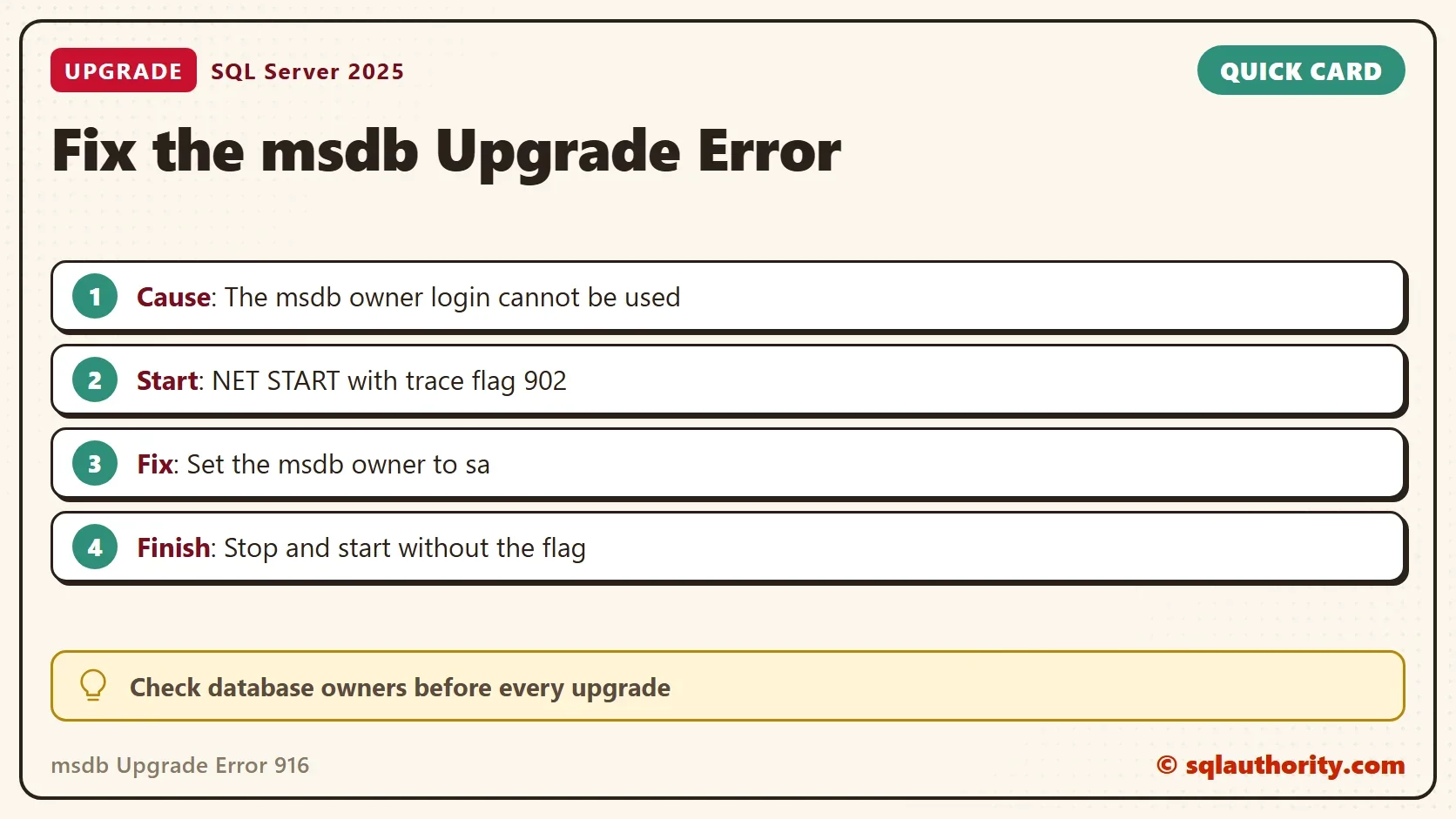
Every database has an owner, and the dbo user maps to that login. In this case, the error named an account that owned msdb and that SQL Server could not use. Changing the owner of msdb to sa fixed the upgrade. The sa login can stay disabled, and the fix still works.
Check the Owners Before an Upgrade
The check is a read-only query. The demo first creates a small database, so there is one owner that differs from the system databases. A database you create belongs to your own login, so connect with a login other than sa for this demo.
IF DB_ID(N'MsdbOwnerDemo') IS NULL CREATE DATABASE MsdbOwnerDemo;
SELECT d.name AS DatabaseName,
       CASE WHEN d.owner_sid = 0x01 THEN N'Yes' ELSE N'No' END AS OwnerIsSa,
       CASE WHEN SUSER_SNAME(d.owner_sid) IS NULL THEN N'No' ELSE N'Yes' END AS OwnerResolves
FROM sys.databases AS d
WHERE d.database_id <= 4 OR d.name = N'MsdbOwnerDemo'
ORDER BY d.database_id, d.name;| DatabaseName | OwnerIsSa | OwnerResolves |
|---|---|---|
| master | Yes | Yes |
| tempdb | Yes | Yes |
| model | Yes | Yes |
| msdb | Yes | Yes |
| MsdbOwnerDemo | No | Yes |
OwnerIsSa shows whether the owner is the built in sa login. OwnerResolves shows whether SQL Server can turn the owner into a login name. A No in the first column on a system database is the first thing to fix. A No in the second column means the owner has no login at all. On a default install, all four system databases belong to sa, as the first four rows show. The demo database shows No in the first column because you own it.
To compare the owner with the name in an error message, read the owner of msdb by name. A match confirms the cause.
SELECT SUSER_SNAME(owner_sid) AS MsdbOwner FROM sys.databases WHERE name = N'msdb';
| MsdbOwner |
|---|
| sa |
ALTER AUTHORIZATION ON DATABASE::MsdbOwnerDemo TO sa;

SELECT d.name AS DatabaseName,
       CASE WHEN d.owner_sid = 0x01 THEN N'Yes' ELSE N'No' END AS OwnerIsSa
FROM sys.databases AS d
WHERE d.name = N'MsdbOwnerDemo';| DatabaseName | OwnerIsSa |
|---|---|
| MsdbOwnerDemo | Yes |
That statement is the fix, applied to the demo database. ALTER AUTHORIZATION replaces the older sp_changedbowner procedure, which is deprecated.
Prepare for the same failure on your own servers. Take full backups of master, msdb and model before an upgrade, so a restore stays possible. Keep a copy of the ERRORLOG from the failed start, because the first error in it shows the cause.
Start SQL Server Past the Failed Upgrade
When the service will not start, start it once with trace flag 902. The flag skips the upgrade scripts for that start, so you can reach msdb. Run the next commands in an elevated Command Prompt on the server, not in SSMS. A named instance uses MSSQL$INSTANCE_NAME in place of MSSQLSERVER, as the second line shows.
NET START MSSQLSERVER /T902
NET START MSSQL$INSTANCE_NAME /T902
Connect with SSMS 22 or sqlcmd, and change the owner of msdb. This statement changes a system database. Note the current owner first, because the old owner is your undo. The same statement with the old login restores it.
ALTER AUTHORIZATION ON DATABASE::msdb TO sa;
Stop the service, and start it again without the flag. The upgrade scripts run once more, and this time they finish.
NET STOP MSSQLSERVER
NET START MSSQLSERVER
You could argue that a failed upgrade is a reason to restore from backup. On a production server, that is a fair fallback. The owner change is shorter, and it keeps the upgrade you already ran.
What to Remember
A msdb upgrade error is easier to prevent than to repair. Check the owners of the system databases before every upgrade. They should belong to sa, and each owner should resolve to a login. Fix a wrong owner while the server is healthy, so the upgrade scripts never meet it. Run the same check on every server in the upgrade plan, not only the first one.
After a failed upgrade, read the ERRORLOG from the first error. Keep the old owner in your notes before you change it. If msdb already shows sa and the error persists, the owner is not the cause. Read the next error in the log with the same care. Run the cleanup script on the demo database.
USE master;
GO
DROP DATABASE IF EXISTS MsdbOwnerDemo;
A failed msdb upgrade is not a broken server, it is an owner that cannot be used.
Published by Pinal Dave on SQLAuthority. More of my work at pinaldave.com.
Discover more from SQL Authority with Pinal Dave
Subscribe to get the latest posts sent to your email.