Serial zones are the parts of a parallel plan where only one thread does the work. A plan can show those yellow parallel arrows and still spend most of its time in a single thread. The trick is to see which zone your rows end up in.

One busy core in a parallel plan
Here is a common conversation. Someone says, “The plan is parallel, so it should use all the cores.” Then they open Task Manager and see one core working hard and the rest sleeping. Both statements can be true.
A parallel plan has parallel zones and serial zones. Many threads share the work in a parallel zone. An operator called Gather Streams sits at the border and funnels everything into one thread. What matters is how many rows cross that border, and what the single thread does with them.
Set up ten million rows
The demo creates the SqlAuthorityDemo database and drops it at the end. Ten million narrow rows need a few hundred MB in tempdb, so check your space or lower the number. I also turn on LAST_QUERY_PLAN_STATS for this database. It lets us read the actual row counts of each operator with a query, no screenshot needed.
USE master;
DROP DATABASE IF EXISTS SqlAuthorityDemo;
GO
CREATE DATABASE SqlAuthorityDemo;
GO
USE SqlAuthorityDemo;
GO
ALTER DATABASE SCOPED CONFIGURATION SET LAST_QUERY_PLAN_STATS = ON;

CREATE TABLE #Sales (Id int PRIMARY KEY, GroupId int, Amount decimal(18,2));
INSERT #Sales SELECT value, value % 10, CONVERT(decimal(18,2), value % 7)
FROM GENERATE_SERIES(1, 10000000);

CREATE TABLE #Copy (Id int, Amount decimal(18,2));
A small serial zone: the final total
The first query adds up each group, then adds the group totals. MAXDOP 4 allows four threads. It does not force a parallel plan, so always check what the optimizer picked. The comment is a label I use later to find this query.
/* grouped total */
WITH Partial AS (SELECT GroupId, SUM(Amount) AS GroupTotal FROM #Sales GROUP BY GroupId)
SELECT SUM(GroupTotal) AS TotalAmount FROM Partial OPTION (MAXDOP 4);
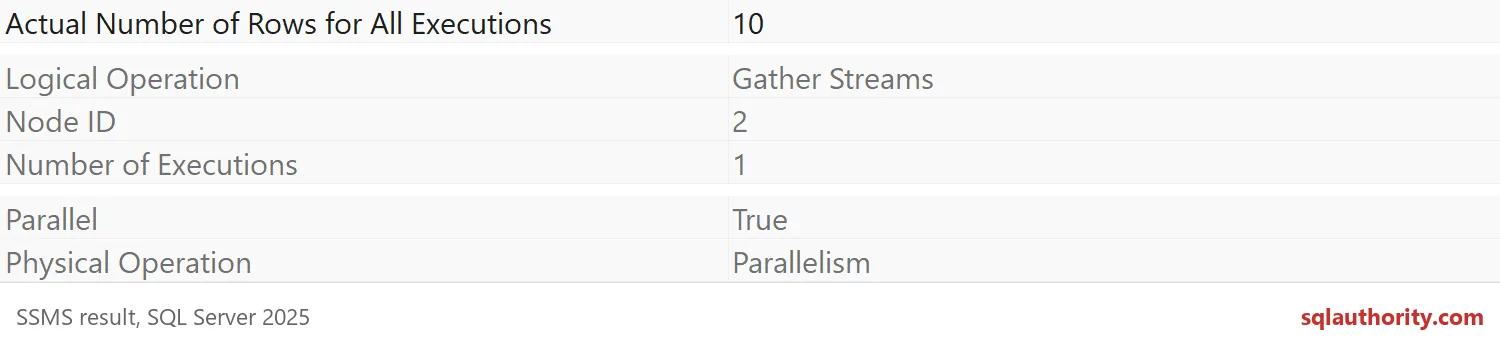
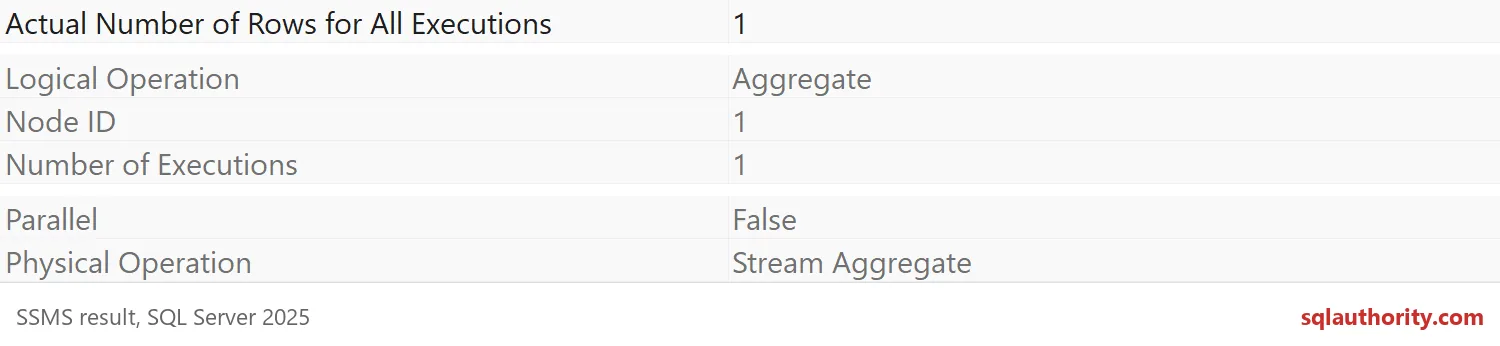
Turn on the actual plan in SSMS and hover over the operators. Gather Streams passed on only ten rows, one per group. The Stream Aggregate after it returned one row and ran serially. That serial zone is real, but it is tiny. Nobody should lose sleep over it.
A big serial zone: copying rows into a table
Now a serial zone that hurts. This statement copies about 5.7 million rows into a heap. The scan runs in parallel, but a plain INSERT writes through a single thread.
/* copy plain */
INSERT #Copy (Id, Amount)
SELECT Id, Amount FROM #Sales WHERE Amount >= 3 OPTION (MAXDOP 4);
Here is the same copy with a table lock. The hint lets the insert itself run in parallel. That lock covers the whole target table, so it suits staging tables and not busy ones.
TRUNCATE TABLE #Copy;
GO
/* copy tablock */
INSERT #Copy WITH (TABLOCK) (Id, Amount)
SELECT Id, Amount FROM #Sales WHERE Amount >= 3 OPTION (MAXDOP 4);
Read the per-thread numbers from the plan
This query reads the stored plans of the three statements. For each operator it counts the threads that handled at least one row, and the total rows. Thread 0 is the coordinator, so a four-thread operator lists five threads.
WITH XMLNAMESPACES (DEFAULT 'http://schemas.microsoft.com/sqlserver/2004/07/showplan')
SELECT l.Query, x.NodeId, x.Operator, COUNT(*) AS ThreadsListed,
       SUM(CASE WHEN x.ActualRows > 0 THEN 1 ELSE 0 END) AS ThreadsWithRows,
       SUM(x.ActualRows) AS TotalRows
FROM sys.dm_exec_query_stats AS qs
CROSS APPLY sys.dm_exec_sql_text(qs.sql_handle) AS st
CROSS APPLY sys.dm_exec_query_plan_stats(qs.plan_handle) AS p
CROSS APPLY (SELECT CASE WHEN st.text LIKE N'%/* copy plain */%' THEN 'copy plain'
                         WHEN st.text LIKE N'%/* copy tablock */%' THEN 'copy tablock'
                         WHEN st.text LIKE N'%/* grouped total */%' THEN 'grouped total' END AS Query) AS l
CROSS APPLY (SELECT o.value('@NodeId', 'int') AS NodeId, o.value('@PhysicalOp', 'nvarchar(60)') AS Operator,
                    t.value('@ActualRows', 'bigint') AS ActualRows
             FROM p.query_plan.nodes('//RelOp') AS r(o)
             CROSS APPLY r.o.nodes('RunTimeInformation/RunTimeCountersPerThread') AS y(t)) AS x
WHERE l.Query IS NOT NULL AND st.text NOT LIKE N'%dm_exec_query_stats%'
GROUP BY l.Query, x.NodeId, x.Operator
ORDER BY l.Query, x.NodeId;
Look at the Table Insert rows. In “copy plain” it shows one thread with rows, and Parallelism carried all 5,714,285 rows into it. In “copy tablock” four threads wrote rows. The grouped total shows the opposite: only 10 rows reach the final step. Exact thread counts vary from run to run, so read the shape, not the digits.
I did not time these here. On your server, compare elapsed time and CPU for the same two copies. Less serial work is not always faster, but now you know where to look.
DROP TABLE IF EXISTS #Copy;
DROP TABLE IF EXISTS #Sales;
GO
USE master;
DROP DATABASE IF EXISTS SqlAuthorityDemo;
Next time a parallel plan feels slow, count the rows at the border before you change MAXDOP.
A parallel plan is not parallel everywhere, it is a map of serial zones.
Published by Pinal Dave on SQLAuthority. More of my work at pinaldave.com.
Discover more from SQL Authority with Pinal Dave
Subscribe to get the latest posts sent to your email.