Repeated spaces are easy to collapse with REGEXP_REPLACE, but the real work is deciding what counts as a space. Tabs and line breaks look harmless in a grid, and one careless pattern can flatten a whole paragraph into a single line.

The name that will not match
A user types “Smith John” with two spaces. Another types “Smith John”. A third pastes it from a document, and a tab sneaks in. In the grid all three look the same, yet a search for one misses the others. That is the day somebody asks you to “just clean the spaces”.
I ran everything here on SQL Server 2025. The first example builds its messy text on purpose, using NCHAR codes for tabs and line breaks. You see exactly what is in it. It collapses every run of whitespace into one space, then trims the ends.
DECLARE @Text nvarchar(max) = N'  Alpha' + NCHAR(9) + N'  Beta'
    + NCHAR(13) + NCHAR(10) + NCHAR(13) + NCHAR(10) + N'Gamma  ';

SELECT N'[' + TRIM(REGEXP_REPLACE(@Text, N'\s+', N' ')) + N']' AS FlatText;

SELECT REGEXP_REPLACE(CAST(NULL AS nvarchar(40)), N'\s+', N' ') AS NullResult,
       TRIM(REGEXP_REPLACE(N'   ', N'\s+', N' ')) AS EmptyResult;
The pattern \s+ means “one or more whitespace characters”. The brackets show that nothing is left at the edges. The result is [Alpha Beta Gamma]. NULL stays NULL. A value with only spaces becomes an empty string after trimming, which is not the same thing as NULL.
Keep one line break when it matters
Sometimes the text is an address or a comment, and the line breaks carry meaning. Replacing every whitespace character with a space would answer a different question. Here I keep a single line break.
The order is the trick. First turn Windows line endings (CR and LF) and lone CR into plain LF. Then collapse spaces and tabs. Then remove spaces around each LF, and finally squeeze repeated LFs into one.
DECLARE @Text nvarchar(max) = N'Alpha  ' + NCHAR(13) + NCHAR(10)
    + N'  ' + NCHAR(13) + NCHAR(10) + N'Beta';

SET @Text = REPLACE(REPLACE(@Text, NCHAR(13) + NCHAR(10), NCHAR(10)), NCHAR(13), NCHAR(10));
SET @Text = REGEXP_REPLACE(@Text, N'[ \t]+', N' ');
SET @Text = REGEXP_REPLACE(@Text, N' *\n *', NCHAR(10));
SET @Text = REGEXP_REPLACE(@Text, N'\n+', NCHAR(10));

SELECT @Text AS LineText, CONVERT(varbinary(max), @Text) AS StoredBytes;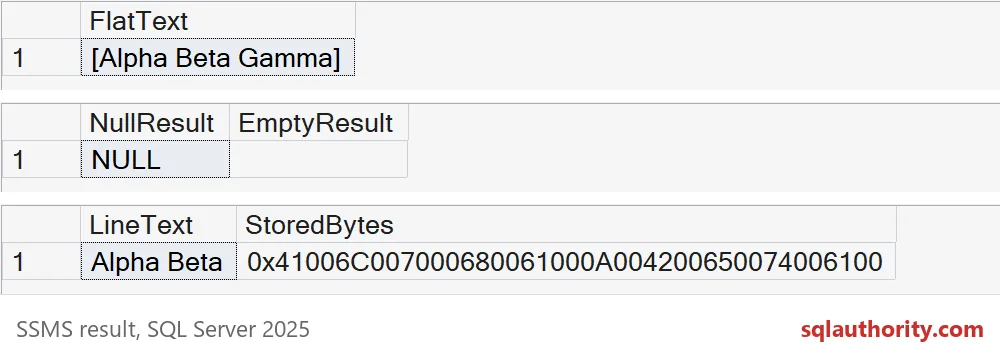
The grid shows “Alpha Beta” on one line, which fools the eye. The stored bytes tell the truth. Each character takes two bytes, and the 0A00 in the middle is the single line feed that survived. The blank line and the spaces around it are gone.
The space that \s does not see
Text pasted from a web page often contains a nonbreaking space, character 160. It looks like a space and acts like a space on screen. The pattern \s does not treat it as whitespace. Watch what happens to two of them between Alpha and Beta.
DECLARE @Text nvarchar(50) = N'Alpha' + NCHAR(160) + NCHAR(160) + N'Beta';

SELECT CHARINDEX(NCHAR(160), REGEXP_REPLACE(@Text, N'\s+', N' ')) AS nbsp_after_regex,
       CHARINDEX(NCHAR(160), REGEXP_REPLACE(REPLACE(@Text, NCHAR(160), N' '), N'\s+', N' ')) AS nbsp_after_replace,
       N'[' + REGEXP_REPLACE(REPLACE(@Text, NCHAR(160), N' '), N'\s+', N' ') + N']' AS cleaned;
After the plain regex, the nonbreaking space is still at position 6, so nothing was collapsed. After replacing it with a normal space first, it is gone (position 0) and the text is [Alpha Beta]. Test the characters your real sources produce. Do not assume one shorthand covers every invisible character.

Check for collisions before you store the result
Normalizing makes different inputs equal. That is the point, and also the danger. Count how many raw values collapse into each clean value before you add a unique key or merge records.
SELECT REGEXP_REPLACE(v.raw, N'\s+', N' ') AS clean, COUNT(*) AS raw_variants
FROM (VALUES (N'Smith  John'),
             (N'Smith John'),
             (N'Smith' + NCHAR(9) + N'John')) AS v(raw)
GROUP BY REGEXP_REPLACE(v.raw, N'\s+', N' ');
All three raw values become “Smith John”, so the count is 3. If those were three customers, a unique key would now reject two of them. Keep the raw value when you need traceability. Apply the same cleanup to both sides of a comparison.
I would not run this kind of cleanup on passwords or free-form documents, unless somebody has agreed what should be kept. A tidy grid does not prove the meaning is unchanged.
Agree on the whitespace rule with whoever reads the text next, then clean.
Cleaning whitespace is not a display trick, it is a decision about which differences survive.
Published by Pinal Dave on SQLAuthority. More of my work at pinaldave.com.
Discover more from SQL Authority with Pinal Dave
Subscribe to get the latest posts sent to your email.