
Question: What does STATS mean in a SQL Server backup command?

Answer: I have seen DBAs copy a backup script with STATS in it for years, then hesitate when I ask what the option does. The name sounds as if it changes SQL Server statistics. It doesn’t. In a BACKUP command, it controls progress messages.
-- Change the database and path for your own instance.
-- The destination directory must already exist and be writable by SQL Server.
BACKUP DATABASE [AdventureWorks2025]
TO DISK = N'D:\SQLBackups\AdventureWorks2025-Full.bak'
WITH COPY_ONLY, STATS = 10;
STATS = 10 asks SQL Server to report as the backup crosses roughly each 10 percent interval. Smaller values produce more frequent messages; larger values produce fewer. The progress appears in the SSMS Messages tab. It doesn’t make the backup faster or change its contents. COPY_ONLY keeps this test backup out of your regular backup chain.
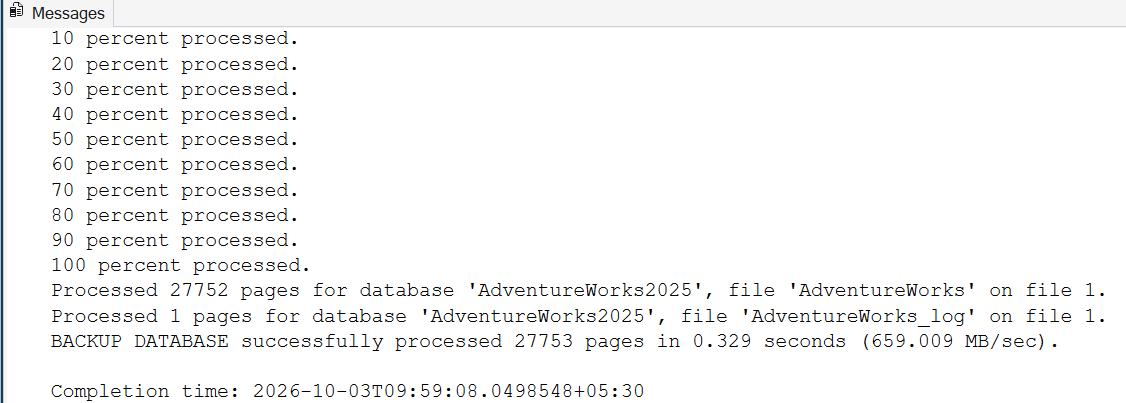
How the Number Changes the Messages
Try STATS = 1 and you get a line for nearly every percent. STATS = 50 gives you roughly two lines, around the middle and at the end. If you write WITH STATS and leave out the number, SQL Server reports every 10 percent. That’s different from leaving out the option altogether; a script with no STATS option prints no progress lines.
The messages are an approximate indicator. SQL Server may report a value just beyond a threshold, so a line reading 43 percent after a 40 percent threshold doesn’t mean the setting failed. For a long-running backup, I generally choose a smaller interval to get a finer sense of progress, without confusing the message frequency with actual speed.
You’ll also see WITH FORMAT in many backup scripts. That changes backup media handling and has nothing to do with progress, so I’ve left it out of the command above.

STATS in a backup is not about statistics, it is how often SQL Server tells you how far it has come.
Published by Pinal Dave on SQLAuthority. More of my work at pinaldave.com.
Discover more from SQL Authority with Pinal Dave
Subscribe to get the latest posts sent to your email.



1 Comment. Leave new
Hi Pinal,
Above you mentioned,”The default value of the stats is 10 and hence if we do not specify the stats, keywords, SQL Server displays the percentage completion at every 10 percentage.”
Is there any configuration which DBA needs to change to set the default value of stats in SQL server?
I never seen the percent complete value if we wont specify the stats in the backup query. It needs to specify at the time of backup other wise backup script will give an output as below.
Script :
backup database DWConfiguration
to disk =’D:\Backup\abc.bak’
O/P:
Processed 528 pages for database ‘DWConfiguration’, file ‘DWConfiguration’ on file 2.
Processed 2 pages for database ‘DWConfiguration’, file ‘DWConfiguration_log’ on file 2.
BACKUP DATABASE successfully processed 530 pages in 0.172 seconds (24.073 MB/sec).
there is no percent complete in the result set.