
Question: How do you insert a line break into a SQL Server string?

Answer: I would usually leave display formatting to the application. SQL is happiest doing relational work. But sometimes a message, export or report must contain the break as part of the returned string. There are two ways to get one into a literal or expression.
A Literal Can Span Lines
If you type an actual newline between the opening and closing quotes, that newline becomes part of the string:
SELECT 'First line
Second line' AS MessageText;
Any spaces you type at the start of the second line become part of the value too. That makes hand-formatted SQL fragile if somebody later adjusts the indentation.
Build the Break Explicitly
For a Windows-style carriage-return-plus-line-feed sequence, use CHAR(13) + CHAR(10):
SELECT 'First line' + CHAR(13) + CHAR(10) + 'Second line'
    AS MessageText;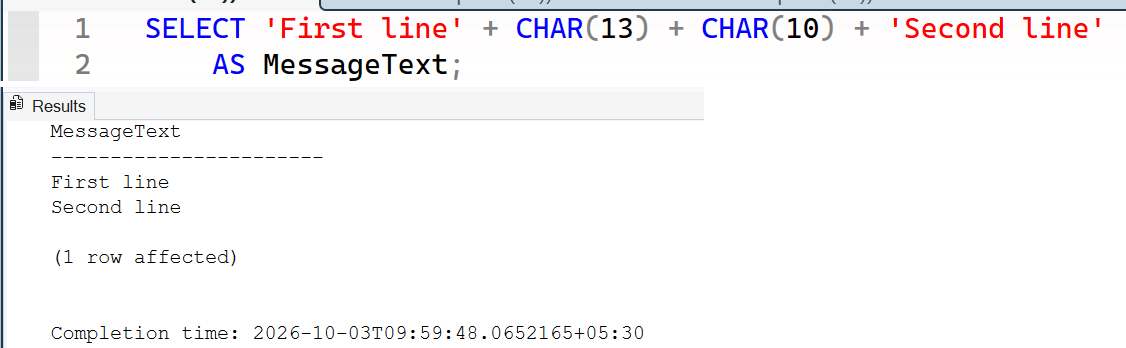
CHAR(13) is a carriage return; CHAR(10) is a line feed. Some programs show a lone carriage return as a break and others don’t, so the pair is clearer when the receiving program expects Windows line endings. Use a single line feed if the receiving system specifically requires that format.
Viewing tip: SSMS Results to Grid shows the value in one cell without displaying its line break. Switch to Results to Text (Ctrl+T) to inspect the layout, and verify the behavior in the application that will consume the value. A grid alone doesn’t prove the string lacks a newline.
I use the multiline literal for a fixed, short piece of text when its whitespace is deliberate. When the text is assembled from values, I prefer the explicit characters, so a change in SQL formatting doesn’t change the data. Which version is easier for you to maintain?

A line break is not formatting, it is two characters in your data, so add them on purpose.
Published by Pinal Dave on SQLAuthority. More of my work at pinaldave.com.
Discover more from SQL Authority with Pinal Dave
Subscribe to get the latest posts sent to your email.



5 Comments. Leave new
This seems to be a Windows-specific solution. Let’s say we have Java code running on a Linux client and we run the query. I expect a single line to render (the second line) because it will overwrite the first line. This is due to the fact that char(13) is carriage return, but the newline character in Linux is char(10), otherwise known as “line feed”.
Good Point, I was suspecting this would be Environment specific.
Personally I use those methods too, but a little different:
In the first example, I put a line break after the first quote like this:
Select ‘
This is the First Line
Second Line
‘
That permits me to Indent all the lines as much as I need.
As about the second example, as David Rosario pointed out, is a windows specific solution.
That is why I use both chars as line break:
Declare @LineBreak nvarchar(10) = char(13)+ Char(10),
@text nvarchar(100);
Select @text = ‘This is the First Line’ + @LineBreak + ‘Second Line’;
Using it like this, It works in Linux, Unix and old IOS tooo.
Some details about line break here:
https://stackoverflow.com/questions/1552749/difference-between-cr-lf-lf-and-cr-line-break-types
How we can add new line between values in select statement ,
like select col1 +’\n’ + col2
Not working
Eg:-
Declare @Text nvarchar(max)
set @Text=’Line 1′ + CHAR(13) +’Line 2′
select @Text