The Filter operator throws rows away after the plan has already paid to produce them. It sits above the scan, the sort or the join, so all that work happens for every row. Let’s find one, measure it and remove it.

What Filter Does in a Plan
Most conditions are applied while the table is read. A seek jumps straight to the matching rows. A scan can test each row as it reads it. Both discard rows early, so little data travels up the plan.
Filter is different. It takes the rows that the operator below it produced and passes only the ones that match. Everything under it already worked on all of them. If Filter takes in 200,000 rows and passes 40, the plan built 199,960 rows and then threw them away.
Build the Test
I ran everything here on SQL Server 2025. The script creates 40 customers and 200,000 orders, so each customer has 5,000 orders.
IF DB_ID(N'SqlFilterOperatorDemo') IS NULL CREATE DATABASE SqlFilterOperatorDemo;
GO
USE SqlFilterOperatorDemo;
GO
DROP TABLE IF EXISTS dbo.Orders;
DROP TABLE IF EXISTS dbo.Customers;
CREATE TABLE dbo.Customers
(
    CustomerID int PRIMARY KEY,
    CustomerName varchar(40) NOT NULL
);
CREATE TABLE dbo.Orders
(
    OrderID int IDENTITY(1,1) PRIMARY KEY,
    CustomerID int NOT NULL,
    OrderDate date NOT NULL,
    Amount decimal(10,2) NOT NULL
);
INSERT INTO dbo.Customers (CustomerID, CustomerName)
SELECT s.value, CONCAT('Customer ', s.value)
FROM GENERATE_SERIES(1, 40) AS s;
INSERT INTO dbo.Orders (CustomerID, OrderDate, Amount)
SELECT s.value % 40 + 1, DATEADD(DAY, s.value % 1000, '2023-01-01'), s.value % 500 + 10.50
FROM GENERATE_SERIES(1, 200000) AS s;
GO
A Query That Needs a Filter
A common request is the latest order of every customer. The usual answer numbers each customer’s orders with ROW_NUMBER, newest first, and keeps number one. ROW_NUMBER is a window function. Its result exists only after the numbering is done. So the condition rn = 1 can’t be applied while the table is read.
Turn on I/O statistics and run it. Press Ctrl+M first, so SSMS shows the actual plan.
SET STATISTICS IO ON;
SELECT OrderID, CustomerID, OrderDate, Amount
FROM (SELECT OrderID, CustomerID, OrderDate, Amount,
             ROW_NUMBER() OVER (PARTITION BY CustomerID ORDER BY OrderDate DESC, OrderID DESC) AS rn
      FROM dbo.Orders) AS t
WHERE rn = 1;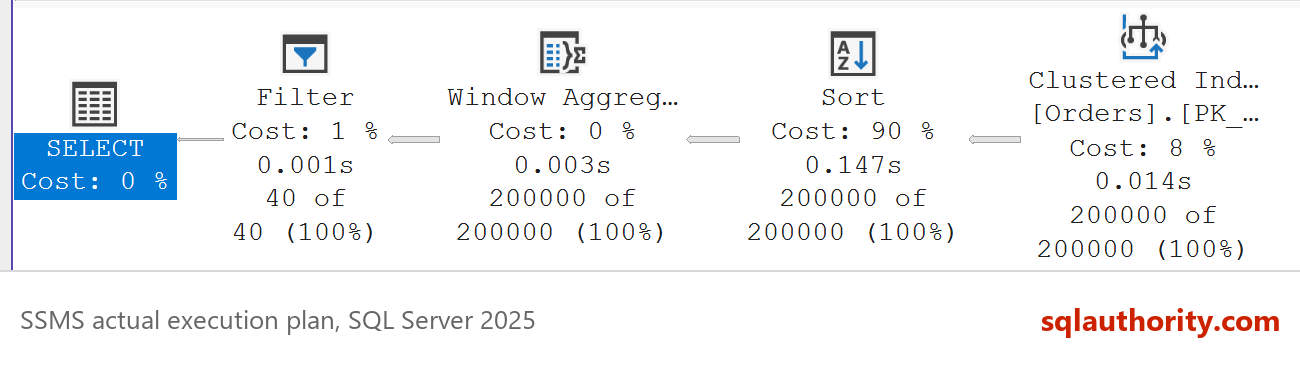
The query returns 40 rows. The plan in the picture shows how it got there. Read it from right to left, because the data flows that way.
Read the Numbers
| Operator | Rows passed up |
|---|---|
| Clustered Index Scan of dbo.Orders | 200,000 |
| Sort | 200,000 |
| Window Aggregate | 200,000 |
| Filter | 40 |
The scan reads every order, because the query wants every customer. The Sort puts the rows in customer and date order. The Window Aggregate numbers them. Only at the top does Filter keep the 40 rows numbered one.
To number one customer’s orders, the plan must see all of them first. That is why the condition can’t help the scan. Every row has to climb through the Sort and the Window Aggregate. Hover over any operator in the plan to see its row counts and its predicate.
The Messages tab agrees. The query read 721 pages (logical reads) from dbo.Orders to return 40 rows. The Filter operator is where the plan admits that most of that work was not needed.
An Index Alone Is Not the Fix
The first idea is an index that stores the rows already in the right order. Create it and run the query again.
CREATE INDEX IX_Orders_Customer_Date ON dbo.Orders (CustomerID, OrderDate DESC, OrderID DESC) INCLUDE (Amount);
The Sort disappears from the plan, and the reads fall from 721 to 648. The Filter stays. The index helped with ordering, but the query still asks for every row of the table. The shape of the query is the problem, not only the missing index.
Rewrite It to Seek
Ask the question the way you would ask a person. For each customer, find the newest order. In T-SQL that is CROSS APPLY with TOP (1). It runs a small query for every customer and returns one row. With the new index, each small query is a seek.
SELECT o.OrderID, o.CustomerID, o.OrderDate, o.Amount
FROM dbo.Customers AS c
CROSS APPLY (SELECT TOP (1) OrderID, CustomerID, OrderDate, Amount
             FROM dbo.Orders AS x
             WHERE x.CustomerID = c.CustomerID
             ORDER BY x.OrderDate DESC, x.OrderID DESC) AS o;
The plan has no Filter. It scans the 40 customers, then runs the seek 40 times. Each seek reads a few pages and stops at the first row. The orders table needed 153 logical reads instead of 721.
| Version | Plan shape | Logical reads on dbo.Orders |
|---|---|---|
| ROW_NUMBER, no index | Scan, Sort, Window Aggregate, Filter | 721 |
| ROW_NUMBER, with index | Index Scan, Window Aggregate, Filter | 648 |
| CROSS APPLY, with index | Nested Loops, Top, Index Seek | 153 |
The index is sorted by customer, then by date with the newest first. So the first entry the seek finds for a customer is the answer, and TOP (1) stops there. No sort, no numbering and no discarded rows.
You could say the ROW_NUMBER version is shorter and easier to read, so it should stay. Fair point, and sometimes it should. I tested 2,000 customers with 100 orders each. The window query read 648 pages, and the apply version needed 6,408. With many small groups, one scan beats thousands of seeks. The rewrite pays off when the groups are few and large.
Other Places Filter Shows Up
ROW_NUMBER is one cause. On SQL Server 2025, these patterns also produced a Filter operator in the plan:
- HAVING on an aggregate. The groups are built first and then tested, so Filter sits above the Hash Match.
- A condition on a derived table that contains TOP. The condition can’t move inside TOP without changing the answer.
- A WHERE condition on the right-hand table of a LEFT JOIN, such as ISNULL on one of its columns. It is checked after the join.
In each case the plan did the costly work first and tested the condition last. That is the pattern to hunt for in a slow plan. A Filter near the top, with a large number below it, is the clue.
A function on a column is different. A query with YEAR(OrderDate) = 2024 did not produce a Filter on this build. The condition stayed inside the scan, which read 200,000 rows and returned 6,200. That is a scan with a predicate, and you find it in the scan’s properties, not as its own operator.
The same smell shows up in a scan with a predicate. The scan’s properties list the rows read and the rows returned. When the first number is far above the second, the table was read for rows that were then thrown away.
A Short Checklist
When you open an actual plan, scan it for Filter operators. Compare the rows going in with the rows coming out. A big drop, such as 200,000 to 40, means work was thrown away. My post on estimated vs actual rows covers the other numbers on the same tooltip.
Then ask whether the condition can move below the operator that does the expensive work. Rewrite the query so it reaches a seek. Add the index that seek needs, and check the logical reads before and after. Don’t trust the plan shape alone.
When you finish testing, remove the example database.
USE master;
GO
ALTER DATABASE SqlFilterOperatorDemo SET SINGLE_USER WITH ROLLBACK IMMEDIATE;
DROP DATABASE SqlFilterOperatorDemo;
A Filter operator is not the slow part, it is the place where the slow part shows.
Published by Pinal Dave on SQLAuthority. More of my work at pinaldave.com.
Discover more from SQL Authority with Pinal Dave
Subscribe to get the latest posts sent to your email.