Interview question: What is the difference between a logical operation and a physical operation in a SQL Server execution plan?
Answer: The logical operation says what relational work is required, such as an Inner Join. The physical operation says how the chosen plan carries it out, such as a Hash Match. One logical join can have more than one possible physical implementation.

I used to hear this interview question often early in my career. It is easiest to answer by opening an actual plan and inspecting one operator, rather than memorizing two lists of names.
My original example joined vendors to the products they supply in AdventureWorks2014. This runnable version uses AdventureWorks2025 with the same objects:
USE AdventureWorks2025;
GO
SELECT V.Name, PV.StandardPrice
FROM Purchasing.ProductVendor AS PV
JOIN Purchasing.Vendor AS V
  ON PV.BusinessEntityID = V.BusinessEntityID;
GO
In SSMS, enable Include Actual Execution Plan, run the query, and select the join operator in the plan. The historical capture below shows Logical Operation: Inner Join and Physical Operation: Hash Match on the same operator:
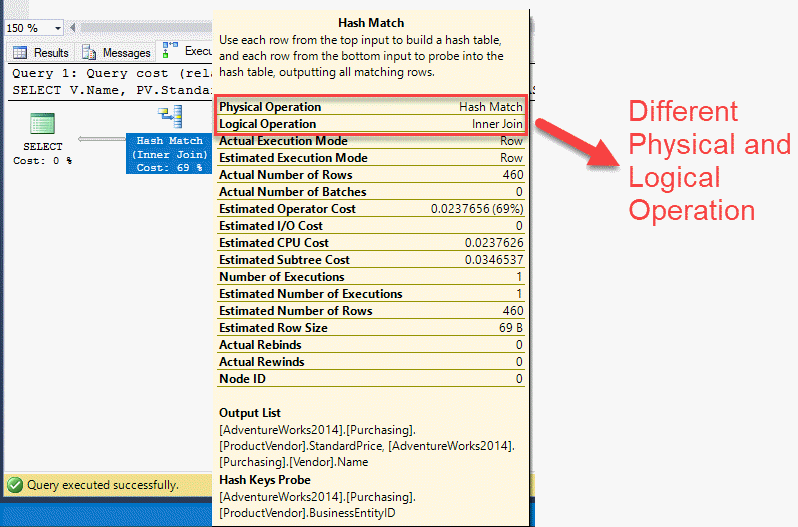
The query requests matching vendor and product-vendor rows. That is the Inner Join. For this particular plan, SQL Server used a hash-based method to produce the matches. With different indexes, row estimates, or data distribution, the optimizer may choose Nested Loops or Merge Join instead. The screenshot demonstrates one plan; it is not a promise that every run of this query will use Hash Match.
Do not assume that every plan icon has two different names. Some operators use the same term for their logical and physical roles. When a plan behaves unexpectedly, inspect its properties and the data flowing into it before treating an operator name as a performance verdict.
Published by Pinal Dave on SQLAuthority. More of my work at pinaldave.com.
Discover more from SQL Authority with Pinal Dave
Subscribe to get the latest posts sent to your email.