
Interview question: How can you find SQL Server memory use by database and object?
Answer: Query sys.dm_os_buffer_descriptors to count data pages currently cached in the buffer pool. Group by database for an instance-wide view, then map cached pages to allocation units and partitions for objects in one database. These figures are cached pages now, not the database’s total size or the SQL Server process’s total memory.

I use the database-level view first when someone asks which database has the largest presence in the buffer pool. Each descriptor represents an 8 KB page. Dividing the page count by 128 gives MB:
SELECT CASE bd.database_id
         WHEN 32767 THEN N'Resource DB'
         ELSE DB_NAME(bd.database_id)
       END AS database_name,
       COUNT_BIG(*) AS cached_pages,
       COUNT_BIG(*) / 128.0 AS cached_mb
FROM sys.dm_os_buffer_descriptors AS bd
GROUP BY bd.database_id
ORDER BY cached_pages DESC;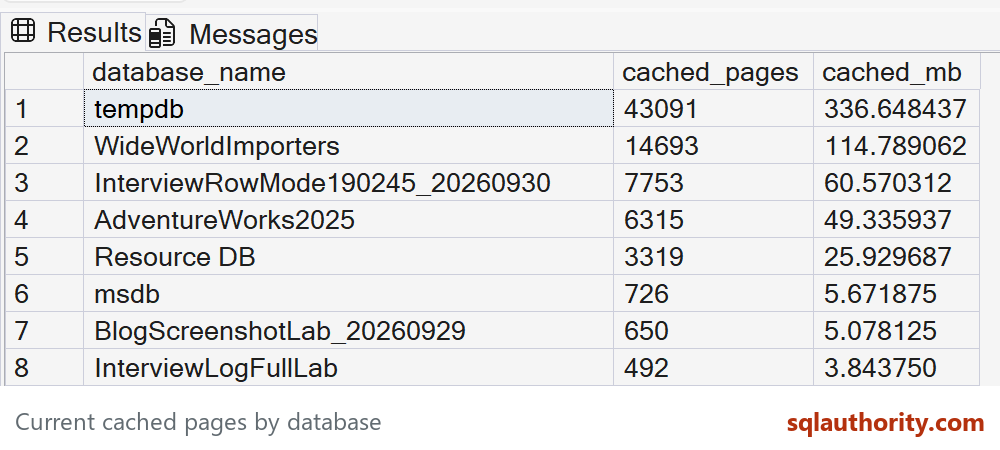
My original result placed AdventureWorks2014 above the other databases. That was a snapshot of one instance after its workload, not a normal allocation that you should expect to reproduce. The old result image has a pointer covering one value, so the query is kept here without that obstructed capture.
For the second part of the question, run this in the database you want to inspect. This example uses AdventureWorks2025: It associates each buffer descriptor with its allocation unit, partition, object, and matching index ID:
USE AdventureWorks2025;
GO
SELECT s.name AS schema_name,
       o.name AS object_name,
       i.name AS index_name,
       i.type_desc AS index_type,
       COUNT_BIG(*) AS cached_pages,
       COUNT_BIG(*) / 128.0 AS cached_mb
FROM sys.dm_os_buffer_descriptors AS bd
JOIN sys.allocation_units AS au
  ON au.allocation_unit_id = bd.allocation_unit_id
JOIN sys.partitions AS p
  ON (au.type IN (1, 3) AND au.container_id = p.hobt_id)
  OR (au.type = 2 AND au.container_id = p.partition_id)
JOIN sys.indexes AS i
  ON i.object_id = p.object_id
 AND i.index_id = p.index_id
JOIN sys.objects AS o
  ON o.object_id = p.object_id
JOIN sys.schemas AS s
  ON s.schema_id = o.schema_id
WHERE bd.database_id = DB_ID()
  AND o.type = 'U'
GROUP BY s.name, o.name, i.name, i.type_desc
ORDER BY cached_pages DESC;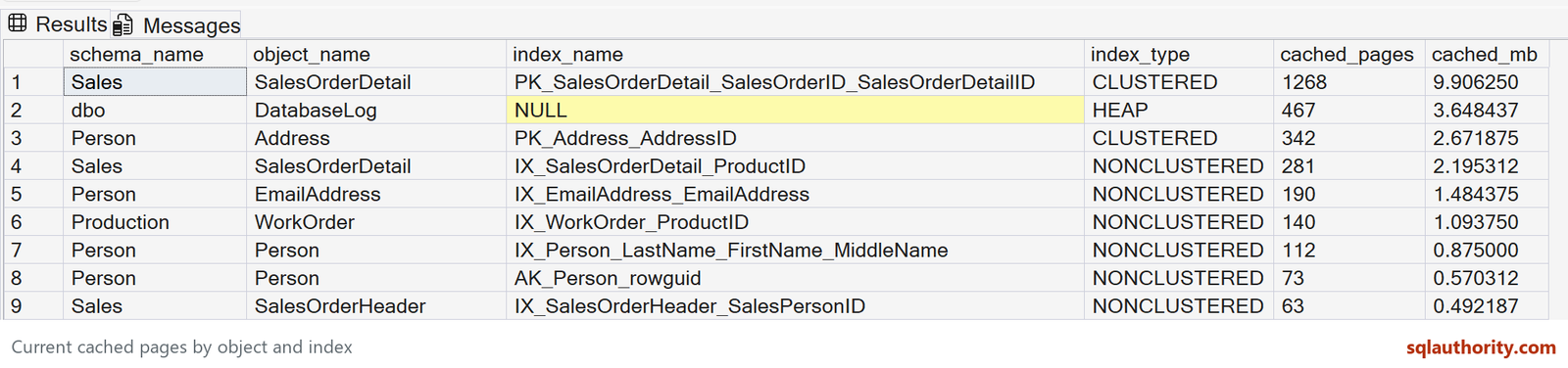
The original object query joined sys.indexes only by object_id. That can attach the same cached pages to multiple indexes. Its old result even showed the same page count beside two indexes on one table. This version also joins on index_id. I have not reused the old clipped result screenshot because it illustrates the incorrect mapping.
The numbers change as pages enter and leave cache. They exclude free and stolen memory and are not a measure of how much memory an application or whole SQL Server instance consumes. Access to this DMV requires server-state permission; SQL Server 2022 and later use VIEW SERVER PERFORMANCE STATE.
Published by Pinal Dave on SQLAuthority. More of my work at pinaldave.com.
Discover more from SQL Authority with Pinal Dave
Subscribe to get the latest posts sent to your email.




4 Comments. Leave new
Ok, I found couple clustered and non clustered indexes taking more spaces, what’s next what do I need to do with those objects?
You need to strike a balance between space consumed and performance of queries which are using those indexes.
can you please make it clear that how do I reduce space consumed by CI and NCI?
there is one join condition missing from “INNER JOIN sys.indexes i ON obj.[object_id] = i.[object_id]”. It should be
“INNER JOIN sys.indexes i ON obj.[object_id] = i.[object_id] and i.index_id=obj.index_id”