
Question: How do I change the owner of a database in SQL Server?

Answer: Use ALTER AUTHORIZATION. Choose an appropriate existing login for your environment and run the change only when you intend to transfer ownership. You’ll also meet an older procedure and the Owner field in SSMS, so here are all three, with the modern command first.
Preferred: ALTER AUTHORIZATION
ALTER AUTHORIZATION ON DATABASE::AdventureWorks2025 TO sa;Substitute your database and the approved owner login. Check the owner before and after with a read-only query:
SELECT name, SUSER_SNAME(owner_sid) AS DatabaseOwner
FROM sys.databases
WHERE name = N'AdventureWorks2025';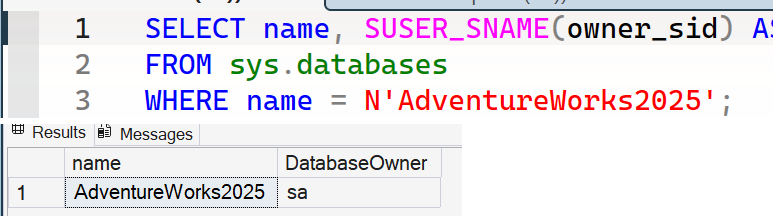
Changing an owner is a security decision. It needs suitable permissions and can affect ownership chains and access, so review the chosen login rather than copying sa without thought.
The Older Procedure
Older scripts often use sp_changedbowner:
USE AdventureWorks2025;
EXEC sys.sp_changedbowner @loginame = N'sa';
This procedure is deprecated and will be removed in a future SQL Server version. Recognize it when you read an older script, but use ALTER AUTHORIZATION for new work.
Where SSMS Shows the Owner
In SSMS, right-click the database, open Properties, and look at the Owner field on the General page. It shows the same login the query returns.

Changing a database owner is not a cleanup chore, it is a security decision, so pick the login on purpose.
Published by Pinal Dave on SQLAuthority. More of my work at pinaldave.com.
Discover more from SQL Authority with Pinal Dave
Subscribe to get the latest posts sent to your email.


12 Comments. Leave new
Pinal, the code doesn’t render properly and there doesn’t appear to be a method 2 (sp_changedbowner is the deprecated one…) –Kevin3NF
Thank you! I fixed the formatted issue.
Yeah it is deprecated. I totally agree.
Pinal,
Great post. Always helpful to see multiple ways of completing a task.
Building on the approaches you described, I was interested in learning when the method 1 approach (ALTER AUTHORIZATION ON DATABASE …) was first offered in SQL Server.
I used sp_helptext to see what T-SQL code is used by the sp_changedbowner system SP for several different versions of SQL Server. All SQL versions I reviewed used this newer approach shown in your method 1 in the sp_changedbowner SP (SQL 2005 through SQL 2016). The oldest SQL Server version I tested this with was SQL Server 2005. So it has been around at least that long (12 years or more), and possibly longer.
In effect, all approaches use the method 1 approach under the covers (directly or indirectly). The deprecated but not yet removed SP sp_changedbowner is retained for interface compatibility in existing scripts. It will be interesting to see how soon Microsoft chooses to remove this SP, as they will also have to change SSMS to generate different code when you script off a DB owner change.
Scott R.
I agree Scott. Even though Microsoft recommends using new syntax/T-SQL, their product uses old ones :)
I am looking for a syntax or query that will first check in a database has DB_Owner has set or not and if not it will use ‘sa’. This has to happen for all databases except for the System Databases. Can you advise a script?
Hi Pinal,
Does changing DB owner will cause any outage or lock the tables? Is it ok to change it during the business hours?
correction: Does it lock the Databases when you change the DB Owner?
Can we rename system databases owner sa to another name please suggest me.
Can we change system databases owner from sa to another name? please advise.
Using method 3, after your screen shot is a dialog asking for the new owner’s account. That dialog is not recognizing several names from our domain, including the one I’m trying to assign ownership to. That dialog has a “Object Types” button but only one type is available “Logins” instead of the usual Groups,. Users, et al — Using the “Browse” button shows a list of 38 items — there are over 2,000 accounts in the AD domain. *Some* domain users appear, but very few, and not the domain user I need to assign ownership to.
Any ideas where to go from here???
Hello,
Is there a way to modify db_owner for several db at the same time?
Have a nice day,
Florent