
Question: What is the difference between TRUNCATE and DELETE in SQL Server?
Answer: This question never gets old. The shortest useful answer is that DELETE can remove selected rows, while TRUNCATE TABLE clears all rows from an eligible table (or specified partitions). Both operations are logged. Both can be rolled back while their transaction is still active. I still hear the claim that TRUNCATE cannot be rolled back, and it is worth testing rather than memorizing.

The differences that matter
| Question | DELETE | TRUNCATE TABLE |
|---|---|---|
| Which rows? | Selected rows with WHERE, or all rows without it. | All rows in the table, or specified partitions where supported. No row-level WHERE. |
| How is the work logged? | Row deletions are fully logged. | Page deallocations are logged rather than individual row deletions. |
| Identity counter? | Removing rows does not reset it. | It resets to the defined seed for a whole-table truncate. |
| DELETE triggers? | They fire when applicable. | They do not fire. |
TRUNCATE usually needs less log space when the operation is eligible, but the old shortcut that DELETE always uses row locks is too broad. Its locks depend on the operation and plan. TRUNCATE takes a table-level schema modification lock, so it can block other work. A table referenced by a foreign key generally cannot be truncated even if the child table is empty. A foreign key that references the same table is the documented exception.
Try the rollback yourself
This example uses a temporary table. Run the entire batch in one connection. The count is zero inside the transaction, and both rows return after ROLLBACK.
-- Run in a fresh window without a caller transaction.
IF @@TRANCOUNT <> 0
    THROW 50118, 'Do not run inside an existing transaction.', 1;
IF OBJECT_ID(N'tempdb..#RemoveDemo') IS NOT NULL
    THROW 50119, '#RemoveDemo already exists. Open a fresh window.', 1;

CREATE TABLE #RemoveDemo
(
    ItemID int IDENTITY(1,1) PRIMARY KEY,
    ItemName varchar(20) NOT NULL
);

INSERT #RemoveDemo (ItemName)
VALUES ('Alpha'), ('Beta');

BEGIN TRANSACTION;
    TRUNCATE TABLE #RemoveDemo;
    SELECT COUNT(*) AS RowsDuringTruncate FROM #RemoveDemo;
ROLLBACK TRANSACTION;

SELECT ItemID, ItemName
FROM #RemoveDemo
ORDER BY ItemID;

DROP TABLE #RemoveDemo;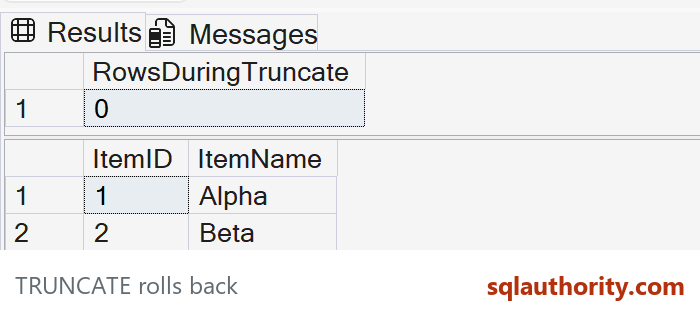
That test is the answer to the common interview myth. Once you commit either operation, a later ROLLBACK does not undo it. Choose DELETE when you need a predicate or DELETE trigger behavior. Choose TRUNCATE only when clearing the eligible table is truly the intended action and its identity, permissions, and dependencies have been reviewed.
For related examples, see my earlier posts on DELETE, TRUNCATE and identity reseeding, rolling back TRUNCATE inside a transaction, and why a committed TRUNCATE is a different recovery problem.
- SQL SERVER – Answer – Value of Identity Column after TRUNCATE command
- SQL SERVER – Interview Questions and Answers – Frequently Asked Questions – Day 6 of 31
- SQLAuthority
Published by Pinal Dave on SQLAuthority. More of my work at pinaldave.com.
Discover more from SQL Authority with Pinal Dave
Subscribe to get the latest posts sent to your email.




4 Comments. Leave new
Why Truncate has been kept as DDL and Delete as DML?
because it doesn’t delete the data, it just de-allocates the pointers.
Unless you need a where clause is there any reason not to use Truncate?
Unless you need a record of what is deleted,No.