
Question: What does GO do in SQL Server? GO is a client-tool batch separator, not a Transact-SQL statement. SSMS and sqlcmd recognize it and submit the preceding batch to SQL Server.

This small question is useful because it explains why a script works in SSMS but fails when an application sends the same text directly to the server. The application driver does not normally interpret GO.
DECLARE @MyMsg varchar(50)='Hello, World.';
SELECT @MyMsg AS FirstBatchMessage;
GO -- Ends the batch containing @MyMsg.
PRINT @MyMsg; -- Expected error137: variable not declared in this batch.
GO
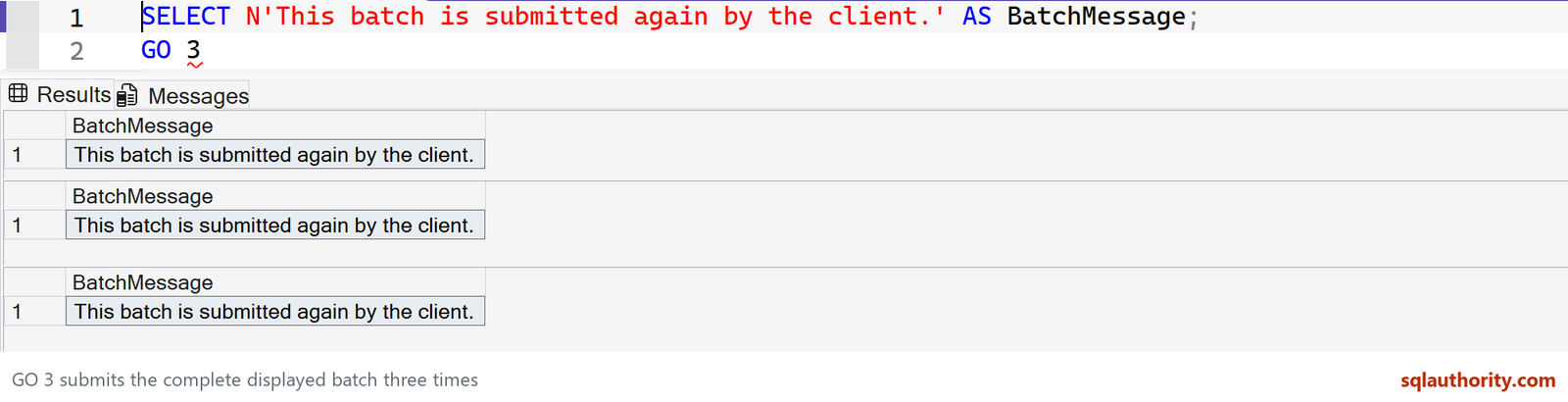
SELECT N'This batch is submitted again by the client.' AS BatchMessage;
GO 3
A batch boundary ends local variable scope
The first batch returns Hello, World. The separate PRINT fails with “Must declare the scalar variable @MyMsg,” because that variable belonged to the previous batch. A connection’s temporary tables and open transaction can survive a GO, however. A batch boundary is not automatically a new connection or a commit.
GO 3 repeats the preceding batch
Run the final SELECT and GO 3 together in SSMS. The client submits that SELECT three times, so three result grids contain the same message. It is not three manually copied SELECT statements.
GO must be on its own line apart from an optional count and comments; do not append a semicolon. The count must be a positive integer, not a T-SQL variable. A command sent directly through an ordinary database API must omit or deliberately parse these client separators.
The batch can contain more than one statement or plan
The original revision said that a batch compiles into one execution plan and knows nothing about earlier batches. That was too broad. SQL Server can compile multiple statements and reuse plans, while the connection retains context such as its current database and transaction.
Some CREATE statements, including CREATE PROCEDURE, require a suitable separate batch. GO is the tool’s way of supplying that boundary; it is not syntax inside a stored procedure.
SSMS can use a custom batch separator, but changing it makes shared scripts harder to run consistently. Keep the default unless there is a documented reason.
Published by Pinal Dave on SQLAuthority. More of my work at pinaldave.com.
Discover more from SQL Authority with Pinal Dave
Subscribe to get the latest posts sent to your email.



1 Comment. Leave new
I wonder how many younger (under 45 years of age) ever worked with batch data processing. When the world used punch cards, we used to say that IBM’s OS/JCL (job control language) would make perfect sense to you after only a year of daily use :) Among other design flaws, all the commands had no spaces; a space separated an optional comment to the right side on each line (card). The simple GO from Sybase was wonderful compared to JCL!