I have been getting my hands dirty working with PowerShell commands for a fun learning experience and few have made to this blog. The after effect of this is that I have been pinged for few queries on them too. Recently I got a call from one of my friend and he wanted to use PowerShell to connect to SQL and run some queries. Initially I thought that he is talking about SQL PowerShell, but his intention was to connect to SQL using SQL Server Native Client and run the query. That was strange but I was ready and up for the challenge in front of me. The curiosity is just too much that I couldn’t sleep till I found a solution to this challenge he put to me. Here is my small PowerShell and Native Client sample.
I wrote a small sample and sharing here for your benefit. First, we need to create a sample database and a table which would be used by PowerShell.
CREATE DATABASE SQLAuthority
GO
USE SQLAuthority
GO
CREATE TABLE EmployeeMaster (
EmployeeID INT
,FirstName VARCHAR(10)
,LastName VARCHAR(10)
)
GO
Now, our task is to use PowerShell and insert data into EmployeeMaster. Here is the step by step PowerShell script.
# Make Connecting string to the SQL Server Instance and the Database
$con = New-Object System.Data.SqlClient.SqlConnection("Data Source=.; Initial Catalog=SQLAuthority; Integrated Security=SSPI")
# Define variables and the values to be inserted
$EmployeeID = 1
$FirstName = 'Pinal'
$LastName = 'Dave'
# Open database connection
$con.Open()
#Create SQL Insert Statement for table EmployeeMaster with the values
$stmt_insert = "INSERT INTO [EmployeeMaster]
([EmployeeID],[FirstName],[LastName])
VALUES($EmployeeID ,'$FirstName' ,'$LastName')"
# Create command to execute to SQL connection
$cmd = $con.CreateCommand()
$cmd.CommandText = $stmt_insert
# Invoke the Insert statement
$cmd.ExecuteNonQuery()
Once we execute above, the data would be inserted into the table. Now, to fetch the data, I am going to use invoke-SQLCMD cmdlet
Add-PSSnapin SqlServerCmdletSnapin100
$DataSet = Invoke-Sqlcmd -Database "SQLAuthority" -Query "SELECT * FROM [EmployeeMaster]" -ServerInstance .
foreach ($element in $DataSet)
{
$element
}
# Close database Connection
$con.Close()
We can run all the statements together in one PowerShell script and use Windows PowerShell ISE to execute it.
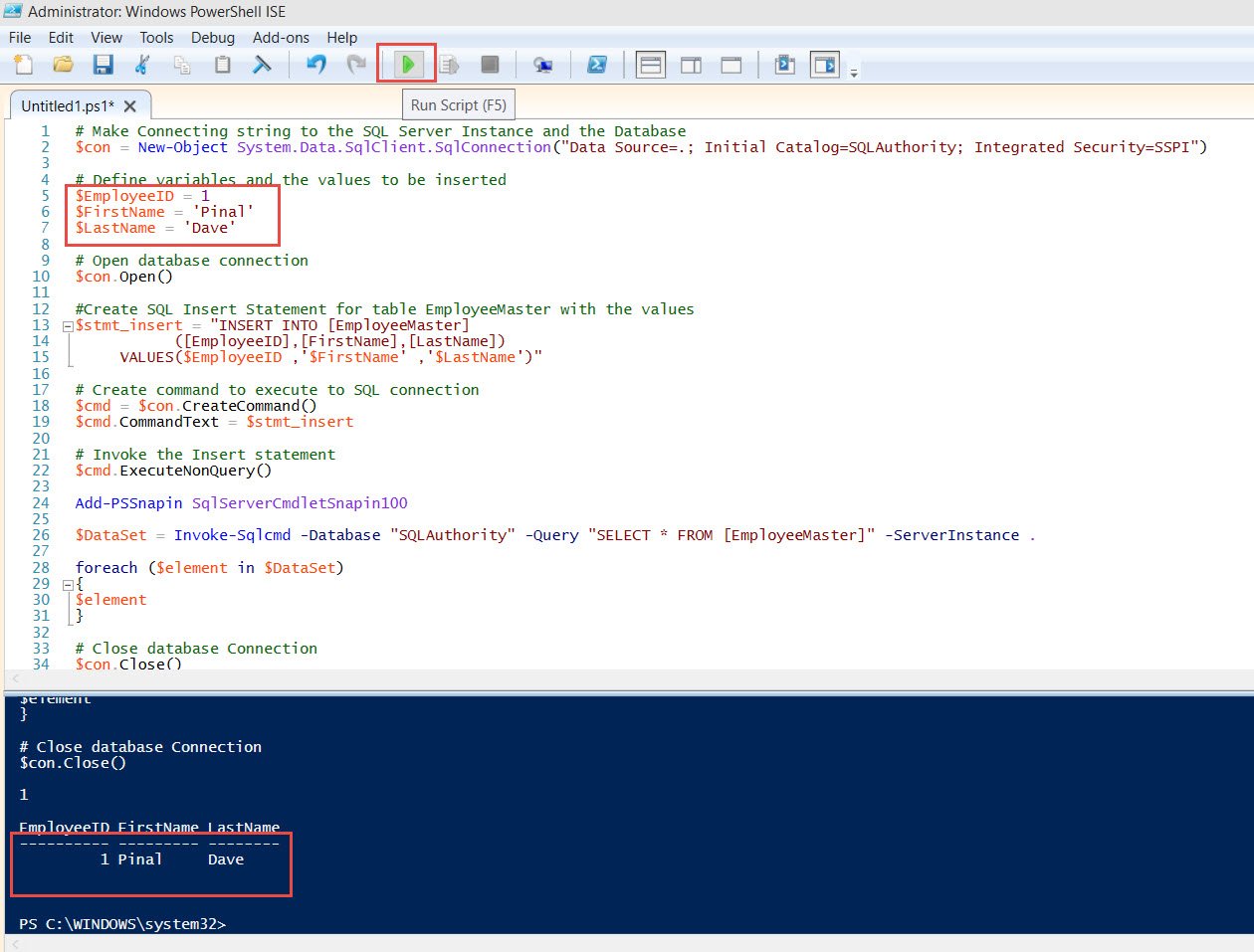
You might get a few errors while using Invoke-SQLCMD which I have explained here
SQL SERVER – FIX – The term ‘Invoke-Sqlcmd’ is not recognized as the name of a cmdlet
Hope this would give you a head start of using PowerShell to connect to SQL and run queries. This was a cool experiment for me and I thought was worth sharing. Have you ever had such requirements? Do share your experience over comments below.
Published by Pinal Dave on SQLAuthority. More of my work at pinaldave.com.
Discover more from SQL Authority with Pinal Dave
Subscribe to get the latest posts sent to your email.