MERGE performance is not decided by how short the statement looks. One MERGE reads tidier than an UPDATE plus an INSERT. Tidy and fast are different things, so measure both on your own data.

Why the argument starts at 2 AM
Picture a nightly job that loads a few hundred thousand rows from a staging table into a customer table. It runs long one night. Someone rewrites it from MERGE to UPDATE then INSERT, and the next run is faster.
By lunch, the team says “MERGE is slow.” Maybe. Or maybe the second run hit a warm cache, a quiet server, or a better plan. I don’t pick a side. I want the same data, the same transaction, and a stopwatch.
Build a demo table you can read at a glance
Start tiny, so you can see both forms agree before you time anything. The target holds Id 1 (Old) and Id 2 (Keep). Staging holds Id 1 (New) and Id 3 (Add). So Id 1 should change, Id 2 should stay, and Id 3 should appear. Both tables have a primary key on Id.
DROP TABLE IF EXISTS #Target;
DROP TABLE IF EXISTS #Stage;

CREATE TABLE #Target (Id int PRIMARY KEY, Label nvarchar(30));
CREATE TABLE #Stage  (Id int PRIMARY KEY, Label nvarchar(30));

INSERT #Target VALUES (1, N'Old'), (2, N'Keep');
INSERT #Stage  VALUES (1, N'New'), (3, N'Add');
Write the upsert both ways
First the MERGE. I add HOLDLOCK because without it, two sessions can both decide a key is missing and both try to insert it. One of them then fails on the primary key. The semicolon at the end is required. I roll back, so the second form starts from the same rows.
BEGIN TRAN;

MERGE #Target WITH (HOLDLOCK) AS t
USING #Stage AS s ON s.Id = t.Id
WHEN MATCHED THEN
    UPDATE SET Label = s.Label
WHEN NOT MATCHED BY TARGET THEN
    INSERT (Id, Label) VALUES (s.Id, s.Label);

SELECT Id, Label FROM #Target ORDER BY Id;

ROLLBACK;
Now the same job as two statements in one transaction. The UPDATE takes locks on the rows it touches. The INSERT checks for missing keys with the same lock hints, so nobody can slip a row in between.
BEGIN TRAN;

UPDATE t
SET Label = s.Label
FROM #Target AS t WITH (UPDLOCK, HOLDLOCK)
JOIN #Stage AS s ON s.Id = t.Id;

INSERT #Target (Id, Label)
SELECT s.Id, s.Label
FROM #Stage AS s
WHERE NOT EXISTS (SELECT 1 FROM #Target AS t WITH (UPDLOCK, HOLDLOCK)
                  WHERE t.Id = s.Id);

SELECT Id, Label FROM #Target ORDER BY Id;

ROLLBACK;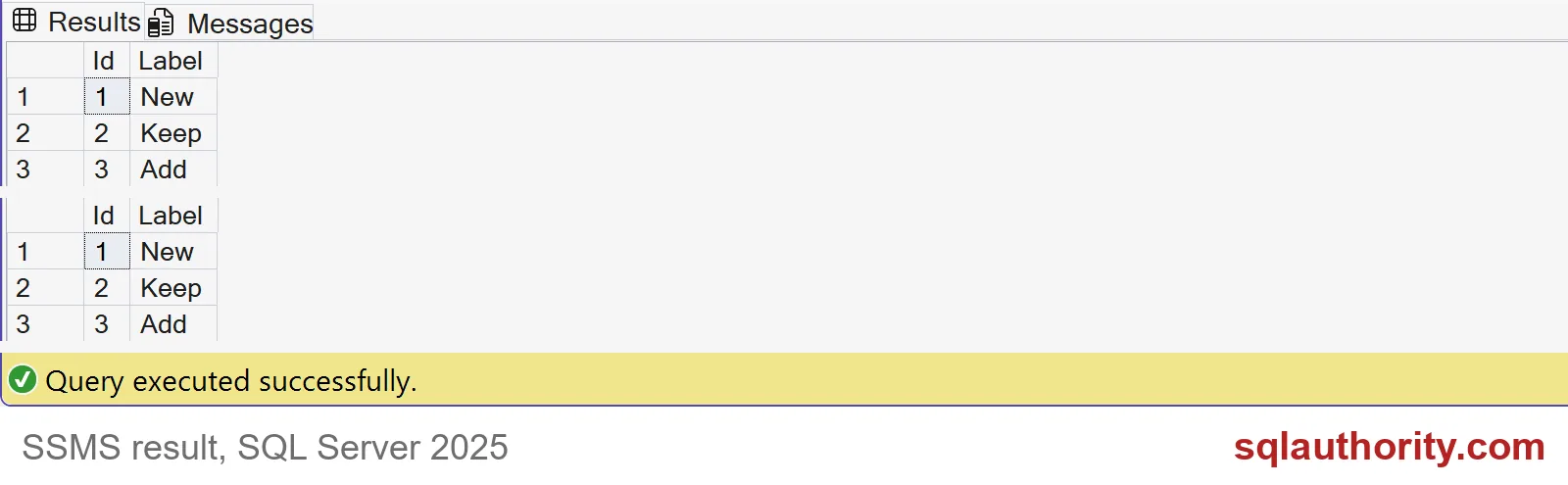
Both grids show 1 New, 2 Keep, 3 Add. The output is identical, so the question is only cost.

Watch out for duplicate staging rows
Here is a difference that has nothing to do with speed. Say staging, loaded from a file, holds two rows for Id 1 and has no primary key to stop it. MERGE refuses to guess and fails with error 8672. The UPDATE form quietly picks one of the two rows. You get no error. In my run Id 1 ended up as First, but nothing promises that.
DROP TABLE IF EXISTS #DupStage;
CREATE TABLE #DupStage (Id int, Label nvarchar(30));
INSERT #DupStage VALUES (1, N'First'), (1, N'Second');

BEGIN TRY
    MERGE #Target AS t
    USING #DupStage AS s ON s.Id = t.Id
    WHEN MATCHED THEN UPDATE SET Label = s.Label;
END TRY
BEGIN CATCH
    SELECT ERROR_NUMBER() AS error_number, ERROR_MESSAGE() AS error_message;
END CATCH;

BEGIN TRAN;
UPDATE t SET Label = s.Label
FROM #Target AS t JOIN #DupStage AS s ON s.Id = t.Id;
SELECT Id, Label FROM #Target ORDER BY Id;
ROLLBACK;
The error is a gift. It tells you the load file has a problem before bad data reaches the table. If you switch to the two-statement form, add your own duplicate check.
Time both on a bigger load
Now give both forms real work. The target gets 200,000 rows. Staging has 200,000 rows too, and half of them match, so each form updates 100,000 rows and inserts 100,000.
DROP TABLE IF EXISTS #BigTarget;
DROP TABLE IF EXISTS #BigStage;

CREATE TABLE #BigTarget (Id int PRIMARY KEY, Label nvarchar(30) NOT NULL);
CREATE TABLE #BigStage  (Id int PRIMARY KEY, Label nvarchar(30) NOT NULL);

WITH n AS (
    SELECT TOP (300000) ROW_NUMBER() OVER (ORDER BY (SELECT NULL)) AS Id
    FROM sys.all_objects AS a CROSS JOIN sys.all_objects AS b)
INSERT #BigTarget SELECT Id, N'Old' FROM n WHERE Id <= 200000;

WITH n AS (
    SELECT TOP (300000) ROW_NUMBER() OVER (ORDER BY (SELECT NULL)) AS Id
    FROM sys.all_objects AS a CROSS JOIN sys.all_objects AS b)
INSERT #BigStage SELECT Id, N'New' FROM n WHERE Id > 100000;
The stopwatch is plain SYSDATETIME. Each form runs inside a transaction that I roll back, so the rollback itself is not timed.
DECLARE @Start datetime2 = SYSDATETIME();
BEGIN TRAN;

MERGE #BigTarget WITH (HOLDLOCK) AS t
USING #BigStage AS s ON s.Id = t.Id
WHEN MATCHED THEN UPDATE SET Label = s.Label
WHEN NOT MATCHED BY TARGET THEN INSERT (Id, Label) VALUES (s.Id, s.Label);

DECLARE @Rows int = @@ROWCOUNT;
SELECT N'MERGE' AS form, @Rows AS rows_changed,
       DATEDIFF(MILLISECOND, @Start, SYSDATETIME()) AS elapsed_ms;
ROLLBACK;
DECLARE @Start datetime2 = SYSDATETIME();
BEGIN TRAN;
UPDATE t SET Label = s.Label
FROM #BigTarget AS t WITH (UPDLOCK, HOLDLOCK)
JOIN #BigStage AS s ON s.Id = t.Id;
DECLARE @Rows int = @@ROWCOUNT;
INSERT #BigTarget (Id, Label)
SELECT s.Id, s.Label FROM #BigStage AS s
WHERE NOT EXISTS (SELECT 1 FROM #BigTarget AS t WITH (UPDLOCK, HOLDLOCK)
WHERE t.Id = s.Id);
SET @Rows += @@ROWCOUNT;
SELECT N'UPDATE then INSERT' AS form, @Rows AS rows_changed,
DATEDIFF(MILLISECOND, @Start, SYSDATETIME()) AS elapsed_ms;
ROLLBACK;Both forms report 200,000 rows changed. The elapsed times will differ on your server, and I won’t quote mine, because my laptop is not your production box. Run each form three times and ignore the first run.
Then look at the actual plans too. A table with triggers, extra indexes or foreign keys changes the picture. Only the numbers from your own workload should decide which form you keep. Clean up when you are done.
DROP TABLE IF EXISTS #DupStage;
DROP TABLE IF EXISTS #BigTarget;
DROP TABLE IF EXISTS #BigStage;
DROP TABLE IF EXISTS #Target;
DROP TABLE IF EXISTS #Stage;
Next time someone says MERGE is slow, ask for the measurement first.
A shorter upsert is not a faster upsert, it is only a shorter one.
Published by Pinal Dave on SQLAuthority. More of my work at pinaldave.com.
Discover more from SQL Authority with Pinal Dave
Subscribe to get the latest posts sent to your email.