
Digging some of my older posts reveal I have written a blog already on Page Splits with SQL Server. This was no surprise because I am in constant need to reinvent as I write the blog posts. Now you might ask, why was I searching. Well, when I was talking about a performance tuning topic at a conference, I told the harmful effects of page splits and one of the attendees asked – “How can we track Page splits inside SQL Server?”.
The easiest way to track if page splits are happening in SQL Server is to use the PerfMon Counters. For the records you can start from- “SQL Server: Access Methods -> Page Splits/sec”. This counter is quite handy to understand if this behavior happens in our SQL Server instance. Now there was an interesting counter question someone asked, “Is there a way to know each of the page splits that happen in the system?”
This question had got me thinking and I wanted to somehow find how this can be found. And to my surprise, I found this was already available with us all along with Extended Events. So here is what I did.
TSQL Script
Let us first create a database for our experiment. We will also create our Extended Event to track the PageSplits.
-- Create a dummy database
CREATE DATABASE PageSplits
GO
-- Get the DB ID, we will use it in next step
SELECT DB_ID('PageSplits')
GO
-- Create Session
CREATE EVENT SESSION [Catch_PageSplit] ON SERVER
ADD EVENT sqlserver.page_split(
WHERE ([package0].[equal_uint64]([database_id],(10))))  -- NOTE: Please make sure you change the DATABASE_ID
ADD TARGET package0.ring_buffer
WITH (MAX_MEMORY=4096 KB,EVENT_RETENTION_MODE=ALLOW_SINGLE_EVENT_LOSS,
MAX_DISPATCH_LATENCY=30 SECONDS,MAX_EVENT_SIZE=0 KB,
MEMORY_PARTITION_MODE=NONE,TRACK_CAUSALITY=OFF)
GO
-- Start the event session
ALTER EVENT SESSION [Catch_PageSplit] ON SERVER
STATE = start;
GO
Before we get to the next step, let us start monitoring our Extended Events for any possible page splits.
USE PageSplits
GO
CREATE TABLE mytest (
myCompany CHAR(5) NOT NULL CONSTRAINT pk_mytest PRIMARY KEY CLUSTERED,
FillData VARCHAR(3000) NOT NULL
)
GO
INSERT mytest ( myCompany, FillData )
VALUES( '00001', REPLICATE( 'A', 3000 ) ),
( '00002', REPLICATE( 'B', 1000 ) ),
( '00003', REPLICATE( 'C', 3000 ) ),
( '00004', REPLICATE( 'A', 3000 ) ),
( '00005', REPLICATE( 'B', 1000 ) ),
( '00006', REPLICATE( 'C', 3000 ) ),
( '00007', REPLICATE( 'A', 3000 ) ),
( '00008', REPLICATE( 'B', 1000 ) ),
( '00009', REPLICATE( 'C', 3000 ) )
GO
Next step is to create a table with some values. Later we will use this to create a page split scenario.
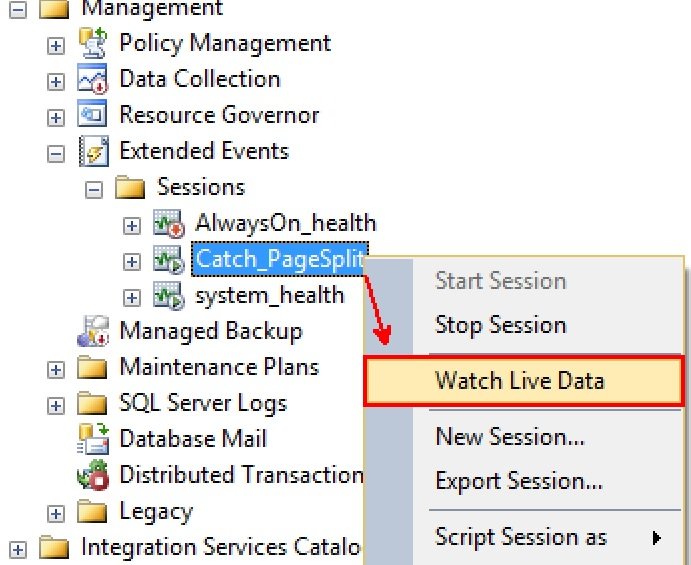
Let us create the scenario of page split by updating a row with some extra data.
-- Update to introduce a page split
UPDATE mytest
SET FillData = REPLICATE( 'B', 3000)
WHERE myCompany = '00002'
GO
Don’t forget to look at the Live Data feed for entries. If the Page Split happen you will see something like:
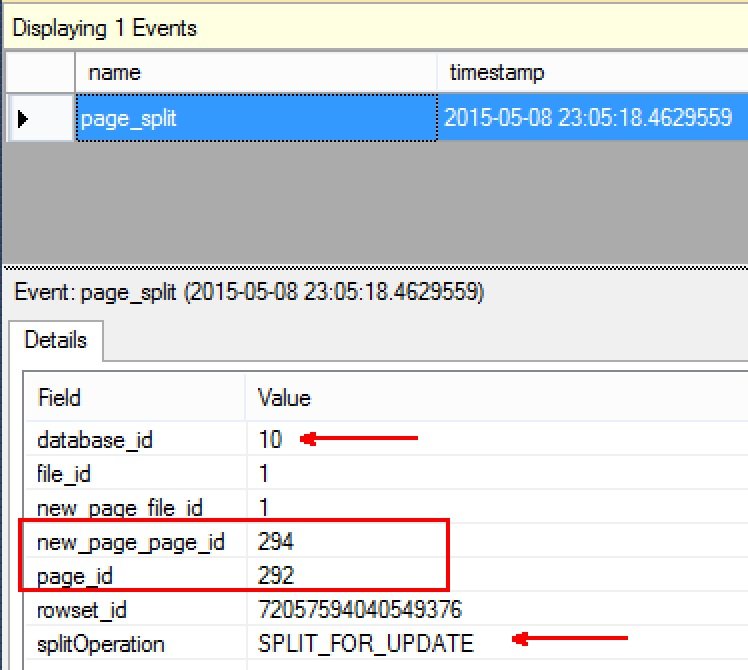
As you can see, this Page Split has happened because of an Update. The two pages under question are also shown. We can also see the database ID under question that caused the page split.
I personally thought this was a wonderful concept hidden between tons of features of Extended Events. This is awesome to learn these fine prints.
Now that we learnt something new here, let us clean up the database we just created.
-- Clean up time
USE MASTER
GO
DROP DATABASE PageSplits
GO
DROP EVENT SESSION [Catch_PageSplit] ON SERVER
GO
Hope you found it interesting and do let me know how you were able to use Extended Events to learn something new inside SQL Server.
Published by Pinal Dave on SQLAuthority. More of my work at pinaldave.com.
Discover more from SQL Authority with Pinal Dave
Subscribe to get the latest posts sent to your email.




2 Comments. Leave new
correct info on Page split is still not available from sql 2005 all the way to 2014.
Have you tried PerfMon?