
I get this question by email more often than I would expect: Is GO a T-SQL statement? The answer is no. SSMS and tools such as sqlcmd recognize GO as a signal to send the preceding batch to SQL Server. The engine does not receive the word GO.

This short SSMS script makes the client behavior visible:
SELECT N'This batch is submitted again by the client.' AS BatchMessage;
GO 3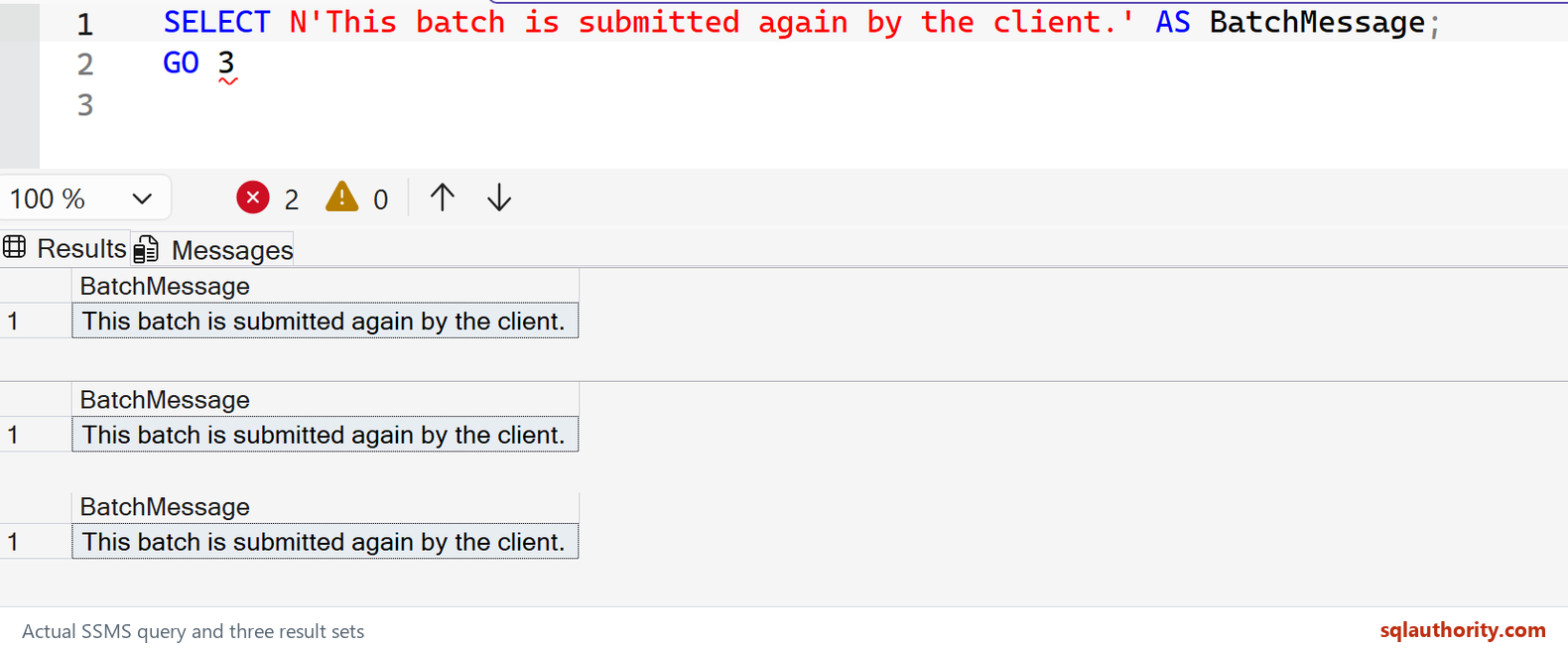
The number after GO tells a supporting client to repeat the preceding batch. It does not copy and paste the statement into your script. That distinction matters if the batch changes data: GO 3 would run the change three times.
Two practical rules answer most follow-up questions. Put GO on its own line, with only an optional comment beside it, and do not add a T-SQL semicolon after it. Also, do not send a script containing GO as one command through an application driver. An ODBC or OLE DB application needs to send separate batches or use a script-aware runner. Local variables also stop at a batch boundary.
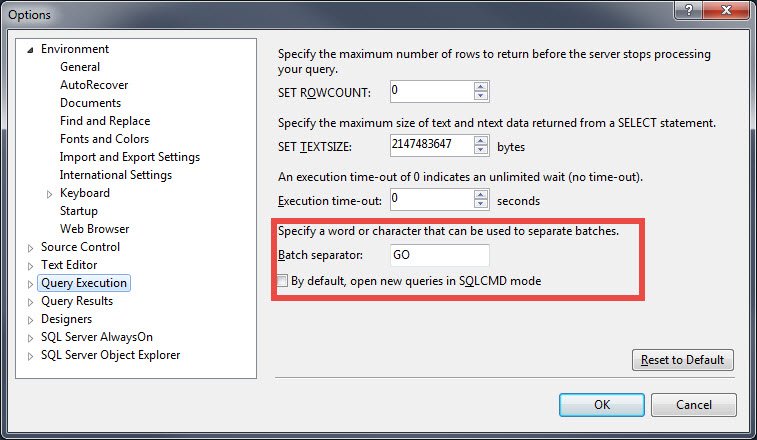
SSMS lets you change its batch-separator word, another reminder that this belongs to the client tool. My older explanation of the SQL command GO covers the same distinction. For an interview, the one-sentence answer is enough: GO ends a client-side batch; it is not T-SQL sent to SQL Server.
The client chooses the separator
Published by Pinal Dave on SQLAuthority. More of my work at pinaldave.com.
Discover more from SQL Authority with Pinal Dave
Subscribe to get the latest posts sent to your email.




13 Comments. Leave new
Hi,
Thanks.I was not knowing so much about GO, specially ..”You can change the command GO to any other value in SSMS by going to Tools > Option”
You can set it as “Run”
What if I set it as “Sir Rajni Kant” ?I think no need of writing query then,everythnig will be automatically handle.
OMG! that is very innovative thinking.
Nice… Change change to any other value…new for me !!!
We all are leaning in this world.
Hi Pinal,
Thank you… New thing. :)
Thanks VAIBHAV !
Really very nice…
Thanks Aaditya.
Hi Pinal, I have tried changing the GO statement to something else..But its not working for me. I have changed value from Tools->Options. Is there something I am missing. Plz help.
Hi Pinal,
SELECT 1 GO ;
the above statement is working fine for me , it is not throwing any error when running above statement.
Yeah, it works fine.