
After I shared a script for stored procedure parameters, readers asked for the same treatment for a view. One reader specifically wanted both the declared data type and the underlying system type. Those emails gave me this week’s interview question: how do you list a view’s columns and their types?

List the columns of one view
Connect to the database that owns the view and replace HumanResources.vEmployee with its schema-qualified name. The query reads the view’s saved output columns, not the columns of every base table used in its definition.
DECLARE @ViewId int = OBJECT_ID(N'HumanResources.vEmployee', N'V');

IF @ViewId IS NULL
    THROW 50001, 'The view was not found in the current database.', 1;

SELECT c.column_id AS ColumnPosition,
       c.name AS ColumnName,
       SCHEMA_NAME(t.schema_id) AS DeclaredTypeSchema,
       t.name AS DeclaredType,
       TYPE_NAME(c.system_type_id) AS SystemType,
       c.max_length AS MaximumBytes,
       c.precision, c.scale, c.is_nullable
FROM sys.columns AS c
JOIN sys.types AS t ON t.user_type_id = c.user_type_id
WHERE c.object_id = @ViewId
ORDER BY c.column_id;
The join on user_type_id preserves an alias type’s declared name. system_type_id identifies its underlying type; assembly types need separate interpretation. max_length is in bytes, so do not call it a character count for nvarchar. For a numeric column, precision and scale answer a different length question.
My original script also reported primary-key and foreign-key flags for the view columns. That can mislead an interviewer: a normal view does not inherit a base table’s constraints as its own. For this question, the useful result is each output column and its type. If the caller needs the type of a different SELECT projection, inspect that projection rather than assuming it matches the saved view output.
One more practical check: metadata visibility depends on permissions. If the query says the view is missing, verify the current database, schema, and access before concluding that it does not exist. Reader emails often turn a simple catalog query into a better interview answer.
Keep the declared and underlying types apart
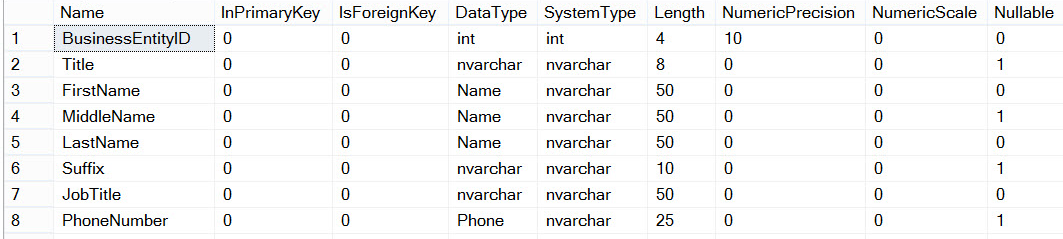
This original AdventureWorks result shows why the reader asked for both types. FirstName uses the declared alias Name with underlying nvarchar; PhoneNumber similarly uses Phone. The old query displayed Unicode lengths in characters. The new query above deliberately labels MaximumBytes, so a value of 50 characters is 100 maximum bytes for an nvarchar alias. The original flags are historical view-column metadata, not inherited table constraints.
Published by Pinal Dave on SQLAuthority. More of my work at pinaldave.com.
Discover more from SQL Authority with Pinal Dave
Subscribe to get the latest posts sent to your email.




3 Comments. Leave new
Good one Pinal.But how about inserting the view output into a physical table and know the datatypes using sp_who.
Sorry i mean to say sp_help table name
sp_help returns multiple result sets. What exactly you want to store?