
Yesterday I wrote about SQL SERVER – Beginning In-Memory OLTP with Sample Example. One of the questions I received right after I published a blog post was why do I call stored procedure natively coded stored procedure when the entire code is in T-SQL. Indeed a very good question. The answer is very simple, the reason we call it natively compiled stored procedure as soon as we execute create statement compiler will convert interpreted T-SQL, query plans and expressions into native code.
You can execute the following query in your SSMS and find out the location of the natively compiled stored procedure.
SELECT name,
description
FROM   sys.dm_os_loaded_modules
WHERE description = 'XTP Native DLL'
GO
To see this DMV in action execute the code from this blog post on your SQL Server.
— Create database
CREATE DATABASE InMemory

ON PRIMARY(NAME = InMemoryData,

FILENAME = 'd:\data\InMemoryData.mdf', size=200MB),

-- Memory Optimized Data

FILEGROUP [InMem_FG] CONTAINS MEMORY_OPTIMIZED_DATA(

NAME = [InMemory_InMem_dir],

FILENAME = 'd:\data\InMemory_InMem_dir')

LOG ON (name = [InMem_demo_log], Filename='d:\data\InMemory.ldf', size=100MB)

GO
— Create table
USE InMemory

GO

-- Create a Memeory Optimized Table

CREATE TABLE DummyTable_Mem (ID INT NOT NULL,

Name VARCHAR(100) NOT NULL

CONSTRAINT ID_Clust_DummyTable_Mem PRIMARY KEY NONCLUSTERED HASH (ID) WITH (BUCKET_COUNT=1000000))

WITH (MEMORY_OPTIMIZED=ON)

GO
— Create stored procedure
-- Inserting same 100,000 rows using InMemory Table

CREATE PROCEDURE ImMemory_Insert_test

WITH NATIVE_COMPILATION, SCHEMABINDING,EXECUTE AS OWNER

AS

BEGIN ATOMIC WITH (TRANSACTION ISOLATION LEVEL=SNAPSHOT, LANGUAGE='english')

DECLARE @counter AS INT = 1

DECLARE @start DATETIME

SELECT @start = GETDATE()

WHILE (@counter <= 100000)

BEGIN

INSERT INTO dbo.DummyTable_Mem VALUES(@counter, 'SQLAuthority')

SET @counter = @counter + 1

END

SELECT DATEDIFF(SECOND, @start, GETDATE() ) [InMemory_Insert in sec]
END

GO
Now let us execute our script as described.
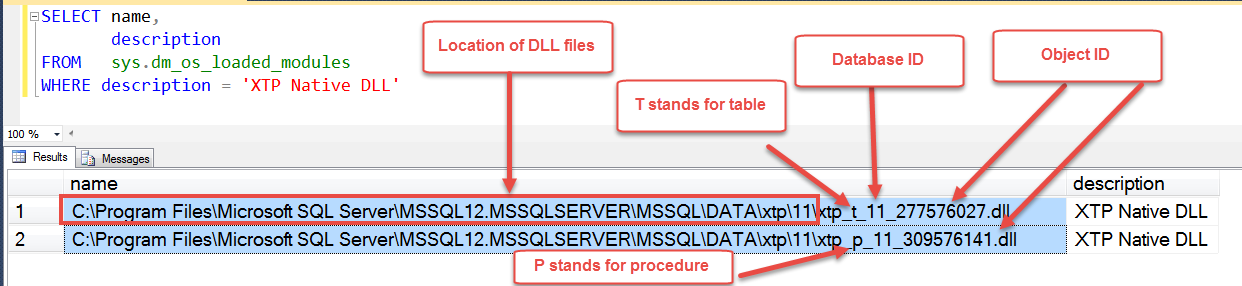
Now we can see in our result, there are two different dll files. From the image above I have explained various parts of the dll file.
As per the image, our database id is 11 and if we check it is same as what we have created few seconds ago. Similarly the name of the object id can be found as well.

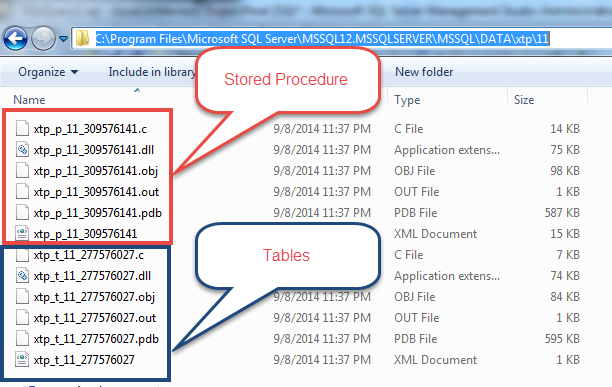
If we open up the folder where we have created this object we will see two sets of file information. One for stored procedure and one for table.
My friend Balmukund explains this concept very well on his blog over here.
Published by Pinal Dave on SQLAuthority. More of my work at pinaldave.com.
Discover more from SQL Authority with Pinal Dave
Subscribe to get the latest posts sent to your email.




2 Comments. Leave new
simpy saying: I am so glad you exist. So many smaller and bigger subjects have helped me further on my tasks. so, Thx!!!