
With constant folding, SQL Server does the math on your literals once, while it builds the plan, not once for every row. It only folds what it can finish without looking at your data. Put the math on the wrong side of a comparison and the savings disappear.

The question about 10 * 2
Picture a junior DBA asking a fair question. If I write Price > 10 * 2 against a million rows, does SQL Server multiply ten by two a million times?
No. The optimizer multiplies once, while it builds the plan, and swaps in 20. That swap is constant folding.
The part worth knowing is where it stops. So let me build a tiny table with three prices and watch it. Only 30.00 comes back, because 20 is not greater than 20.
DROP TABLE IF EXISTS #FoldPrice;
CREATE TABLE #FoldPrice (Price decimal(10,2) NOT NULL);
INSERT #FoldPrice VALUES (10), (20), (30);

SELECT Price FROM #FoldPrice WHERE Price > 10 * 2 ORDER BY Price;
See the folded value in the plan
Now ask for the estimated plan. SHOWPLAN_XML returns the plan without running the query. The query text still says 10 * 2. But look at the predicate on the Table Scan. It reads Price > 20.
In the XML, that is a Const element holding (20.). The dot only shows it is a decimal value. The multiplication is gone before the first row is read.
SET SHOWPLAN_XML ON;
GO
SELECT Price FROM #FoldPrice WHERE Price > 10 * 2 ORDER BY Price;
GO
SET SHOWPLAN_XML OFF;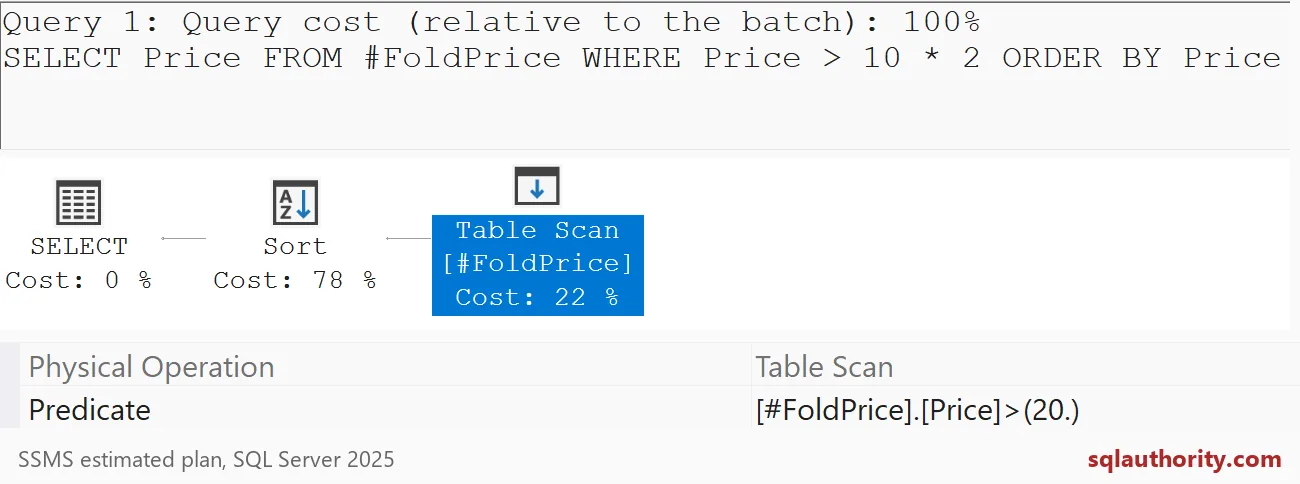
Math on the column does not fold
Now move the multiplication to the other side. Price * 2 > 20 gives the same answer for our three rows. But SQL Server cannot fold Price * 2, because Price changes from row to row.
I switch to SHOWPLAN_TEXT here. It prints the plan as plain lines, which is easier to read at a glance. The first plan shows Price > 20. The second shows Price * 2 > 20.00, so every row gets multiplied.
SET SHOWPLAN_TEXT ON;
GO
SELECT Price FROM #FoldPrice WHERE Price > 10 * 2 ORDER BY Price;
GO
SELECT Price FROM #FoldPrice WHERE Price * 2 > 20 ORDER BY Price;
GO
SET SHOWPLAN_TEXT OFF;
With three rows, nobody cares. With three million, the next section matters.
When folding decides seek or scan
Here folding stops being trivia. This table has an index on Amount. I ask for the same rows two ways: Amount = 10 * 20, and Amount * 10 = 2000.
DROP TABLE IF EXISTS #Orders;
CREATE TABLE #Orders (OrderId int PRIMARY KEY, Amount int NOT NULL);
INSERT #Orders (OrderId, Amount)
SELECT TOP (5000) ROW_NUMBER() OVER (ORDER BY (SELECT NULL)),
       ROW_NUMBER() OVER (ORDER BY (SELECT NULL)) % 500
FROM sys.all_objects AS a
CROSS JOIN sys.all_objects AS b;
CREATE INDEX IX_Orders_Amount ON #Orders (Amount);
The first plan shows an Index Seek with Amount = 200. The optimizer folded 10 * 20 into 200, then found the index. The second plan shows an Index Scan with Amount * 10 = 2000 as a filter.
Same rows, different work. The index is sorted by Amount, not by Amount times ten. So SQL Server reads the whole index and multiplies every entry.
SET SHOWPLAN_TEXT ON;
GO
SELECT OrderId FROM #Orders WHERE Amount = 10 * 20;
GO
SELECT OrderId FROM #Orders WHERE Amount * 10 = 2000;
GO
SET SHOWPLAN_TEXT OFF;
I see this mistake often in real code. Someone wraps the column in math or a function, and the index goes unused. Keep the column bare. Do the math on the other side.

Clocks, GUIDs and function calls
Not everything can fold. GETDATE and NEWID give a different answer on every call, so they can never be baked into the plan. Run this and compare the two rows. The text and the math match, but NEWID returns two different values.
SELECT UPPER('ready') AS literal_upper,
       10 * 2 AS literal_math,
       GETDATE() AS execution_time,
       NEWID() AS generated_identifier
FROM (VALUES (1), (2)) AS v(n);
Function calls on literals are a gray area. Ask for Amount = LEN(UPPER(‘ready’)) * 40. The plan still shows len(upper(‘ready’)) * 40 instead of the number 200. Yet it is still an Index Seek.
SET SHOWPLAN_TEXT ON;
GO
SELECT OrderId FROM #Orders WHERE Amount = LEN(UPPER('ready')) * 40;
GO
SET SHOWPLAN_TEXT OFF;
GO
DROP TABLE IF EXISTS #Orders;
DROP TABLE IF EXISTS #FoldPrice;
So “folded” and “seekable” are not the same thing. Whether a function folds depends on the function and the version. Look at the plan.
Check it on your own server
Take a slow query and turn on SHOWPLAN_TEXT. Find the Scan or Seek line and read its predicate. If you still see arithmetic or a function wrapped around a column, move it to the constant side.
Then run both versions and compare. Your plan may differ from mine, since I ran these on SQL Server 2025. The habit is what matters: read the predicate, not the query text.
Next time a query scans when you expected a seek, check the predicate before you blame the index.
Constant folding is not repeated arithmetic, it is work removed before execution.
Published by Pinal Dave on SQLAuthority. More of my work at pinaldave.com.
Discover more from SQL Authority with Pinal Dave
Subscribe to get the latest posts sent to your email.




1 Comment. Leave new
I like Harry Potter and reading the books now with my daughters (60% through book 4 – Harry Potter and the Goblet of Fire). It’s amazing how the series progresses and you learn so much about the characters and get to be there with them as they grow up. I think the best lesson with Harry is how we are there with him as he feels his fear – he doesn’t deny it and doesn’t try to cover it with bravado – he feels it and does what needs to be done anyway.