An outbox table saves the message and the business change in one transaction, so one cannot exist without the other. A separate worker then sends the message later. It is not magic, but it closes the gap where orders commit and the notification vanishes.

Why messages vanish after a commit
Here is a story I hear often. The app saves an order, commits, and then tells the shipping system about it. One day the app server restarts between those two steps. The order exists. The shipping message never left.
Nobody gets an error. A customer simply waits for a package nobody knows about. Swapping the order of the steps only moves the problem. Now you can ship an order that was never saved.
The fix is to stop doing two things in two places. Write the order and a “please send this” row into the same database, in the same transaction. The demo uses temp tables so you can paste it anywhere. In real life these are normal tables in your order database.
Give the outbox table its shape and an index
Each outbox row has a unique message id, a state, a time when it becomes available, a lease deadline, and the payload. The index serves the question the worker asks all day: which messages are ready?
DROP TABLE IF EXISTS #Outbox;
DROP TABLE IF EXISTS #Orders;

CREATE TABLE #Orders (OrderId int PRIMARY KEY, Amount decimal(12,2) NOT NULL);

CREATE TABLE #Outbox (
    MessageId   int PRIMARY KEY,
    OrderId     int NOT NULL,
    State       varchar(12) NOT NULL,
    AvailableAt datetime2 NOT NULL,
    LeaseUntil  datetime2 NULL,
    Payload     nvarchar(100) NOT NULL);

CREATE INDEX IX_Outbox_Ready ON #Outbox (State, AvailableAt) INCLUDE (LeaseUntil);
Commit both rows, or neither
Order 1 commits with its message. For order 2 I roll the transaction back, as if the app failed before finishing. Both inserts disappear together. The counts afterward are one order and one message, not two and one. XACT_ABORT ON makes any runtime error roll everything back too.
SET XACT_ABORT ON;

BEGIN TRANSACTION;
    INSERT #Orders VALUES (1, 20);
    INSERT #Outbox VALUES (1, 1, 'Ready', '20260403', NULL, N'Order created');
COMMIT;

BEGIN TRANSACTION;
    INSERT #Orders VALUES (2, 30);
    INSERT #Outbox VALUES (2, 2, 'Ready', '20260403', NULL, N'Rolled back');
ROLLBACK;

SELECT COUNT(*) AS OrdersAfterRollback FROM #Orders;
SELECT COUNT(*) AS MessagesAfterRollback FROM #Outbox;
Claim a message so only one worker sends it
A plain SELECT does not reserve anything. Two workers could read the same row and both send it. So the worker claims a row with one UPDATE and uses OUTPUT to get the row back. UPDLOCK keeps others from claiming it. READPAST tells other workers to skip a locked row instead of waiting. READCOMMITTEDLOCK is there for databases that use read committed snapshot.
The claim sets the state to Processing and a lease of five minutes. I pass in the clock as a parameter so the lease deadline is predictable. The first claim at noon returns message 1 with a lease until 12:05.
CREATE OR ALTER PROCEDURE #ClaimNext @Now datetime2
AS
BEGIN
    WITH NextRow AS (
        SELECT TOP (1) *
        FROM #Outbox WITH (UPDLOCK, READPAST, READCOMMITTEDLOCK)
        WHERE AvailableAt <= @Now
          AND (State = 'Ready' OR (State = 'Processing' AND LeaseUntil < @Now))
        ORDER BY AvailableAt, MessageId)
    UPDATE NextRow
    SET State = 'Processing', LeaseUntil = DATEADD(minute, 5, @Now)
    OUTPUT inserted.MessageId, inserted.State, inserted.LeaseUntil;
END;
GO
EXEC #ClaimNext @Now = '2026-04-03T12:00:00';

SELECT MessageId, State, LeaseUntil FROM #Outbox ORDER BY MessageId;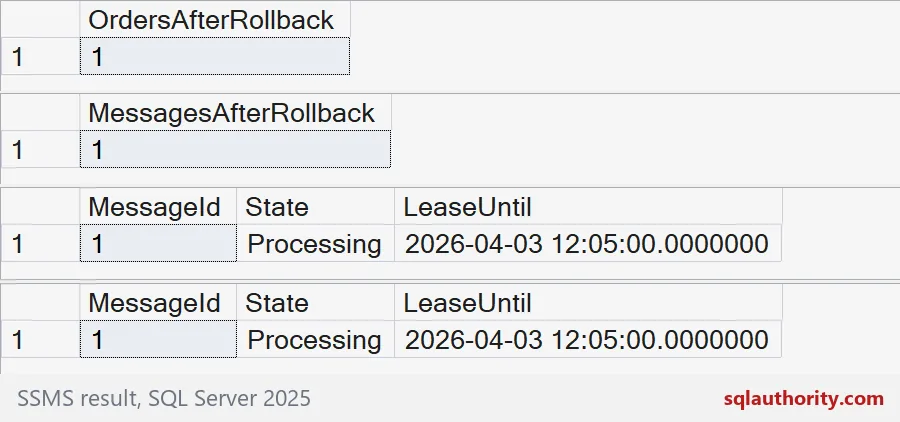
When a worker crashes, the lease runs out
Say the worker claims message 1 and dies before it marks the row Sent. At 12:01 the lease is still valid, so a second claim returns nothing. At 12:06 the lease has expired, so the message comes back with a new lease until 12:11. Then the worker succeeds and marks it Sent, and a later claim finds nothing.
EXEC #ClaimNext @Now = '2026-04-03T12:01:00';   -- lease still valid: no row
EXEC #ClaimNext @Now = '2026-04-03T12:06:00';   -- lease expired: same message again

UPDATE #Outbox SET State = 'Sent' WHERE MessageId = 1;

EXEC #ClaimNext @Now = '2026-04-03T12:30:00';   -- nothing left to claim

SELECT MessageId, State, LeaseUntil FROM #Outbox ORDER BY MessageId;
GO
DROP PROCEDURE IF EXISTS #ClaimNext;
DROP TABLE IF EXISTS #Outbox;
DROP TABLE IF EXISTS #Orders;
What an outbox does not promise
Look again at the 12:06 claim. If the first worker was only slow, not dead, the message is sent twice. An outbox gives you at-least-once delivery, not exactly-once. The receiver must cope with a repeat. The message id exists for that reason: the consumer remembers which ids it has handled.
In production, also count attempts, and park a message that keeps failing instead of retrying forever. Delete old Sent rows on a schedule. Test the crash points yourself: before the send, after the send, and before the Sent update.
Keep the retries bounded and make the receiving side safe to repeat.
An outbox is not exactly-once delivery, it is a saved promise with careful retries.
Published by Pinal Dave on SQLAuthority. More of my work at pinaldave.com.
Discover more from SQL Authority with Pinal Dave
Subscribe to get the latest posts sent to your email.