
Batch vs Stream Processing is a choice about how long an answer can wait. A batch job collects data and works on it later, on a schedule. A stream job works on each event as it arrives. Both are good, and each has a price.
Two Ways to Handle Events
An event is a small record of something that happened, such as an order, a click or a sensor reading. A busy system creates thousands of them every minute. Sooner or later, someone wants totals, trends or alerts from those events.
You have two choices. Wait until you’ve collected a pile, then process the whole pile. Or process each event as it shows up. The first is batch, and the second is stream. The words describe when the work happens, not how much data there is.
Batch Processing: Wait, Then Work
A batch job reads a bucket of data and processes it in one go. Say a grocery store collects orders all day, and a job runs at the top of every hour. It reads the last hour of orders, adds them up and writes a report.
Batch is simple. The input is a fixed set of files or rows. You can test it, rerun it after a failure and compare two runs. It’s also efficient, because a big job reads data in large chunks, and the cluster stops when the job ends. Spark batch jobs on Parquet or Delta Lake tables work this way.
The price is delay. An order placed one minute after the job starts waits almost an hour for the next run. Then it waits for the job to finish.
Stream Processing: Work as It Arrives
A stream job never finishes. Events flow into a log such as Apache Kafka. A stream processor, such as Apache Flink or Spark Structured Streaming, reads them as they come. The totals update continuously, so a dashboard stays current within seconds or minutes.
Because a stream has no end, you can’t add up everything. You group events into windows instead. A tumbling window is a fixed slice of time with no overlap, for example five minutes. The processor counts the orders in each slice and publishes the result when the slice closes.
One Clock, Two Answers
The diagram shows both styles on the same clock. Events arrive all day along the top. In the batch lane, events wait in a bucket until the job runs, and the result arrives late. In the stream lane, each event is handled as it arrives and grouped into five-minute windows. The result updates continuously, and the gap between the lanes is the delay.
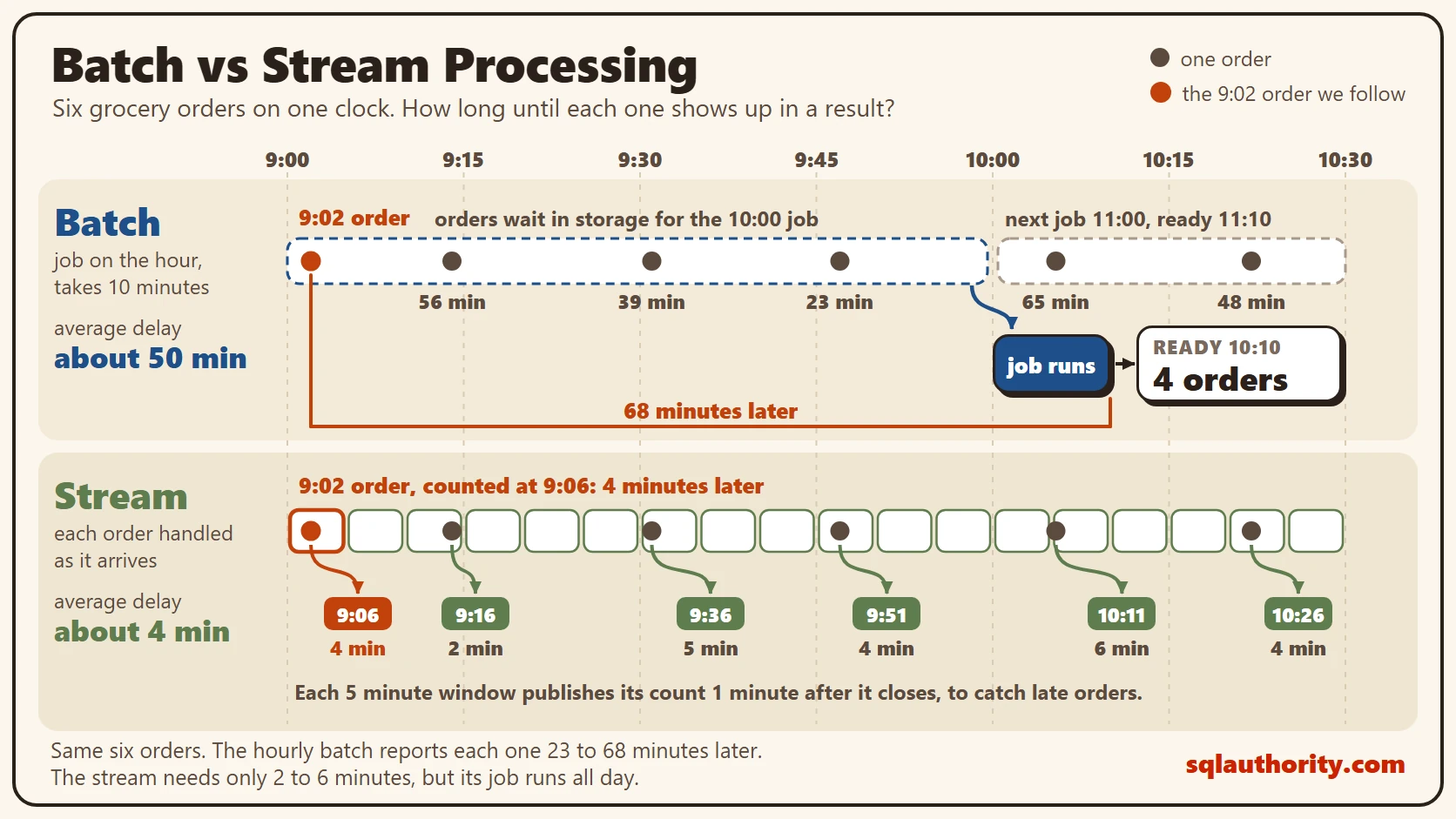
Here are six orders from the grocery store. Assume the batch job runs on the hour and takes 10 minutes. Assume the stream windows wait one extra minute for late events.
| Order time | Hourly batch result | Delay (minutes) | 5-minute window result | Delay (minutes) |
|---|---|---|---|---|
| 9:02 | 10:10 | 68 | 9:06 | 4 |
| 9:14 | 10:10 | 56 | 9:16 | 2 |
| 9:31 | 10:10 | 39 | 9:36 | 5 |
| 9:47 | 10:10 | 23 | 9:51 | 4 |
| 10:05 | 11:10 | 65 | 10:11 | 6 |
| 10:22 | 11:10 | 48 | 10:26 | 4 |
The batch average delay is about 50 minutes. The stream average is about 4 minutes. The 9:02 order waited longest in the batch, because it came in right after its hour began.
The Cost of Real Time
A faster answer isn’t free, and batch vs stream processing is partly a question of cost. A batch job runs and stops. A stream job runs all day, so it needs servers, monitoring and someone to look at it when it breaks.
Streams also ask for harder design. You must handle events that arrive twice, out of order or late. You must keep state, such as the running count in each window, and recover it after a crash. Testing is harder, because there’s no fixed input to replay, unless the log keeps the events.
Batch also wins on history. When a rule changes, you rerun last year’s data with the same job. A stream can replay its log too, but only as far back as the log keeps events.
Windows bring a new problem. Events can arrive late, after their window has closed. A window can follow the time an event happened, called event time, or the time it arrived. Late events matter only for event time. The rule for how long to wait for them is called a watermark. I explain how events get into a platform in Data Ingestion: Batch Loads, Change Data Capture and Streams.
Then there’s the question of value. A result that arrives in four minutes instead of fifty only matters if someone acts on it in that time.
How to Choose
Batch vs stream processing comes down to one question: what decision changes if the answer is an hour old? A monthly revenue report doesn’t change. A fraud check, a delivery map or a server alert does. Those need a stream. Most reports and dashboards can wait for a batch.
Many platforms run both. A stream gives fast numbers, and a nightly batch recalculates them with late events included. If a batch every minute is fast enough, you can also run small, frequent batches and skip the stream’s complexity. Spark Structured Streaming works this way by default, running small batches.
Why not build the stream every time? You can roll a stream up into batch totals later, and that’s true in principle. In practice you pay for the always-on system every day, even for numbers nobody looks at until Monday.
What to Remember
Batch vs stream processing is a choice about delay. Batch waits and then works, and it’s simple and cheap. Stream works as events arrive, and it’s fast and demanding. The delay you can accept decides between them.
When I review a design, I ask each team how old a number can be before it stops being useful. When the answer is a day, a nightly batch is enough.
Real time is not a feature you switch on, it is a price you decide to pay.
Published by Pinal Dave on SQLAuthority. More of my work at pinaldave.com.
Discover more from SQL Authority with Pinal Dave
Subscribe to get the latest posts sent to your email.



16 Comments. Leave new
Pinal, your blog posts are really inspiring me to learn Big Data. I will surely check out your Pluralsight videos.
is their any online workplace to find Big Data related jobs @Pinal Dave?
Hello Sir, thanks for your all posts , really enjoyed and were very informative , looking forward for more posts about Big data ,could you please include some stuff regarding privacy of Big data or could you please guide me to this, i am passionate about it’s privacy.
Thanks a lot for the wonderful guidance of BIG Data path. It helps me a lot for my new journey of BI space.. Hats off to you…
Thanks a lot Pinal for your beginner guidance of BIG Data… It is helps a lot new journey of BI Space.. Hats off to you…
Pinal, Thanks for this great posting. It gave a quick glimpse on Big data and the Road Ahead.
Wonderful set of posts Pinal. I had been trying to get started on Big Data from various books and sites, but nothing hooked my interest as your posts did.
Looking forward to more learning now from your suggested resources.
Thank you!
Excellent post Pinal, I was just wondering ‘How to start with the Bigdata’ and came across your blog. Got my start. Started with my first course from pluralsight. Thanks for the knowledge sharing.
Thank you sir!!! It is really helping us to know about big data and technology related to big data…It will help in my research work…thank you
excellent post……
am really interesting to take further steps in big data from u r 21 days coaching……………..
so lot lot of thanks to you………..
I am glad that it helped you Ambika.
Hi Pinal, Thank you so much for giving the idea of big data, with lots of valuable details to explore. This will help me a lot for learning more on big data.
Thank you sir!! its really interesting to learn .and thanks for the Knowledge sharing.
Thank you so much for giving insight of Hadoop sir. Glad I found this article. Really helpful.
Thank you. As always your articles were very informative and easy to understand.
Thank you for your post. It is really inspiring and ‘eyeopener’ for me to begin.