
MapReduce is a way to split one huge job into many small jobs that run at the same time. Then it puts the answers back together. The name sounds like a product, but it’s an idea. Once you see it on a tiny example, you’ll spot it inside almost every big data engine, including SQL Server.

The Problem MapReduce Solves
Picture a log file too big for one machine to read in a reasonable time. You could buy a bigger machine, and that works until it doesn’t. The other choice is to cut the file into pieces and let many machines read their own piece.
That raises a harder question. If every machine counts its own piece, who adds up the totals, and how? MapReduce answers it with three steps. Google described the approach in a 2004 paper, and Hadoop made an open-source version popular a few years later.
One Small Example: Counting Words
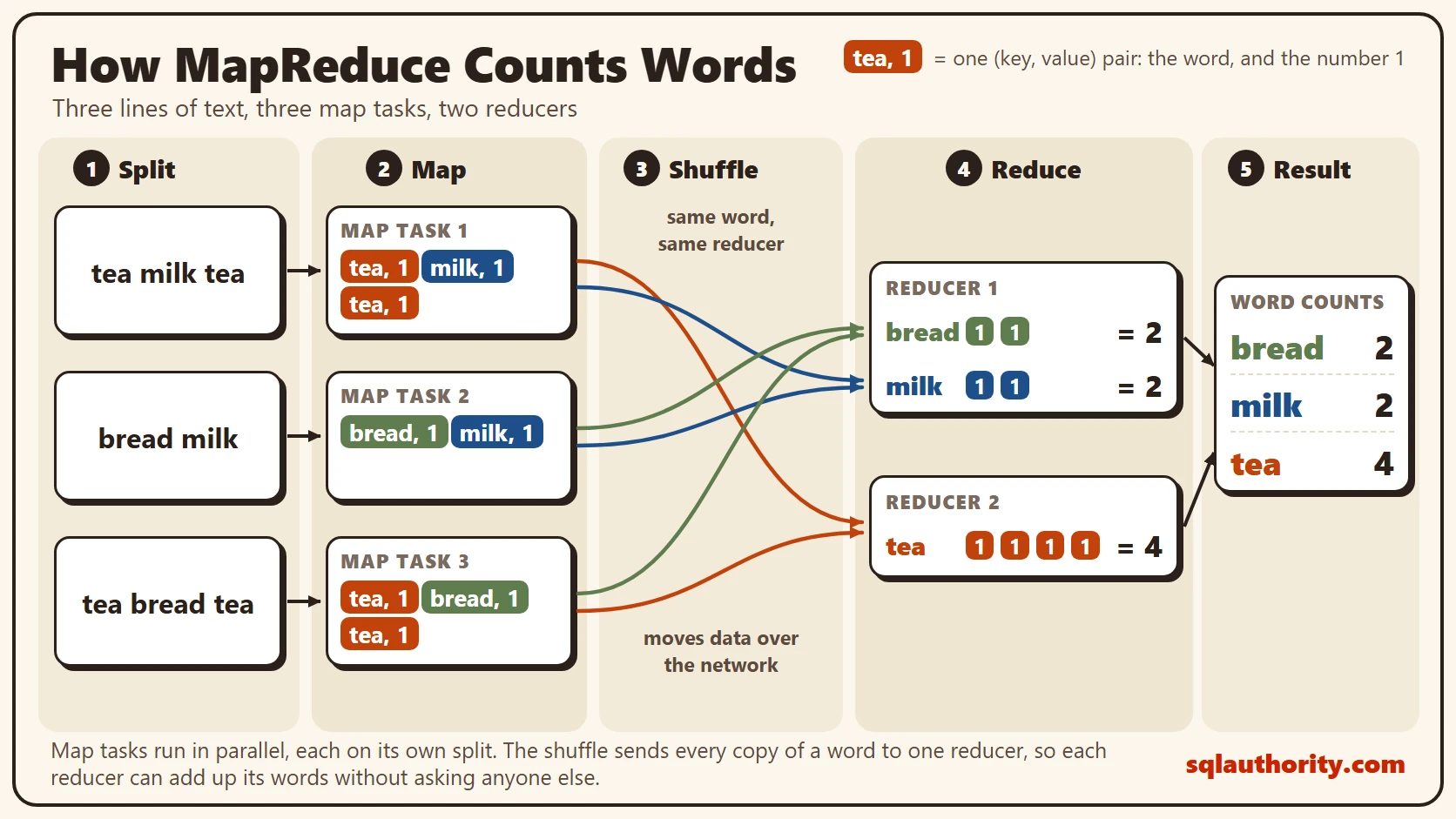
We’ll count words in three short lines of text. Each line stands for a split, which is the piece of data one machine reads.
Line 1 is “tea milk tea”. Line 2 is “bread milk”. Line 3 is “tea bread tea”. The right answer is easy to check by eye: bread 2, milk 2, tea 4. Keep those numbers in mind, because every step below has to arrive at them.
Step 1: Map
Each map task reads only its own split. For every word it finds, it writes out a small pair. The word is the key, and the number 1 is the value. Map task 1 writes (tea, 1), (milk, 1) and (tea, 1).
Notice what the map step doesn’t do. It doesn’t add anything up, and it doesn’t talk to the other map tasks. That’s the point. Because each task works alone, you can run three of them, or three thousand, at the same time.
Step 2: Shuffle
The shuffle is the step people skip, and it’s the one that matters most. Its job is to move every pair with the same key to the same reducer. In our example, bread and milk go to reducer 1, and tea goes to reducer 2.
The routing rule is a partition function. Real systems use a hash of the key, so the same word always lands in the same place. This is also the expensive part. The pairs travel over the network from the map machines to the reduce machines. They’re sorted by key on the way.
Step 3: Reduce
Each reducer now holds every pair for its keys, and only those keys. Reducer 1 sees bread with two 1s, and milk with two 1s. Reducer 2 sees tea with four 1s. Each one adds up its values and writes the result.
No reducer needs to ask another reducer anything. That’s what the shuffle bought us. The final output is bread 2, milk 2 and tea 4, which matches the answer we checked by eye.
The Same Idea in T-SQL
You don’t need a cluster to see this. Here is the same word count in SQL Server. The script creates a small database called SqlBigDataMapReduce, used only for this example, so run it on a test server.
IF DB_ID(N'SqlBigDataMapReduce') IS NULL CREATE DATABASE SqlBigDataMapReduce;
GO
USE SqlBigDataMapReduce;
GO
DROP TABLE IF EXISTS dbo.InputLine;
CREATE TABLE dbo.InputLine
(
    LineID int NOT NULL PRIMARY KEY,
    LineText nvarchar(200) NOT NULL
);
INSERT INTO dbo.InputLine (LineID, LineText)
VALUES (1, N'tea milk tea'), (2, N'bread milk'), (3, N'tea bread tea');
The map step turns every word into a pair. STRING_SPLIT with its third argument set to 1 returns an ordinal, so the words come back in reading order. Without it, SQL Server doesn’t promise any order.
SELECT l.LineID AS MapTask, w.value AS Word, 1 AS One
FROM dbo.InputLine AS l
CROSS APPLY STRING_SPLIT(l.LineText, N' ', 1) AS w
ORDER BY l.LineID, w.ordinal;
On SQL Server 2025 it returned eight rows, one pair per word. Task 1 gave tea, milk and tea. Task 2 gave bread and milk, and task 3 gave tea, bread and tea.
The shuffle and the reduce happen together inside GROUP BY. To make the shuffle visible, this query uses a simple partition rule. Words before the letter n go to reducer 1, and the rest go to reducer 2.
SELECT CASE WHEN w.value < N'n' THEN 1 ELSE 2 END AS Reducer, w.value AS Word, COUNT(*) AS PairsReceived
FROM dbo.InputLine AS l
CROSS APPLY STRING_SPLIT(l.LineText, N' ') AS w
GROUP BY CASE WHEN w.value < N'n' THEN 1 ELSE 2 END, w.value
ORDER BY Reducer, Word;

SELECT w.value AS Word, COUNT(*) AS Total
FROM dbo.InputLine AS l
CROSS APPLY STRING_SPLIT(l.LineText, N' ') AS w
GROUP BY w.value
ORDER BY Word;
The first query shows the routing, and the second shows the final counts.
| Reducer | Word | PairsReceived |
|---|---|---|
| 1 | bread | 2 |
| 1 | milk | 2 |
| 2 | tea | 4 |
| Word | Total |
|---|---|
| bread | 2 |
| milk | 2 |
| tea | 4 |
The Trick That Saves Network Time: a Combiner
Map task 1 sends (tea, 1) twice. Map task 3 does the same. On real data, a common word gets sent millions of times, and every copy crosses the network.
A combiner fixes that. It adds up pairs on the map side before the shuffle, so task 1 sends (tea, 2) once. In T-SQL, that’s a GROUP BY on the map task and the word together.
SELECT l.LineID AS MapTask, w.value AS Word, COUNT(*) AS LocalCount
FROM dbo.InputLine AS l
CROSS APPLY STRING_SPLIT(l.LineText, N' ') AS w
GROUP BY l.LineID, w.value
ORDER BY l.LineID, Word;
It returned six rows instead of eight. Task 1 now sends milk 1 and tea 2, and task 3 sends bread 1 and tea 2. The final answer doesn’t change, but less data moves. A combiner only works when partial totals can be added again later, which is true for counts and sums. An average needs more care.
Why the Pattern Still Matters
Few new projects write Hadoop MapReduce jobs today. Classic MapReduce wrote each job’s full output to replicated storage before the next job could start. Pipelines with many jobs got slow. Apache Spark plans the whole chain at once and keeps work in memory within a stage. Its shuffles still write to local disk, though. Distributed SQL engines plan the steps for you.
The idea didn’t go away, though. Spark splits data into partitions and moves rows by key between stages. That move is a shuffle. SQL Server does it too. A parallel plan uses Parallelism operators called Repartition Streams to send rows to threads by a hash of a key. When you see one in a plan, you’re looking at a shuffle inside one server.
You could argue that a DBA never needs to know any of this. If the tool hides it, why learn it? The answer shows up on the day a job runs slowly. Most slow distributed jobs come down to one of two things. Either too much data crosses the shuffle, or one key has far more rows than the rest. That second problem is called skew, and it leaves one reducer working while the others wait.
What to Remember
Map works alone on its own split. Shuffle moves every value for a key to one place. Reduce adds up each key without help. If you can explain the word count above, you can explain how most big data engines split their work.
When I look at a slow parallel query, I check where rows move between threads first. The same habit works on a Spark job. Find the shuffle, then ask whether less data could cross it.
When you finish testing, remove the example database.
USE master;
GO
ALTER DATABASE SqlBigDataMapReduce SET SINGLE_USER WITH ROLLBACK IMMEDIATE;
DROP DATABASE SqlBigDataMapReduce;
MapReduce is not an old Hadoop feature, it is the pattern that still runs most big data engines.
Published by Pinal Dave on SQLAuthority. More of my work at pinaldave.com.
Discover more from SQL Authority with Pinal Dave
Subscribe to get the latest posts sent to your email.



12 Comments. Leave new
Pinal, glad to see your hold to new terms and technologies. Keep it up, I am encouraged!
Very well presented. I might have a very good use case coming close to the end of the 21 days. Pinal D. for President!
Your last line was very much impressing MapReduce is equivalent to SELECT and GROUP BY of a relational database for a very large database.
exactly that is where i actually understood what this was all about.
Great work .. awesome article… Kindly add few examples (real life scenario) for Mapreduce.
Really impressive lines “MapReduce is equivalent to SELECT and GROUP BY of a relational database for a very large database.”
“MapReduce is equivalent to SELECT and GROUP BY of a relational database for a very large database.” – this line makes the process more visualize as always we are in touch with these key word.
Tip: it would better to read if you link each post with previous and next.
Thanks again,
Suman
Hi Pinal,in transactional replication whats the value i need to give for @schema_option in order to create the stored procedures for insert,update,delete at subscriber.
Thank you, THANK YOU; you explain it very easy and clearly. The last line makes every thing clear about mapreduce.
Thanks for your comment huda.
Pinal. I am a fresher and I have read multiple articles on Big Data. None was so clear and easy to understand. This 21days articles encourages me to read lot about the Technology. Thank you so much for this article. You Rock. Add me in ur fan list :P
After browsing through loads of BigData tutorials, and signing up for expensive BD course, I stumbled to this post which is so easy to understand for beginner. Great work.