
Columnar file formats store a table one column at a time, not one row at a time. That change, plus cheap cloud object storage, made Parquet files the usual home of big data. Before that, those files mostly sat in HDFS, Hadoop’s file system.

Rows Versus Columns
A row store keeps each row together, like a card file with one card per sale. A column store keeps each column together, like a separate list for every field. The data is the same, and only the order on disk changes.
Here are the first six rows of the sales table we’ll build later. Each row is one sale in a shop, with the store, the product, the quantity and the amount.
| SaleID | Store | Product | Quantity | Amount | SaleDate |
|---|---|---|---|---|---|
| 1 | Seattle | juice | 5 | 15.00 | 2026-01-03 |
| 2 | Seattle | milk | 6 | 13.50 | 2026-03-11 |
| 3 | Austin | juice | 3 | 9.00 | 2026-11-10 |
| 4 | Austin | milk | 7 | 15.75 | 2026-06-06 |
| 5 | Austin | bread | 5 | 17.50 | 2026-10-28 |
| 6 | Boston | juice | 7 | 21.00 | 2026-02-25 |
Why Columns Win for Reports
Say a report needs the total Amount. A row store has to read every row, with all six fields, to reach one field. A column store reads the Amount column and nothing else. On these six rows the total is 91.75, and the query needs one of the six columns. Reading fewer columns means less to read from disk and less to move over the network. That matters when files sit in cloud storage.
The second win is compression. Values in one column look alike. The Store column reads Seattle, Seattle, Austin, Austin, Austin, Boston. Run-length encoding stores that as Seattle twice, Austin three times and Boston once.
Dictionary encoding handles words that repeat out of order, like Product. It stores each name once, and the column holds small numbers that point into the list. Mixed rows compress less well, because a juice sits next to a quantity and a date.
How a Parquet File Is Laid Out
Parquet is the best-known of the columnar file formats in big data. ORC is another one, built on the same idea. A Parquet file cuts the table into row groups, and each row group stores one chunk for every column. At the end, a footer lists the schema and can hold the minimum and maximum value of each chunk. The picture shows this layout, with those statistics, next to the row layout.
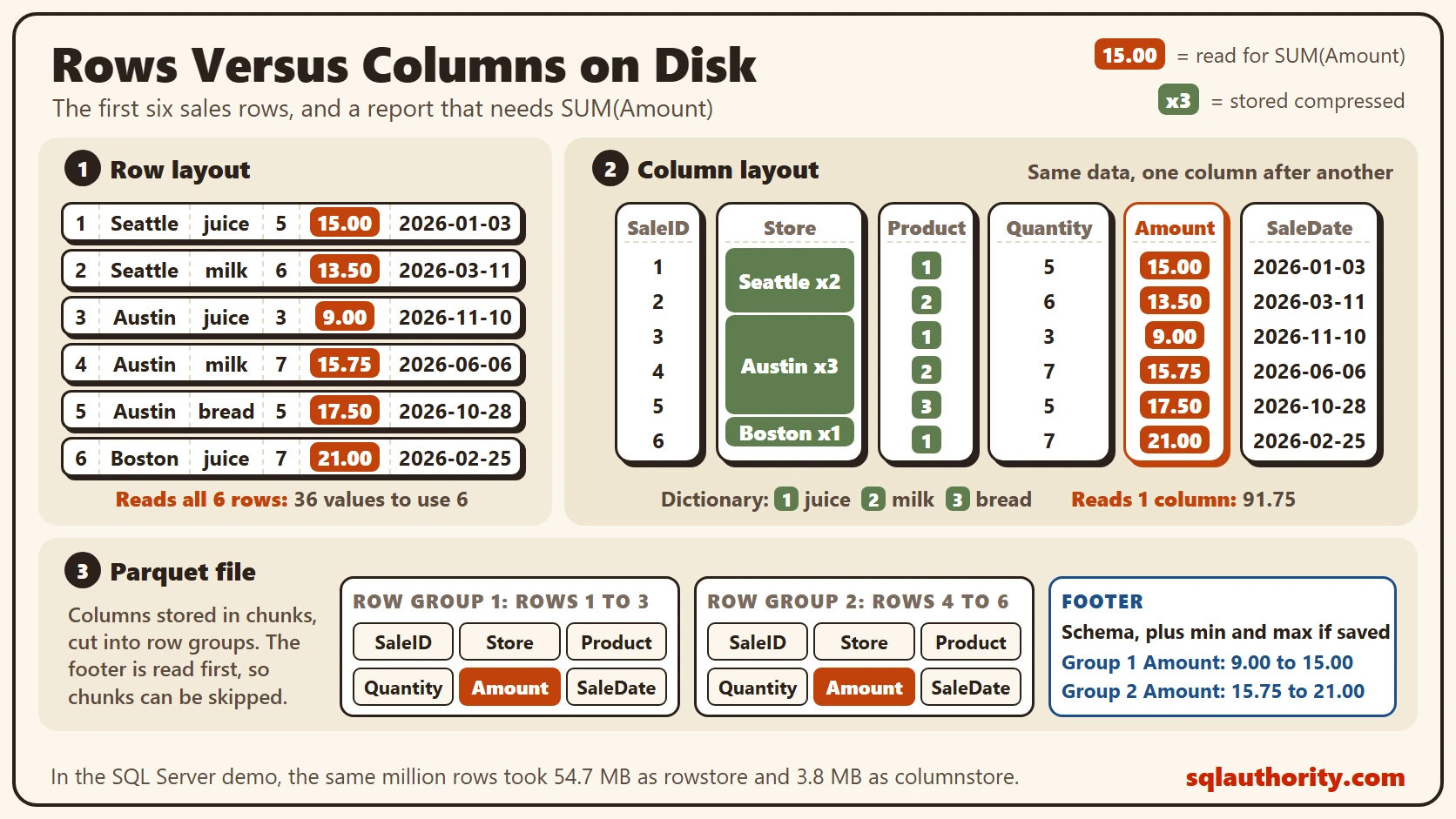
The footer is a quiet bonus. Writers can save those minimum and maximum values, and a reader that supports them checks the footer first. It can then skip any chunk whose range can’t match your filter. Ask for sales from March, and a chunk with only November dates can stay unread. Engines such as Spark read these files in parallel. I covered how in How Apache Spark Works: Driver, Executors and Partitions.
Parquet is only a file, so any engine can read it from cloud storage. Open table formats, such as Delta Lake and Apache Iceberg, add transactions on top of those same files. Because any engine can read the file, the format matters more than the engine that wrote it.
The Same Idea in SQL Server
SQL Server stores tables by column too. This script creates a database called SqlBigDataColumnar, used only for this example, so run it on a test server. It builds one million sales rows twice: once in a normal clustered index, and once in a clustered columnstore index.
The values come from a hash of the row number. You get the same rows every time you run it.
IF DB_ID(N'SqlBigDataColumnar') IS NULL CREATE DATABASE SqlBigDataColumnar;
GO
USE SqlBigDataColumnar;
GO
DROP TABLE IF EXISTS dbo.SaleRow;
DROP TABLE IF EXISTS dbo.SaleColumn;
CREATE TABLE dbo.SaleRow
(
    SaleID int NOT NULL,
    Store nvarchar(20) NOT NULL,
    Product nvarchar(20) NOT NULL,
    Quantity int NOT NULL,
    Amount decimal(10,2) NOT NULL,
    SaleDate date NOT NULL,
    CONSTRAINT PK_SaleRow PRIMARY KEY CLUSTERED (SaleID)
);
CREATE TABLE dbo.SaleColumn
(
    SaleID int NOT NULL,
    Store nvarchar(20) NOT NULL,
    Product nvarchar(20) NOT NULL,
    Quantity int NOT NULL,
    Amount decimal(10,2) NOT NULL,
    SaleDate date NOT NULL,
    INDEX CCI_SaleColumn CLUSTERED COLUMNSTORE
);
INSERT INTO dbo.SaleRow (SaleID, Store, Product, Quantity, Amount, SaleDate)
SELECT g.value,
       CHOOSE(h.StorePick, N'Austin', N'Boston', N'Denver', N'Seattle'),
       CHOOSE(h.ProductPick, N'bread', N'milk', N'tea', N'juice', N'honey'),
       h.Qty,
       h.Qty * CHOOSE(h.ProductPick, 3.50, 2.25, 4.00, 3.00, 6.75),
       DATEADD(DAY, h.DayPick, '20260101')
FROM GENERATE_SERIES(1, 1000000) AS g
CROSS APPLY (SELECT HASHBYTES('SHA1', CAST(g.value AS binary(4))) AS Hash) AS x
CROSS APPLY (SELECT CAST(SUBSTRING(x.Hash, 1, 1) AS int) % 4 + 1 AS StorePick,
                    CAST(SUBSTRING(x.Hash, 2, 1) AS int) % 5 + 1 AS ProductPick,
                    CAST(SUBSTRING(x.Hash, 3, 1) AS int) % 9 + 1 AS Qty,
                    CAST(SUBSTRING(x.Hash, 4, 2) AS int) % 365 AS DayPick) AS h;
INSERT INTO dbo.SaleColumn (SaleID, Store, Product, Quantity, Amount, SaleDate)
SELECT SaleID, Store, Product, Quantity, Amount, SaleDate FROM dbo.SaleRow;
The first query shows the six rows from the table above. It’s the same data we reasoned about on paper.
SELECT TOP (6) SaleID, Store, Product, Quantity, Amount, SaleDate
FROM dbo.SaleRow
ORDER BY SaleID;
Now the size test. This query reads the page counts straight from SQL Server.
SELECT OBJECT_NAME(ps.object_id) AS TableName, SUM(ps.row_count) AS TotalRows,
       CAST(SUM(ps.used_page_count) * 8 / 1024.0 AS decimal(8,1)) AS UsedMB
FROM sys.dm_db_partition_stats AS ps
WHERE ps.object_id IN (OBJECT_ID(N'dbo.SaleRow'), OBJECT_ID(N'dbo.SaleColumn'))
  AND ps.index_id IN (0, 1)
GROUP BY ps.object_id
ORDER BY TableName;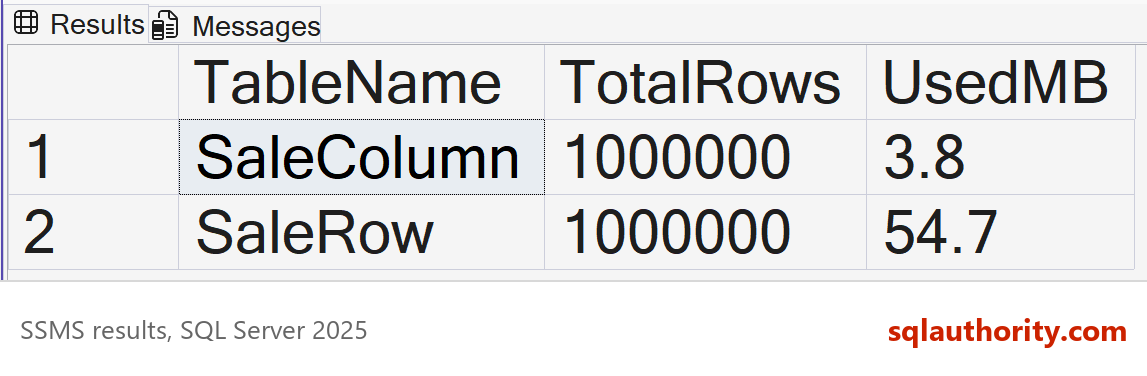
Both tables hold the same million rows. The columnstore copy uses 3.8 MB, and the rowstore copy uses 54.7 MB. That’s about 14 times smaller. This data has only a few distinct values, so it compresses unusually well. Your data won’t shrink as much if it has many unique values.
Next, a report that needs two columns, Product and Amount. Turn on STATISTICS IO and run the same query on both tables. Then read the Messages tab.
SET STATISTICS IO ON;
SELECT Product, SUM(Amount) AS Revenue FROM dbo.SaleRow GROUP BY Product ORDER BY Product;

SELECT Product, SUM(Amount) AS Revenue FROM dbo.SaleColumn GROUP BY Product ORDER BY Product;
SET STATISTICS IO OFF;
Both queries return the same five rows. The rowstore query read about 7,000 pages, because it walks every row. The columnstore query reported 12 LOB logical reads and one segment read. It needed only the Product and Amount columns.
One last look shows how SQL Server cut the columns into groups, the same idea as a Parquet row group.
SELECT row_group_id, state_desc, total_rows, size_in_bytes / 1024 AS SizeKB
FROM sys.dm_db_column_store_row_group_physical_stats
WHERE object_id = OBJECT_ID(N'dbo.SaleColumn');
On my run it returned one compressed row group with 1,000,000 rows and about 3,728 KB. A row group holds up to 1,048,576 rows, so a bigger table gets more of them.
When Rows Are Still the Better Choice
The case against columns is a fair one: row storage is the safer default, and for many apps it is. A row store wins when you look up one order, or when many small writes arrive all day. Changing one row inside a columnstore costs more work.
Small inserts land in a delta store, a row-based holding area, until a background task compresses them. Large bulk loads can compress straight into row groups. A delete only marks the row in a delete bitmap. REORGANIZE, the background merge or a rebuild removes it later.
That’s why one database can hold both layouts. Orders go in rowstore tables, and history for reports goes into columnstore. Big data platforms made the same split, and Parquet became the file form of the report side.
What to Remember
Columnar storage reads only the columns a query needs, and it compresses repeated values well. A Parquet footer can let a reader skip whole chunks. When you read about columnar file formats, picture the six sales rows turned on their side.
When I review a slow report, I count the columns it reads and the columns the table holds. A wide table with a narrow query is a good fit for columns. When you finish testing, remove the example database.
USE master;
GO
ALTER DATABASE SqlBigDataColumnar SET SINGLE_USER WITH ROLLBACK IMMEDIATE;
DROP DATABASE SqlBigDataColumnar;
A columnar file is not a different table, it is the same table turned on its side.
Published by Pinal Dave on SQLAuthority. More of my work at pinaldave.com.
Discover more from SQL Authority with Pinal Dave
Subscribe to get the latest posts sent to your email.




1 Comment. Leave new
very use full…..
thx…..