Single-row inserts in a loop are slow because every row pays for its own commit. The insert itself is cheap. Waiting for the log to be written to disk, 100 times, is not. Group the rows, or insert them as a set, and the waiting nearly disappears.

The import that feels slow but looks idle
You know this call. “The nightly import takes forever, but the server looks bored.” The CPU is low and the disks do not look busy. Somewhere a loop inserts one row at a time, with no transaction around it.
Without an explicit transaction, each INSERT is its own transaction. SQL Server must write that commit to the log on disk before it can say “done”. So the loop waits for the log again and again. That wait is called WRITELOG.
I can count those waits for my own session. Let me set up a small table and try it.
One commit per row
The loop below inserts 100 rows, one INSERT at a time. I read my session’s WRITELOG wait count before and after, and report the difference. SET NOCOUNT ON keeps SSMS from printing 100 “1 row affected” messages.
DROP TABLE IF EXISTS dbo.InsertCommitDemo;
CREATE TABLE dbo.InsertCommitDemo (Id int PRIMARY KEY);
GO
SET NOCOUNT ON;

DECLARE @before bigint = COALESCE((SELECT waiting_tasks_count
                                   FROM sys.dm_exec_session_wait_stats
                                   WHERE session_id = @@SPID AND wait_type = N'WRITELOG'), 0);
DECLARE @i int = 1;

WHILE @i <= 100
BEGIN
    INSERT dbo.InsertCommitDemo VALUES (@i);
    SET @i += 1;
END;

SELECT N'Autocommit loop' AS TestName, COUNT(*) AS RowsInserted FROM dbo.InsertCommitDemo;

SELECT COALESCE((SELECT waiting_tasks_count
                 FROM sys.dm_exec_session_wait_stats
                 WHERE session_id = @@SPID AND wait_type = N'WRITELOG'), 0) - @before AS WriteLogWaitDelta;
100 rows went in. The wait delta is the second grid, and in my run it is 102: one wait for each commit, plus a couple of extras. That is the cost of the loop in one number.
Same loop, one transaction
Now keep the loop but wrap it in one transaction. The table is emptied first so both runs start equal. SET XACT_ABORT ON means any error rolls the whole transaction back instead of leaving it open.
TRUNCATE TABLE dbo.InsertCommitDemo;
SET XACT_ABORT ON;

DECLARE @before bigint = COALESCE((SELECT waiting_tasks_count
                                   FROM sys.dm_exec_session_wait_stats
                                   WHERE session_id = @@SPID AND wait_type = N'WRITELOG'), 0);
DECLARE @i int = 1;

BEGIN TRAN;
WHILE @i <= 100
BEGIN
    INSERT dbo.InsertCommitDemo VALUES (@i);
    SET @i += 1;
END;
COMMIT;

SELECT N'Transaction loop' AS TestName, COUNT(*) AS RowsInserted FROM dbo.InsertCommitDemo;

SELECT COALESCE((SELECT waiting_tasks_count
                 FROM sys.dm_exec_session_wait_stats
                 WHERE session_id = @@SPID AND wait_type = N'WRITELOG'), 0) - @before AS WriteLogWaitDelta;
Same 100 rows, and the delta drops to 1. There is only one commit now, so there is only one wait for it.
Drop the loop
The loop is still 100 separate statements. INSERT with SELECT sends the whole set as a single statement. GENERATE_SERIES supplies the numbers 1 to 100.
TRUNCATE TABLE dbo.InsertCommitDemo;

DECLARE @before bigint = COALESCE((SELECT waiting_tasks_count
                                   FROM sys.dm_exec_session_wait_stats
                                   WHERE session_id = @@SPID AND wait_type = N'WRITELOG'), 0);

INSERT dbo.InsertCommitDemo
SELECT value FROM GENERATE_SERIES(1, 100, 1);

SELECT N'Set insert' AS TestName, COUNT(*) AS RowsInserted,
       MIN(Id) AS FirstId, MAX(Id) AS LastId
FROM dbo.InsertCommitDemo;

SELECT COALESCE((SELECT waiting_tasks_count
                 FROM sys.dm_exec_session_wait_stats
                 WHERE session_id = @@SPID AND wait_type = N'WRITELOG'), 0) - @before AS WriteLogWaitDelta;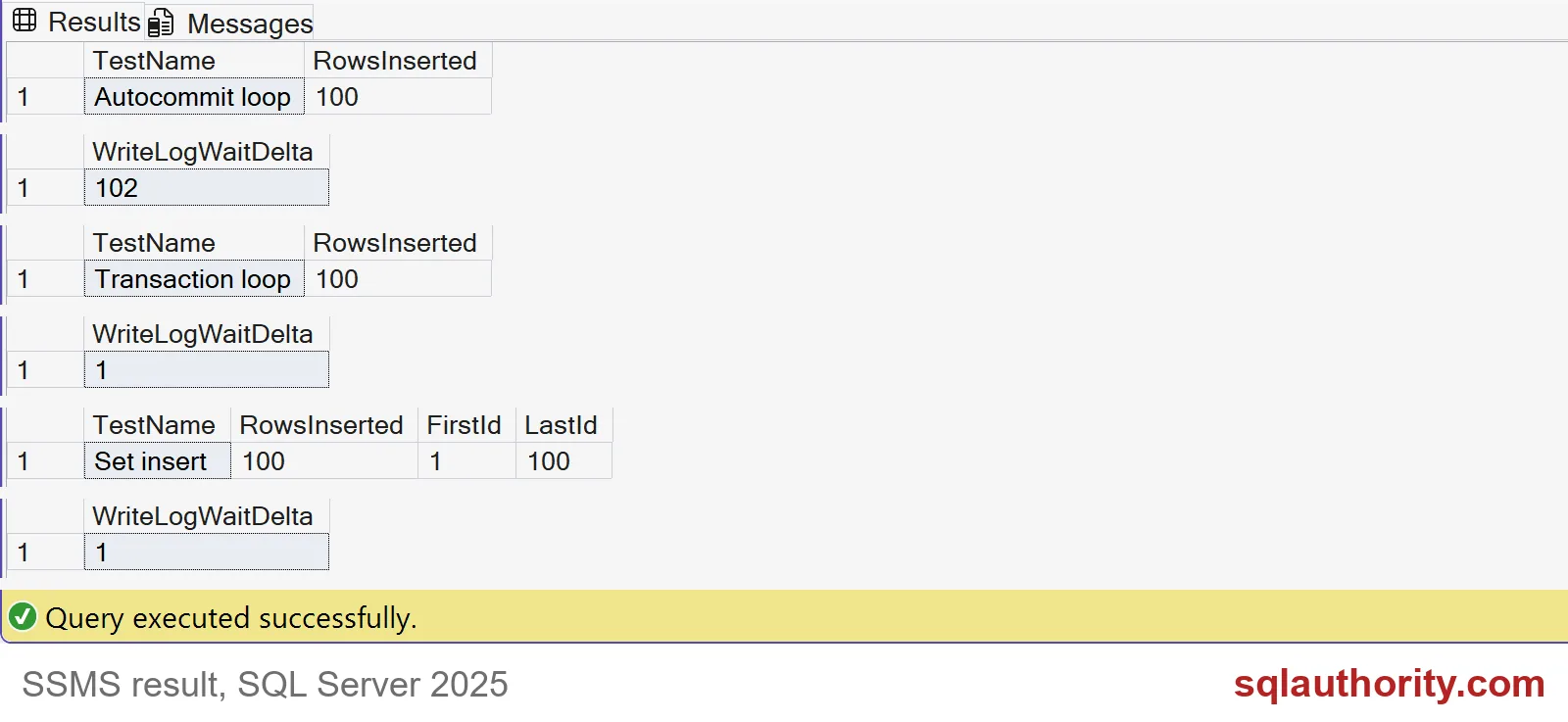
The screenshot shows all three results. Each form inserted 100 rows, and the keys run from 1 to 100. The waits were 102, then 1 and 1. Your exact numbers will differ. The shape will not: about one wait per row for the autocommit loop, and about one in total for the others.

Commit in batches, not in one giant transaction
One giant transaction is not the goal either. It holds locks and log space until the end, and a failure at row 9 million throws everything away. The practical middle is a commit every few thousand rows. Here it is with a tiny batch of 25.
TRUNCATE TABLE dbo.InsertCommitDemo;

DECLARE @before bigint = COALESCE((SELECT waiting_tasks_count
                                   FROM sys.dm_exec_session_wait_stats
                                   WHERE session_id = @@SPID AND wait_type = N'WRITELOG'), 0);
DECLARE @start int = 1, @batch int = 25;

WHILE @start <= 100
BEGIN
    INSERT dbo.InsertCommitDemo
    SELECT value FROM GENERATE_SERIES(@start, @start + @batch - 1, 1);
    SET @start += @batch;
END;

SELECT N'Commit every 25 rows' AS TestName, COUNT(*) AS RowsInserted FROM dbo.InsertCommitDemo;

SELECT COALESCE((SELECT waiting_tasks_count
                 FROM sys.dm_exec_session_wait_stats
                 WHERE session_id = @@SPID AND wait_type = N'WRITELOG'), 0) - @before AS WriteLogWaitDelta;
Four statements, four commits, and 4 waits in my run. For a real load, use a restart key such as the last Id loaded, so a failed run can continue where it stopped. Also remember that a loop outside SQL Server adds a network round trip per row. That cost is separate and sits on top of this one.
Clean up the demo table.
DROP TABLE IF EXISTS dbo.InsertCommitDemo;Next time an import crawls, count the commits before you blame the disks.
A fast insert is not only a small statement, it is a sensible transaction shape.
Published by Pinal Dave on SQLAuthority. More of my work at pinaldave.com.
Discover more from SQL Authority with Pinal Dave
Subscribe to get the latest posts sent to your email.