Set operator rules decide what a UNION returns, and they are not the rules of a normal SELECT. Column names come from the first query. Types are matched by position. ORDER BY sits at the very end. Learn those three and most UNION surprises go away.

One result, not two queries
Imagine a report that stacks this year’s sales on top of last year’s. It works for months. Then a colleague tidies the code and swaps the two queries. Suddenly the column headers in the app change, and nobody knows why.
The reason is simple. A UNION is one combined result, and it follows its own rules. Let me walk through them with tiny queries you can run.
Names come from the first SELECT
The first query names the columns. Later aliases are ignored. Columns are matched by position, not by name. The third statement asks SQL Server to describe the result, so we can see the type.
SELECT 1 AS FirstName UNION ALL SELECT 2 AS LaterName ORDER BY FirstName;

SELECT CONVERT(varchar(10), 1) AS TextValue
UNION ALL
SELECT CONVERT(varchar(10), 'abc')
ORDER BY TextValue;

SELECT name, system_type_name
FROM sys.dm_exec_describe_first_result_set(
     N'SELECT CONVERT(varchar(10), 1) AS TextValue
       UNION ALL SELECT CONVERT(varchar(10), ''abc'');', NULL, 0)
WHERE is_hidden = 0;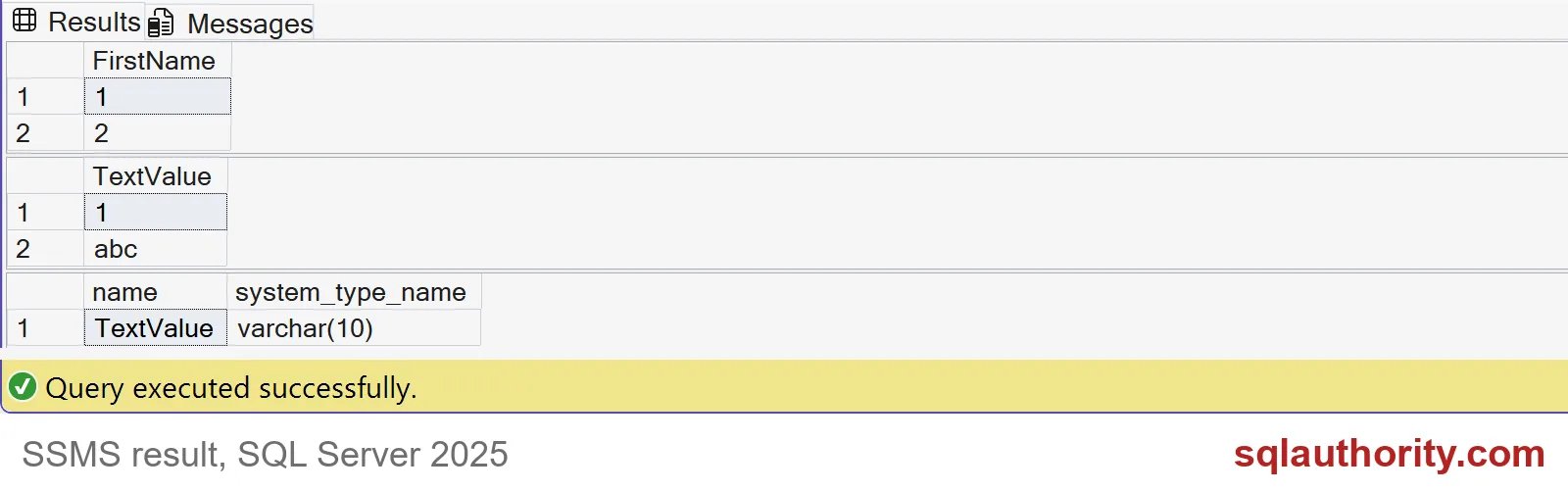
The first grid is named FirstName, and LaterName never shows up. The second grid is TextValue with the rows 1 and abc. The third says the column type is varchar(10).
Now three ways to get it wrong. Each statement below fails on purpose, so expect red text in SSMS.
SELECT 1 AS FirstName UNION ALL SELECT 2 AS LaterName ORDER BY LaterName;
GO
SELECT 1 AS n ORDER BY n UNION ALL SELECT 2;
GO
SELECT 1 AS A, 2 AS B UNION ALL SELECT 3;
Sorting by the later alias gives error 207, invalid column name. Error 104 follows it: ORDER BY items must appear in the select list. Putting ORDER BY inside the first query gives a syntax error, number 156. One query with two columns and one with a single column gives error 205. ORDER BY goes last, and it can only use the first query’s names.
Types: the stronger type wins
SQL Server combines the columns into one type. It picks the type with the higher precedence, and converts the other side to it. Number types beat text types. That is why mixing a number and a word fails, whichever one comes first.
SELECT 1 AS Value UNION ALL SELECT 'abc';
GO
SELECT 'abc' AS Value UNION ALL SELECT 1;
GO
SELECT 1 AS n UNION ALL SELECT 2.5;
Both of the first two fail with error 245. It tries to turn the word abc into an integer and cannot. Swapping the order does not help. The third query works, but look at the output: the 1 comes back as 1.0, because the column is now a decimal. Cast to the type you want, on both sides.
UNION removes duplicates, UNION ALL keeps them
UNION removes duplicate rows from the whole result. UNION ALL keeps every row, and skips the extra work. Two NULLs count as the same value here, so they collapse into one.
SELECT n FROM (VALUES (1), (1)) AS a(n) UNION SELECT 2 ORDER BY n;
SELECT n FROM (VALUES (1), (1)) AS a(n) UNION ALL SELECT 2 ORDER BY n;
SELECT CONVERT(int, NULL) AS n UNION SELECT CONVERT(int, NULL);
UNION returns 1 and 2. UNION ALL returns 1, 1 and 2. The NULL query returns a single NULL row. Use UNION ALL when you know the inputs do not overlap, and UNION only when you want the cleanup.
INTERSECT goes first
When you mix operators, INTERSECT binds tighter than UNION. Without parentheses it runs first. A derived table lets you group the other way.
SELECT 1 AS n UNION SELECT 2 INTERSECT SELECT 2 ORDER BY n;

SELECT n
FROM (SELECT 1 AS n UNION SELECT 2) AS combined
INTERSECT
SELECT 2
ORDER BY n;
The first query returns 1 and 2, because 2 INTERSECT 2 runs first, and the union then adds the 1. The second returns only 2, because the union runs first and then gets intersected. Same words, different meaning.
Check the contract before you ship
A matching data type does not mean matching meaning. Column 2 in one query might be dollars and in the other quantity. SQL Server will happily stack them. Write the names, the casts, the duplicate rule and the final ORDER BY down where the next person can see them.

Give every combined column one clear meaning, and your reports will survive tidy-ups.
A set expression is not a pile of queries, it is one result with shared rules.
Published by Pinal Dave on SQLAuthority. More of my work at pinaldave.com.
Discover more from SQL Authority with Pinal Dave
Subscribe to get the latest posts sent to your email.