Database roles let you grant permissions to a group once, then add and remove members as jobs change. You stop tracking who can read which table, because the role answers that question. The work shrinks, and the mistakes shrink with it.

What Database Roles Are
A role is a named group of permissions inside one database. You grant permissions to the role, and every member gets them. A user can belong to many roles, and the permissions add up.
Compare the alternative. Without roles, you grant SELECT on each table to each person. When someone moves to another team, you hunt down every grant and remove it. With a role, you remove one membership, and that role’s access is gone. Other paths can remain, such as a direct grant, another role or a Windows group, so check the result afterwards.
Roles pair well with Windows groups. A group holds the people. A login for that group lets them in. A user maps the login into the database, and a role holds the permissions. Adding a new team member then means one change in Windows, and nothing in SQL Server.
The Fixed Database Roles
SQL Server ships with fixed roles in every database. Some are safe to use freely, and some are risky. Every user also belongs to the public role automatically, so anything granted to public reaches everyone. Leave its default permissions alone, and avoid granting anything else to it.
| Role | What it allows | What to watch |
|---|---|---|
| db_datareader | Read every user table and view | It includes tables added later, so new sensitive data is readable at once |
| db_datawriter | Insert, update and delete in every user table | It has the same reach for changes |
| db_ddladmin | Run any data definition command | It can alter or drop any table |
| db_owner | Everything in the database, including dropping it | Treat it like a master key |
The risk I flag first is db_owner. Applications get it for convenience, because nobody wants to work out the exact permissions. Then one bug or one injected command can drop tables. Give an application only what it needs, and use db_owner for a small number of administrators.
How to Create Database Roles
The demo below builds a small tea menu, a user and a role. The demo user is created WITHOUT LOGIN, so it has no password and nobody can sign in as it. We will test it by impersonation instead. The script creates a database named SqlBasicsRoles if it’s missing. The database is used only for this example. The script drops and rebuilds dbo.TeaMenu inside it and is safe to run twice. Run it on a test instance.
USE master;
GO
IF DB_ID(N'SqlBasicsRoles') IS NULL CREATE DATABASE SqlBasicsRoles;
GO
USE SqlBasicsRoles;
GO
DROP TABLE IF EXISTS dbo.TeaMenu;
CREATE TABLE dbo.TeaMenu (TeaID int NOT NULL CONSTRAINT PK_TeaMenu PRIMARY KEY, TeaName nvarchar(60) NOT NULL, Price decimal(6,2) NOT NULL);
INSERT INTO dbo.TeaMenu (TeaID, TeaName, Price) VALUES (1, N'Masala chai', 3.50), (2, N'Green tea', 3.00), (3, N'Mint tea', 3.25);
IF DATABASE_PRINCIPAL_ID(N'DemoMenuReader') IS NULL CREATE USER DemoMenuReader WITHOUT LOGIN;
IF DATABASE_PRINCIPAL_ID(N'MenuReaders') IS NULL CREATE ROLE MenuReaders;
GRANT SELECT ON dbo.TeaMenu TO MenuReaders;
IF IS_ROLEMEMBER(N'MenuReaders', N'DemoMenuReader') = 0 ALTER ROLE MenuReaders ADD MEMBER DemoMenuReader;
GO
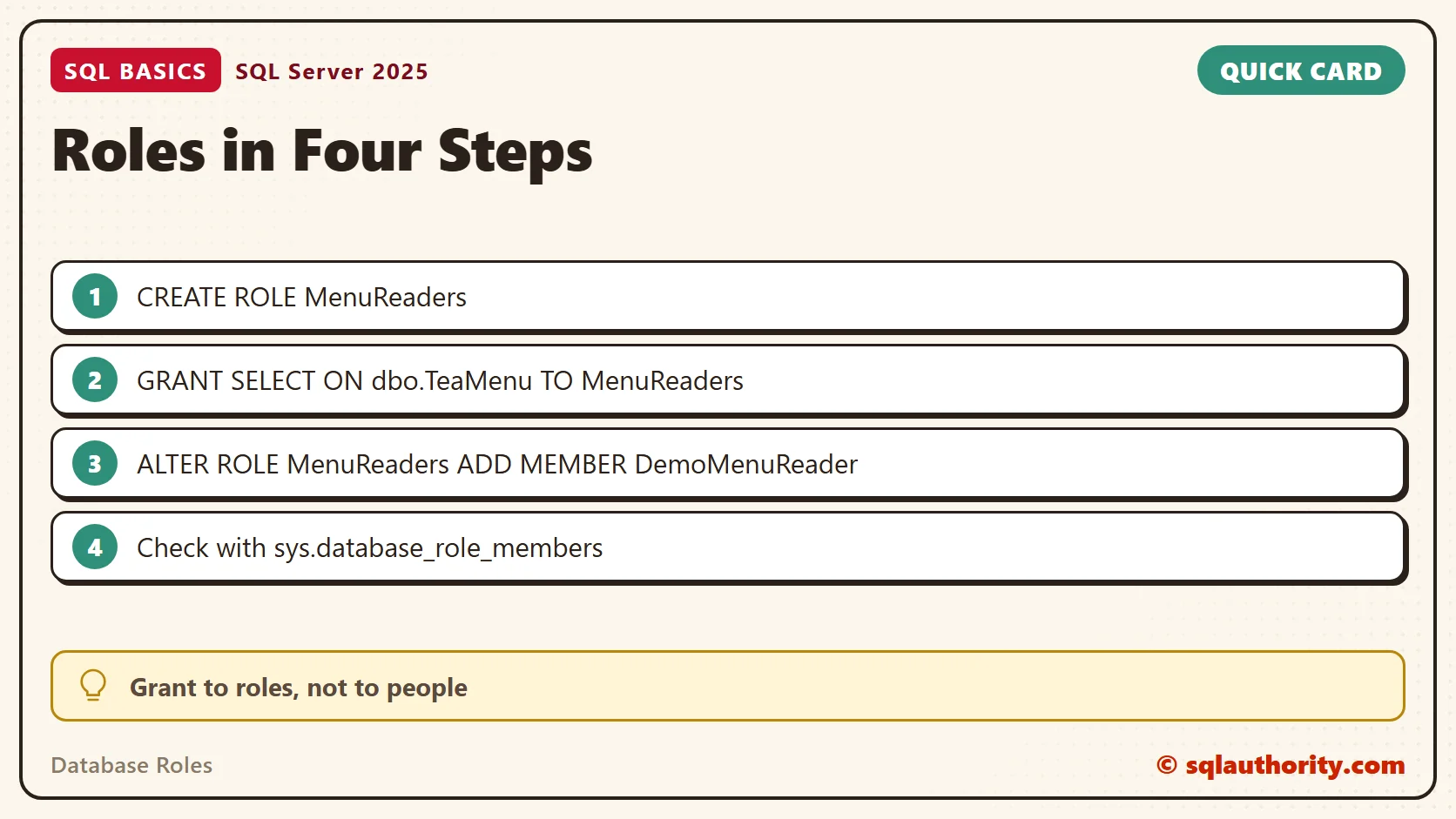
Three steps matter here. CREATE ROLE makes the group. GRANT gives the group a permission. ALTER ROLE … ADD MEMBER puts a user in it. The older procedure, sp_addrolemember, still works, but the ALTER ROLE form is the current one.
Test as the Member
Run this block after the first script. EXECUTE AS USER switches your session to the demo user until you run REVERT. The first batch reads the menu, which the role allows. The second batch tries an INSERT, which the role doesn’t allow. Run REVERT after each batch, even after an error.
USE SqlBasicsRoles;
GO
EXECUTE AS USER = N'DemoMenuReader';
SELECT USER_NAME() AS current_user_name, IS_ROLEMEMBER(N'MenuReaders') AS in_menu_readers;

SELECT TeaID, TeaName, Price FROM dbo.TeaMenu;
GO
REVERT;
GO
EXECUTE AS USER = N'DemoMenuReader';
INSERT INTO dbo.TeaMenu (TeaID, TeaName, Price) VALUES (4, N'Lemon tea', 3.00);
GO
REVERT;
GO
The first batch returns the user name with a 1, then three rows. The INSERT fails with a permission error. That is the role working as designed. The member can read the menu and can’t change it.
Check Role Membership and Permissions
Two queries show the current state. The first lists every role with its members. The second lists the explicit permissions granted or denied to a role. It doesn’t show inherited or fixed-role capabilities. I run both before I trust any permission setup.
USE SqlBasicsRoles;
GO
SELECT r.name AS role_name, m.name AS member_name, m.type_desc AS member_type
FROM sys.database_role_members AS drm
JOIN sys.database_principals AS r ON r.principal_id = drm.role_principal_id
JOIN sys.database_principals AS m ON m.principal_id = drm.member_principal_id
ORDER BY r.name, m.name;

SELECT pr.name AS grantee, pe.class_desc, OBJECT_NAME(pe.major_id) AS object_name, pe.permission_name, pe.state_desc
FROM sys.database_permissions AS pe
JOIN sys.database_principals AS pr ON pr.principal_id = pe.grantee_principal_id
WHERE pr.name = N'MenuReaders';
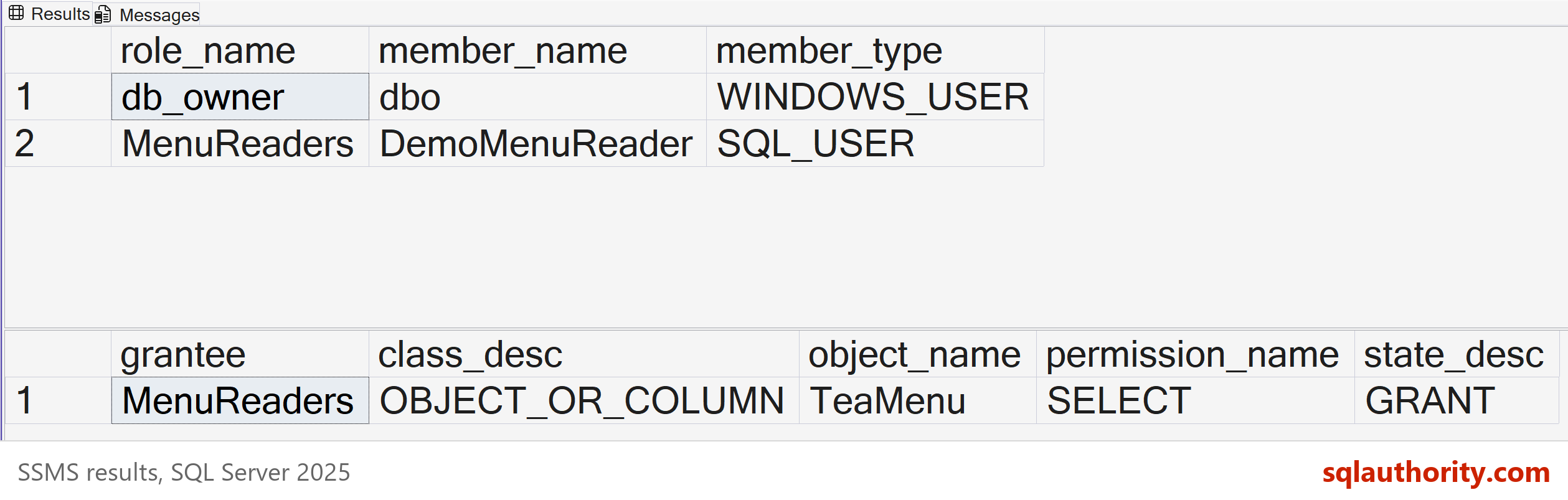
The membership list shows dbo as the member of db_owner, and the demo user as the member of MenuReaders. The public role isn’t listed, because every user belongs to it without a row. The second grid shows one explicit grant, SELECT on the menu table.
Now picture a team member who moves to another job. You drop them from one role with ALTER ROLE … DROP MEMBER and add them to the next. Two short statements finish the change, and the membership query shows the new state. No table-by-table cleanup is left behind.
Membership is not the same as access. Dropping a member removes that role’s permission path only. A direct grant, another role or a Windows group can still allow the same action. So test the effective result. This block asks SQL Server what the demo user can do on the menu table.
USE SqlBasicsRoles;
GO
EXECUTE AS USER = N'DemoMenuReader';
SELECT permission_name FROM sys.fn_my_permissions(N'dbo.TeaMenu', N'OBJECT') ORDER BY permission_name;
SELECT HAS_PERMS_BY_NAME(N'dbo.TeaMenu', N'OBJECT', N'SELECT') AS can_select;
GO
REVERT;
GO
Run this block after the first script. The list should include SELECT and leave out INSERT. After a real removal, run the same check and read the list again. Run REVERT even after an error.
Name Roles After Jobs
I name a role after the job it does, such as MenuReaders or OrderEntry. A name like Role1 tells the next administrator nothing. A job name tells them who belongs in it and what it should allow.
Grant at the level that matches the job. When a whole area of tables belongs to one job, grant on the schema instead of each table. For an application that only calls stored procedures, grant EXECUTE on those procedures and nothing more. Small roles are easier to explain and to audit.
Two Traps to Know
The first trap is DENY. A DENY on the table wins over a GRANT on the table. Say one role gives SELECT on it and another role gives a DENY on it. The user can’t read the table. Check every role a user belongs to before you chase a missing permission.
The second trap is nesting. A role can be a member of another role. It looks tidy, but it hides access, because a user’s rights now depend on a chain. Keep roles flat until you have a reason not to.
When you’re done, this script removes the demo member, role, user and table. It touches only those four names.
USE SqlBasicsRoles;
GO
IF IS_ROLEMEMBER(N'MenuReaders', N'DemoMenuReader') = 1 ALTER ROLE MenuReaders DROP MEMBER DemoMenuReader;
IF DATABASE_PRINCIPAL_ID(N'MenuReaders') IS NOT NULL DROP ROLE MenuReaders;
DROP USER IF EXISTS DemoMenuReader;
DROP TABLE IF EXISTS dbo.TeaMenu;
GO
Related reading
Roles hold users, and users come from logins. That link is explained in Logins and Users in SQL Server: Who Gets In and What They Can Do. The idea behind small roles is in Least Privilege for Application Logins. To see members for every role at once, try Showing Comma-Separated Role Members for Every Database Role.
A role is not a way to grant more access, it is a way to grant the right access once.
Published by Pinal Dave on SQLAuthority. More of my work at pinaldave.com.
Discover more from SQL Authority with Pinal Dave
Subscribe to get the latest posts sent to your email.