Logins and users are two different things in SQL Server. A login opens the door to the server, and a user opens the door to one database. Mixing them up explains many “I can connect but I can’t see my data” complaints.

Logins and Users: Two Doors
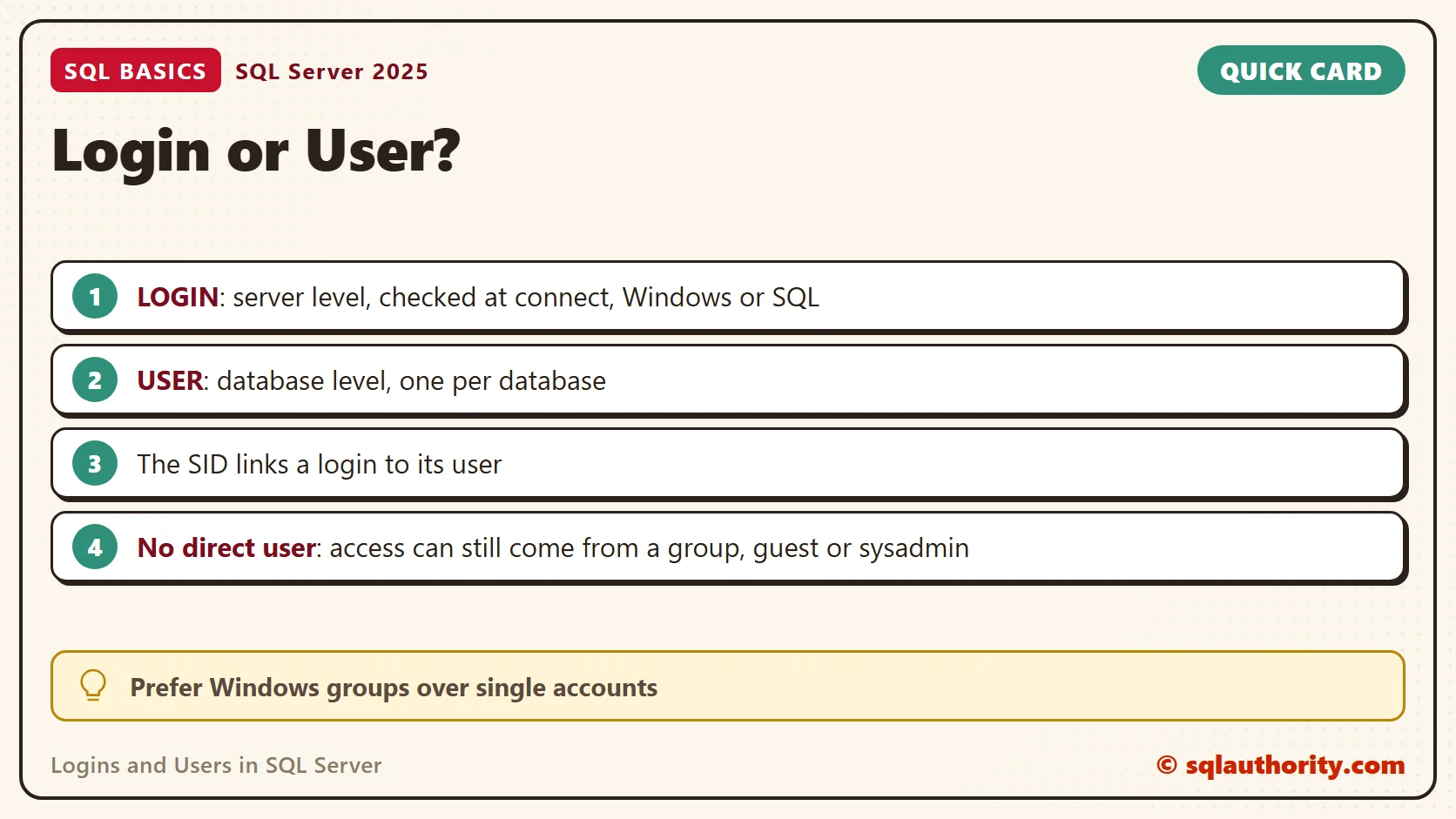
A login is a server-level identity. SQL Server checks it when a connection is made. A user is a database-level identity. It exists inside one database and decides what the connection can do there.
The two are linked by a security identifier, the SID, not by name. A login and a user can have different names and still belong together. They can also share a name and be unrelated, which matters after a restore.
A login with no user of its own can’t use a database directly. Three other paths exist. The guest user is switched off for connections in user databases by default. A Windows group login can have a user, and its members come in through it. Members of the sysadmin role map to dbo everywhere.
Roles follow the same split. Server roles, such as sysadmin, belong to logins. Database roles belong to users. Keep the two apart in your head, and most security questions get easier to answer.
Windows Login or SQL Login
With Windows authentication, SQL Server trusts Windows to prove who you are. You create a login for a Windows account or, better, for a Windows group. Nobody stores a password in SQL Server. People who leave the company lose access when their Windows account is disabled.
With SQL authentication, SQL Server keeps the name and a hash of the password itself. This needs mixed mode on the instance. I use it only for software that can’t use Windows authentication. Turn on the password policy for these logins, and give each application its own.
Be careful with the guest user. Leave it disabled for connections, so a login without its own user can’t wander into a database by accident. Granting access one database at a time is slower than a shortcut, and it’s also safer.
Create a Login and a User
The first script creates a database named SqlBasicsLogins if it’s missing. The database is used only for this example, and a later block drops and rebuilds its demo table. Run everything on a test instance, because a login belongs to the whole server.
The script then creates a SQL login named DemoShopLogin. Suppose a login with that name already exists, made by someone else. Then the script stops with a message and changes nothing. Rename the demo login if that happens. Replace the placeholder with a strong, unique password, and never reuse one from a real system. The script disables the login straight away.
USE master;
GO
IF DB_ID(N'SqlBasicsLogins') IS NULL CREATE DATABASE SqlBasicsLogins;
GO
-- Stop if a login with this name exists that this script did not create.
IF EXISTS (SELECT 1 FROM sys.server_principals WHERE name = N'DemoShopLogin' AND ISNULL(default_database_name, N'') <> N'SqlBasicsLogins')
  THROW 50000, N'A login named DemoShopLogin already exists and was not created by this script. Rename the demo login in every script of this post, then run again.', 1;
-- For a Windows account the form is: CREATE LOGIN [YourDomain\SomeAccount] FROM WINDOWS;
-- Replace the placeholder with a strong, unique password before you run this.
IF NOT EXISTS (SELECT 1 FROM sys.server_principals WHERE name = N'DemoShopLogin')
  CREATE LOGIN DemoShopLogin WITH PASSWORD = N'ReplaceWith-A-Strong-Password-9', DEFAULT_DATABASE = SqlBasicsLogins, CHECK_POLICY = ON;
ALTER LOGIN DemoShopLogin DISABLE;
GO
The login exists, but it has no way into any database yet. Next, create the user that links the login to SqlBasicsLogins.
USE SqlBasicsLogins;
GO
IF DATABASE_PRINCIPAL_ID(N'DemoShopUser') IS NULL
  CREATE USER DemoShopUser FOR LOGIN DemoShopLogin;
GO
Check Who Maps to Whom
Two queries answer the question I ask first. Run them after the user script. The first shows the login and its user side by side, joined on the SID. The second lists logins without a direct user mapping in this database.
USE SqlBasicsLogins;
GO
SELECT sp.name AS login_name, sp.type_desc AS login_type, sp.is_disabled, dp.name AS user_name, dp.default_schema_name
FROM sys.server_principals AS sp
LEFT JOIN sys.database_principals AS dp ON dp.sid = sp.sid
WHERE sp.name = N'DemoShopLogin';

-- Logins without a direct user mapping here. Not an effective-access report.
SELECT sp.name AS login_name, sp.type_desc AS login_type
FROM sys.server_principals AS sp
WHERE sp.type IN ('S', 'U', 'G')
  AND sp.name NOT LIKE N'##%'
  AND NOT EXISTS (SELECT 1 FROM sys.database_principals AS dp WHERE dp.sid = sp.sid)
ORDER BY sp.name;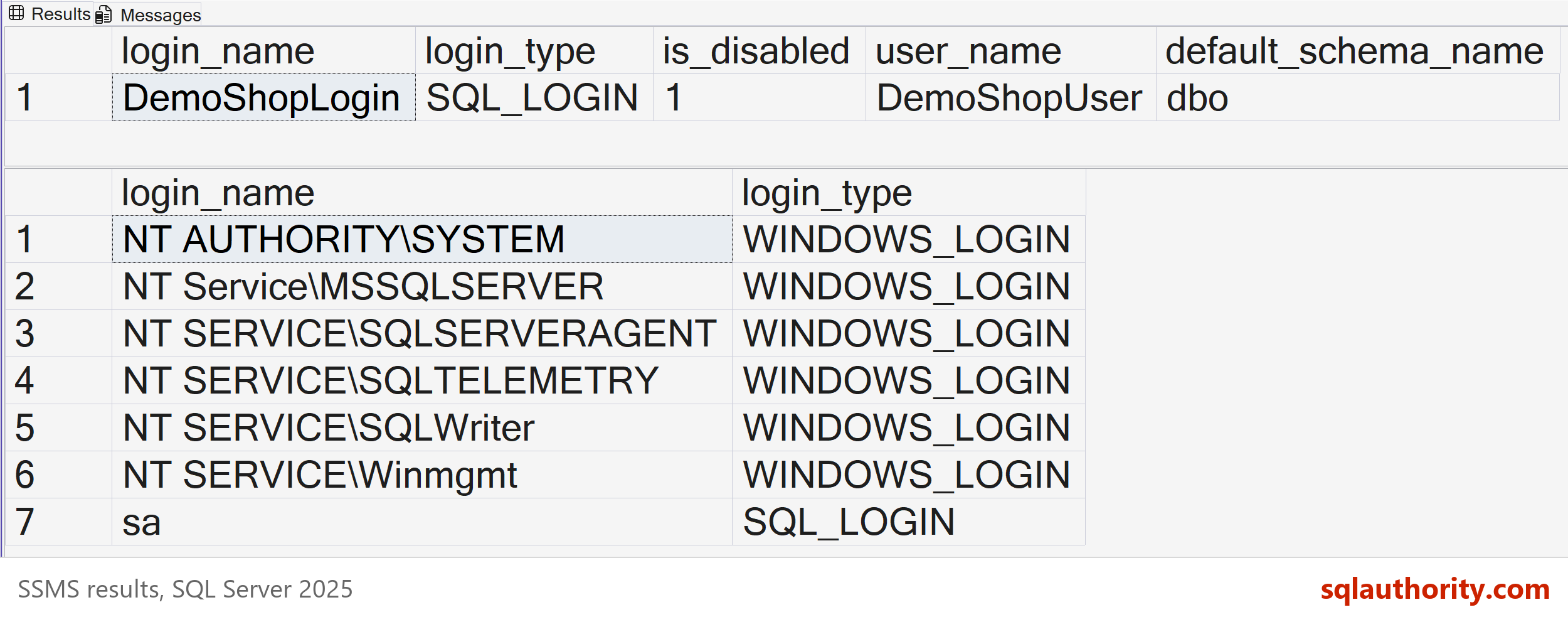
The second query matches SIDs only. It can’t see access through a Windows group, the guest user or the sysadmin role. Members of sysadmin, such as sa, can appear in it even though they enter every database as dbo. Treat it as a mapping list, not an access audit.
An orphaned user is a database user that needs a server login, SQL or Windows, whose login is missing. It appears after a database is restored on another server, where the SIDs no longer match. A user created WITHOUT LOGIN, or a contained database user, has no login by design. The fix for orphans has its own post, linked below.
What a New User Can Do
A new user can connect to the database and do little else. Permissions are separate. The script below creates a small table of books. Run it after the user script, because it needs DemoShopUser. The script drops and rebuilds dbo.Book first. Then it switches your session to DemoShopUser with EXECUTE AS and tries to read the table. You can test this without a password, because you are impersonating the user, not signing in as the login.
USE SqlBasicsLogins;
GO
DROP TABLE IF EXISTS dbo.Book;
CREATE TABLE dbo.Book (BookID int NOT NULL CONSTRAINT PK_Book PRIMARY KEY, Title nvarchar(80) NOT NULL, Price decimal(8,2) NOT NULL);
INSERT INTO dbo.Book (BookID, Title, Price)
VALUES (1, N'Gardening for Beginners', 14.00), (2, N'A Year of Vegetable Curries', 19.50), (3, N'Poems for a Rainy Day', 9.25);
GO
EXECUTE AS USER = N'DemoShopUser';
SELECT USER_NAME() AS current_user_name;

SELECT BookID, Title, Price FROM dbo.Book;
GO
REVERT;
GO
The first query returns DemoShopUser. The second fails with a permission error, and that error is the lesson. Getting in is one step. Being allowed to read a table is another. The REVERT line returns your session to yourself, so run it even after an error.
USE SqlBasicsLogins;
GO
GRANT SELECT ON dbo.Book TO DemoShopUser;
GO
EXECUTE AS USER = N'DemoShopUser';
SELECT BookID, Title, Price FROM dbo.Book;
GO
REVERT;
GO
Run this block after the table block, because the GRANT needs dbo.Book. After the GRANT, the same query returns three books. In real systems you don’t grant to one user at a time. You grant to a role and add users to it, which is the next step after this post.
When someone says they can’t get in, I check three things in order. First, the login exists and isn’t disabled. Second, a user for that login, or for a Windows group it belongs to, exists in the database. Third, the default database is one the login can open. The first mapping query covers the direct case in seconds.
Default Database and Contained Users
Every login has a default database, the one it lands in after connecting. If the login has no user there, the sign-in can fail. Set the default to a database the login can open.
A contained database user is a different design. It signs in at the database level, so no server login exists. It can hold its own password, or it can map to a Windows account. It travels with the database when you move it. The database must allow containment, and the instance must turn on the contained database authentication option.
When you finish, the last script removes the demo table, user and login. It touches only those three names, and it’s safe to run twice. It drops the login only if this post’s script created it.
USE SqlBasicsLogins;
GO
DROP TABLE IF EXISTS dbo.Book;
DROP USER IF EXISTS DemoShopUser;
GO
USE master;
GO
IF EXISTS (SELECT 1 FROM sys.server_principals WHERE name = N'DemoShopLogin' AND default_database_name = N'SqlBasicsLogins')
  DROP LOGIN DemoShopLogin;
GO
Related reading
The next step is Database Roles: Give Permissions to Groups, Not People. For the principle behind all of this, read Least Privilege for Application Logins. A restore can leave a user without a login. For that case, see Orphaned Users After a Restore, and How to Fix Them.
A login is not permission to see your data, it is only permission to knock on the door.
Published by Pinal Dave on SQLAuthority. More of my work at pinaldave.com.
Discover more from SQL Authority with Pinal Dave
Subscribe to get the latest posts sent to your email.