A database schema is a folder for your tables. That is the short answer, and for most of the work you do it is enough. The longer answer is that a schema is also a permission boundary. It is also the reason two tables can share a name. Those two facts are why dbo keeps showing up in front of everything you write.

The Word Has Two Meanings
This is the first thing to clear up, because it confuses people for years. When somebody says “send me the schema”, they usually mean the whole design: the tables, the columns, the keys, the shape of the database. That is the everyday meaning.
Inside SQL Server, schema is also an exact object. It is a named container that sits between the database and the table. Both meanings are correct. The rest of this post is about the second one.
The Four Part Name
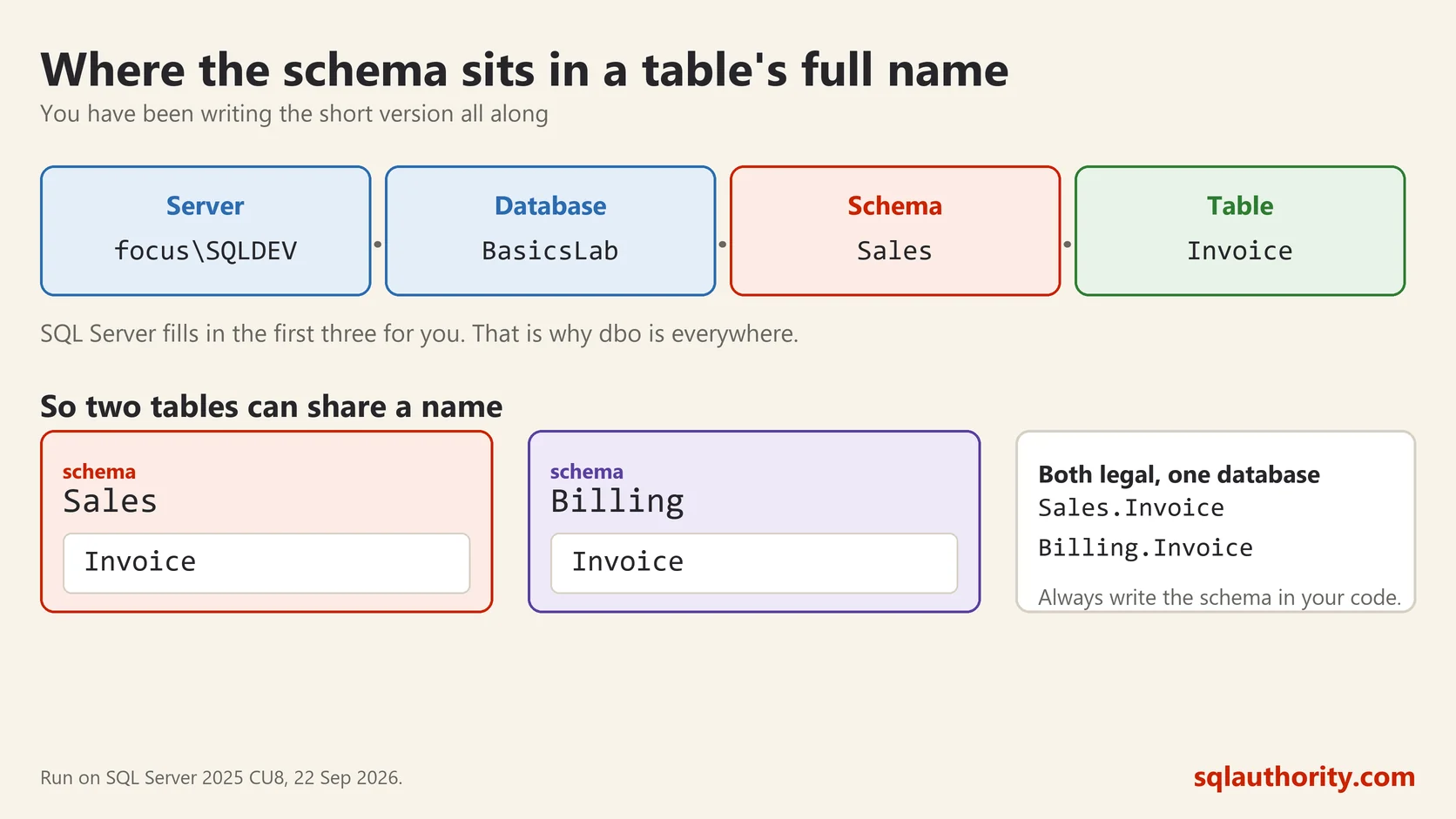
Every table in SQL Server has a full name with four parts. You have been using a short version of it all along.
SELECT * FROM Server.Database.Schema.Table;When you write SELECT * FROM Customer, SQL Server fills in the first three parts for you. The schema it fills in is your default schema, which for most people is dbo. That is why dbo is everywhere. It stands for database owner, it is created with every database, and it is where objects land when nobody says otherwise.
Two Tables, One Name
Here is the trick a schema buys you. Two tables can carry the same name as long as they live in different schemas. I ran this on SQL Server 2025 in a scratch database:
CREATE SCHEMA Sales;
GO
CREATE SCHEMA Billing;
GO
CREATE TABLE Sales.Invoice (id int PRIMARY KEY, amount money);
CREATE TABLE Billing.Invoice (id int PRIMARY KEY, amount money);
SELECT s.name AS schema_name, t.name AS table_name
FROM sys.tables AS t
JOIN sys.schemas AS s ON s.schema_id = t.schema_id
WHERE t.name = 'Invoice';schema_name table_name
Sales Invoice
Billing InvoiceTwo tables called Invoice, both perfectly legal, both in one database. The sales team’s invoice and the billing team’s invoice are different things, and now the database can say so.
Note that CREATE SCHEMA must be the first statement in its batch, which is why GO appears after each one. That catches people the first time.
Your Default Schema
Every database user has a default schema. It decides where your objects go when you do not name one. It also decides which schema SQL Server looks in first for a bare table name.
SELECT SCHEMA_NAME() AS my_default_schema;my_default_schema
dboThis is why I ask people to always write the schema name in their code. SELECT * FROM dbo.Customer is one word longer and never surprises you. A bare name gets resolved at run time against whoever is running it. On a server with several schemas, that is a real source of odd bugs. Naming the schema also lets SQL Server reuse the cached plan more often.
A Schema Is a Permission Boundary
This is the part that earns a schema its place. You can grant a permission on the whole schema instead of on each table, and any table added later is covered automatically.
GRANT SELECT ON SCHEMA::Sales TO ReportingRole;One line, and the reporting people can read everything in Sales, today and next year. Without schemas you are back to granting on every table and remembering to do it again each time somebody adds one. That memory always fails eventually.
How to Use Them Well
Group by what the tables are for, not by who owns them. WideWorldImporters, one of Microsoft’s sample databases, is a good model: Sales, Purchasing, Warehouse, Application. Anyone opening it can find their way around in a minute.
Do not create a schema per person. People leave, and the schema stays behind carrying a name nobody recognises. Do not put everything in dbo either, at least not once a database grows past a few dozen tables. A list of two hundred objects under one heading is a list nobody reads.
Moving an object between schemas is one statement. It breaks any code that used the old two part name, so plan it:
ALTER SCHEMA Billing TRANSFER Sales.Invoice;A schema costs nothing to create and it will not make a single query faster. What it does is make a database a new person can read. It also makes permissions something you set once instead of something you chase.
A schema is not a folder for tidiness, it is the line you draw so a name and a permission can both mean something.
This post was rewritten from scratch in September 2026. The original, published on 2008-10-03, was a short announcement about something that no longer exists. The address is the same, the subject is now a basic idea worth keeping.
Published by Pinal Dave on SQLAuthority. More of my work at pinaldave.com.
Discover more from SQL Authority with Pinal Dave
Subscribe to get the latest posts sent to your email.