To calculate age correctly, count the birthdays that have passed, not the calendar years between two dates. The popular DATEDIFF shortcut counts years and ignores months and days. Below are the failure, two correct versions and a function you can reuse.

Why DATEDIFF Gives the Wrong Age
DATEDIFF with the YEAR argument counts year boundaries. A boundary is the moment the calendar flips from December 31 to January 1. The function never looks at the month or the day. A baby born on December 31 is reported as one year old the next morning. One boundary sits between those two dates.
The same mistake hits adults. Take someone born on December 31, 1990 and check on February 28, 2026. DATEDIFF says 36. They’re 35, and they turn 36 on December 31. Anyone whose birthday is still ahead this year gets an age that’s one too high.
A Bike Club With Tricky Birthdays
The demo uses a members table for a small bike rental club. The seven birthdays sit at awkward edges on purpose. They include December 31, the day after a leap day and a leap day itself. One member turns 18 on March 1. The script creates a database named AgeDemo, used only for this example, so run it on a test server. The scripts need SQL Server 2016 SP1 or later, because of DROP TABLE IF EXISTS and CREATE OR ALTER.
IF DB_ID(N'AgeDemo') IS NULL CREATE DATABASE AgeDemo;
GO
USE AgeDemo;
GO
DROP TABLE IF EXISTS dbo.Members;
CREATE TABLE dbo.Members (
    MemberID   int           NOT NULL PRIMARY KEY,
    MemberName nvarchar(50)  NOT NULL,
    BirthDate  date          NOT NULL
);
INSERT INTO dbo.Members (MemberID, MemberName, BirthDate)
VALUES (1, N'Maya Brooks', '1990-12-31'),
       (2, N'Leo Carter',  '1988-02-28'),
       (3, N'Priya Nair',  '1992-03-01'),
       (4, N'Sam Ortiz',   '2000-02-29'),
       (5, N'Jordan Lee',  '2008-03-01'),
       (6, N'Nora Hughes', '1975-07-04'),
       (7, N'Ben Foster',  '1999-01-01');
The queries below use a fixed date, February 28, 2026. That keeps the output the same every time you run them. In your own code, replace it with CAST(GETDATE() AS date). GETDATE reads the server’s clock, so a client in another time zone can see a different date.
Calculate Age Correctly: Three Versions Side by Side
This query puts three methods next to each other. WrongAge is the DATEDIFF shortcut. AgeDateAdd takes the same DATEDIFF and subtracts 1 when this year’s birthday hasn’t arrived yet. AgeInteger turns each date into a number such as 20260228 and divides the difference by 10000.
DECLARE @AsOf date = '2026-02-28';
SELECT m.MemberName, m.BirthDate,
       DATEDIFF(YEAR, m.BirthDate, @AsOf) AS WrongAge,
       DATEDIFF(YEAR, m.BirthDate, @AsOf)
         - CASE WHEN DATEADD(YEAR, DATEDIFF(YEAR, m.BirthDate, @AsOf), m.BirthDate) > @AsOf
                THEN 1 ELSE 0 END AS AgeDateAdd,
       (CONVERT(int, CONVERT(char(8), @AsOf, 112))
         - CONVERT(int, CONVERT(char(8), m.BirthDate, 112))) / 10000 AS AgeInteger
FROM dbo.Members AS m
ORDER BY m.MemberID;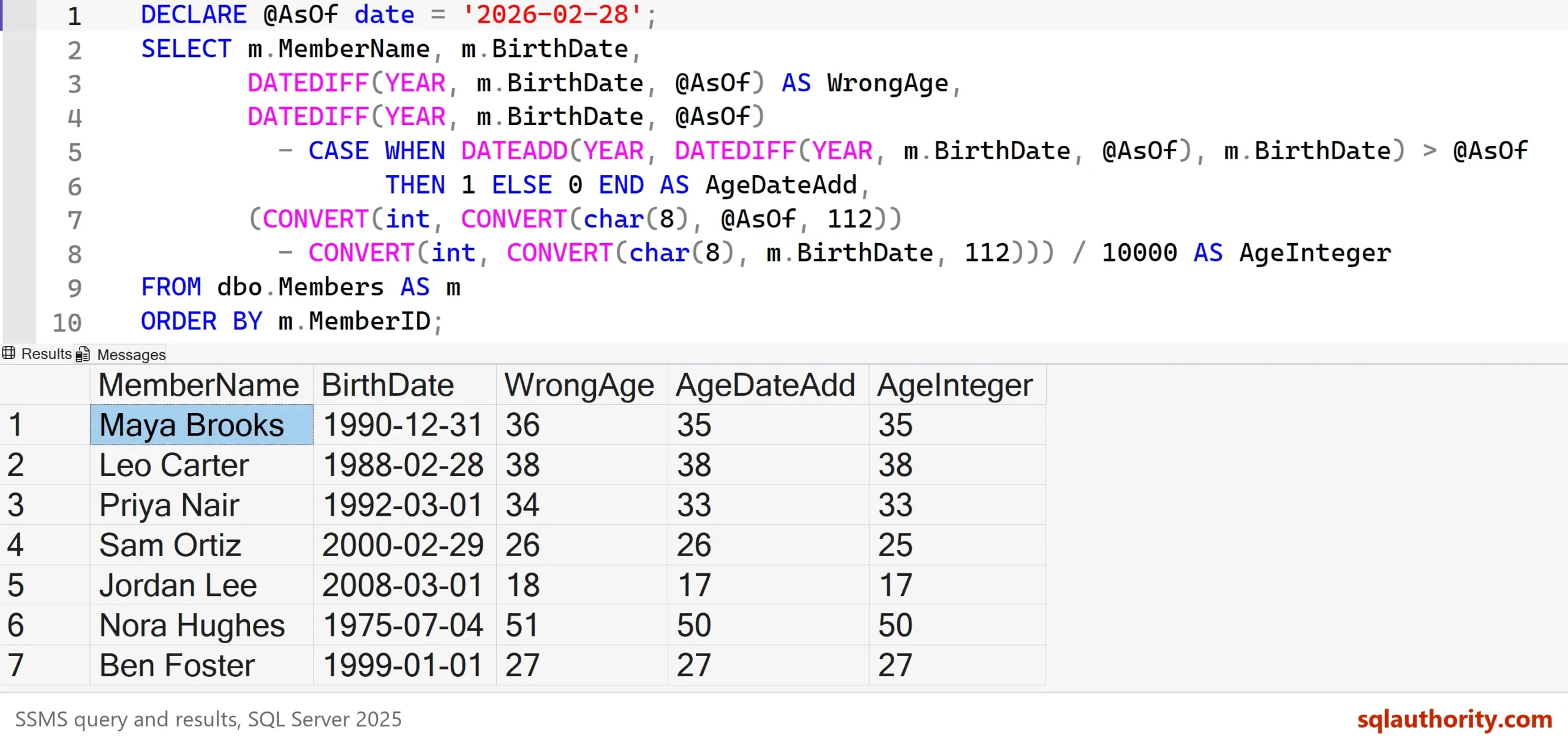
WrongAge is off by one for four of the seven members. Maya Brooks shows 36 instead of 35. Priya Nair shows 34 instead of 33, Jordan Lee 18 instead of 17 and Nora Hughes 51 instead of 50. Each of them still has a birthday ahead this year. Leo Carter’s birthday is the as-of date itself, so every method gives 38.
Here’s why the two correct versions work. DATEADD(YEAR, n, BirthDate) gives this year’s birthday as a date. If that date comes after the as-of date, the CASE subtracts one. The integer version works because yyyymmdd numbers sort in date order, and 10000 stands for one year. Integer division drops the leftover months and days. Style 112 is the format code for yyyymmdd.
Two Shortcuts to Avoid
Some people divide the number of days by 365.25 to allow for leap years. A year averages close to 365.25 days, but any single year has 365 or 366. This query shows both shortcuts failing.
SELECT DATEDIFF(YEAR, '2025-12-31', '2026-01-01') AS YearBoundaries,
DATEDIFF(DAY, '2001-03-01', '2002-03-01') / 365.25 AS AgeByDays;| YearBoundaries | AgeByDays |
|---|---|
| 1 | 0.999315 |
The first column is the baby born on December 31. One boundary sits between the dates, so DATEDIFF reports one year after a single day. The second column covers someone born on March 1, 2001, on their birthday in 2002. That’s exactly one year, yet 365 days divided by 365.25 gives 0.999315, and truncating it gives 0.
You could argue that an age within a year is close enough for a report that groups people by decade. For a marketing chart, that’s fair. For a rule such as 18 or older, one day decides who can rent a bike.
People Born on February 29
A leap day birthday has no anniversary in three years out of four. Your business has to pick a day. One rule treats February 28 as the birthday in common years. The other uses March 1. Rules differ from one business to the next, so write down which one you follow.
The two correct versions already disagree. On February 28, 2026, Sam Ortiz, born on February 29, 2000, is 26 under AgeDateAdd and 25 under AgeInteger. DATEADD(YEAR, 26, ‘2000-02-29’) returns 2026-02-28, so that method follows the February 28 rule. The integer method puts the birthday on March 1. Neither one is a bug, but you must choose on purpose.
Age on a Given Date, in Years and Months
Eligibility checks rarely ask about today. They ask how old someone is on the day of the booking. So the as-of date has to be a parameter. An inline table-valued function is a function that returns a table from a single SELECT. SQL Server expands it into the calling query, much like a view.
This function counts total months. It subtracts one when this month’s anniversary hasn’t come yet, then splits the result into years and leftover months. It’s the same DATEADD idea, so it follows the February 28 rule.
CREATE OR ALTER FUNCTION dbo.AgeOn (@BirthDate date, @OnDate date)
RETURNS TABLE
AS
RETURN
(
    SELECT AgeYears  = t.TotalMonths / 12,
           AgeMonths = t.TotalMonths % 12
    FROM (SELECT DATEDIFF(MONTH, @BirthDate, @OnDate)
                 - CASE WHEN DATEADD(MONTH, DATEDIFF(MONTH, @BirthDate, @OnDate), @BirthDate) > @OnDate
                        THEN 1 ELSE 0 END AS TotalMonths) AS t
);
Call it with CROSS APPLY, which runs the function once for each member row.
DECLARE @AsOf date = '2026-02-28';
SELECT m.MemberName, m.BirthDate, a.AgeYears, a.AgeMonths
FROM dbo.Members AS m
CROSS APPLY dbo.AgeOn(m.BirthDate, @AsOf) AS a
ORDER BY m.MemberID;
| MemberName | BirthDate | AgeYears | AgeMonths |
|---|---|---|---|
| Maya Brooks | 1990-12-31 | 35 | 2 |
| Leo Carter | 1988-02-28 | 38 | 0 |
| Priya Nair | 1992-03-01 | 33 | 11 |
| Sam Ortiz | 2000-02-29 | 26 | 0 |
| Jordan Lee | 2008-03-01 | 17 | 11 |
| Nora Hughes | 1975-07-04 | 50 | 7 |
| Ben Foster | 1999-01-01 | 27 | 1 |
Maya Brooks is 35 years and 2 months. December 31 plus two months lands on February 28, the last day of that month. The second month counts as complete on that day. Priya Nair is 33 years and 11 months, one day short of 34.
Now the eligibility question. Jordan Lee turns 18 on March 1. This query asks whether they can rent an e-bike on two different days.
SELECT d.RentalDate, a.AgeYears,
       CASE WHEN a.AgeYears >= 18 THEN N'Yes' ELSE N'No' END AS MayRent
FROM dbo.Members AS m
CROSS APPLY (VALUES (CAST('2026-02-28' AS date)), (CAST('2026-03-01' AS date))) AS d(RentalDate)
CROSS APPLY dbo.AgeOn(m.BirthDate, d.RentalDate) AS a
WHERE m.MemberName = N'Jordan Lee'
ORDER BY d.RentalDate;| RentalDate | AgeYears | MayRent |
|---|---|---|
| 2026-02-28 | 17 | No |
| 2026-03-01 | 18 | Yes |
The same function answers both days. To get the age as of today, pass the current date instead of a fixed one.
SELECT m.MemberName, a.AgeYears
FROM dbo.Members AS m
CROSS APPLY dbo.AgeOn(m.BirthDate, CAST(GETDATE() AS date)) AS a
ORDER BY m.MemberID;
Check your data before you trust any age. A birth date after the as-of date gives a negative age. The function returned -3 years and -11 months for a birth date of January 1, 2030 on February 28, 2026. A NULL birth date gives NULL. A CHECK constraint on the column keeps impossible dates out.
What to Remember
Never use DATEDIFF with YEAR on its own to calculate age. Subtract one when this year’s birthday hasn’t arrived, or use the integer version. Pass the as-of date as a parameter, and decide the February 29 rule before the first report ships.
When I review a query that returns an age, I look for DATEDIFF with YEAR first. It’s the quickest way to find a bug that nobody has noticed. When you finish testing, remove the example database.
USE master;
GO
ALTER DATABASE AgeDemo SET SINGLE_USER WITH ROLLBACK IMMEDIATE;
DROP DATABASE AgeDemo;
Age is not the number of years between two dates, it is the number of birthdays you have completed.
Published by Pinal Dave on SQLAuthority. More of my work at pinaldave.com.
Discover more from SQL Authority with Pinal Dave
Subscribe to get the latest posts sent to your email.