
Hot row contention happens when every page view has to update the same counter row. Each update waits for the one before it. The fix is to spread one count over several rows, and add them up when you read.

The counter everyone fights over
Picture launch day. Your home page has one row in a table that counts its views. Every visitor runs an UPDATE on that same row. SQL Server protects it with a lock, so visitors line up like people at a single checkout counter.
The cure is more checkout counters. Instead of one row for page 1, keep four rows, called buckets. Each visit adds one to one bucket. The total is the sum of the buckets. Let me build that on a small demo table. The demo creates a few tables, and the last block drops them.
Split one counter into buckets
The table has one row per page and bucket. I add two views, one in bucket 0 and one in bucket 2, then read the total and the buckets.
DROP TABLE IF EXISTS dbo.PageViewBuckets;
CREATE TABLE dbo.PageViewBuckets (
    PageId   int    NOT NULL,
    BucketId int    NOT NULL,
    Views    bigint NOT NULL,
    PRIMARY KEY (PageId, BucketId));

INSERT dbo.PageViewBuckets (PageId, BucketId, Views)
VALUES (1, 0, 0), (1, 1, 0), (1, 2, 0), (1, 3, 0);

UPDATE dbo.PageViewBuckets SET Views = Views + 1 WHERE PageId = 1 AND BucketId = 0;
UPDATE dbo.PageViewBuckets SET Views = Views + 1 WHERE PageId = 1 AND BucketId = 2;

SELECT PageId, SUM(Views) AS TotalViews FROM dbo.PageViewBuckets GROUP BY PageId ORDER BY PageId;
SELECT BucketId, Views FROM dbo.PageViewBuckets WHERE PageId = 1 ORDER BY BucketId;
The total is 2. Buckets 0 and 2 hold one view each, and the others hold none. The count is correct. In production, the application picks the bucket, perhaps at random or from the session ID.
Catch a missing bucket
Here is a quiet bug. If the app picks bucket 9 and no such row exists, the UPDATE succeeds and changes nothing. A visit gets lost, with no error. Check the row count, as below.
BEGIN TRY
    UPDATE dbo.PageViewBuckets SET Views = Views + 1 WHERE PageId = 1 AND BucketId = 9;
    IF @@ROWCOUNT <> 1 THROW 50000, N'The page-view bucket is not configured.', 1;
END TRY
BEGIN CATCH
    SELECT ERROR_NUMBER() AS MissingBucketError;
END CATCH;

SELECT SUM(Views) AS TotalAfterRejectedUpdate FROM dbo.PageViewBuckets WHERE PageId = 1;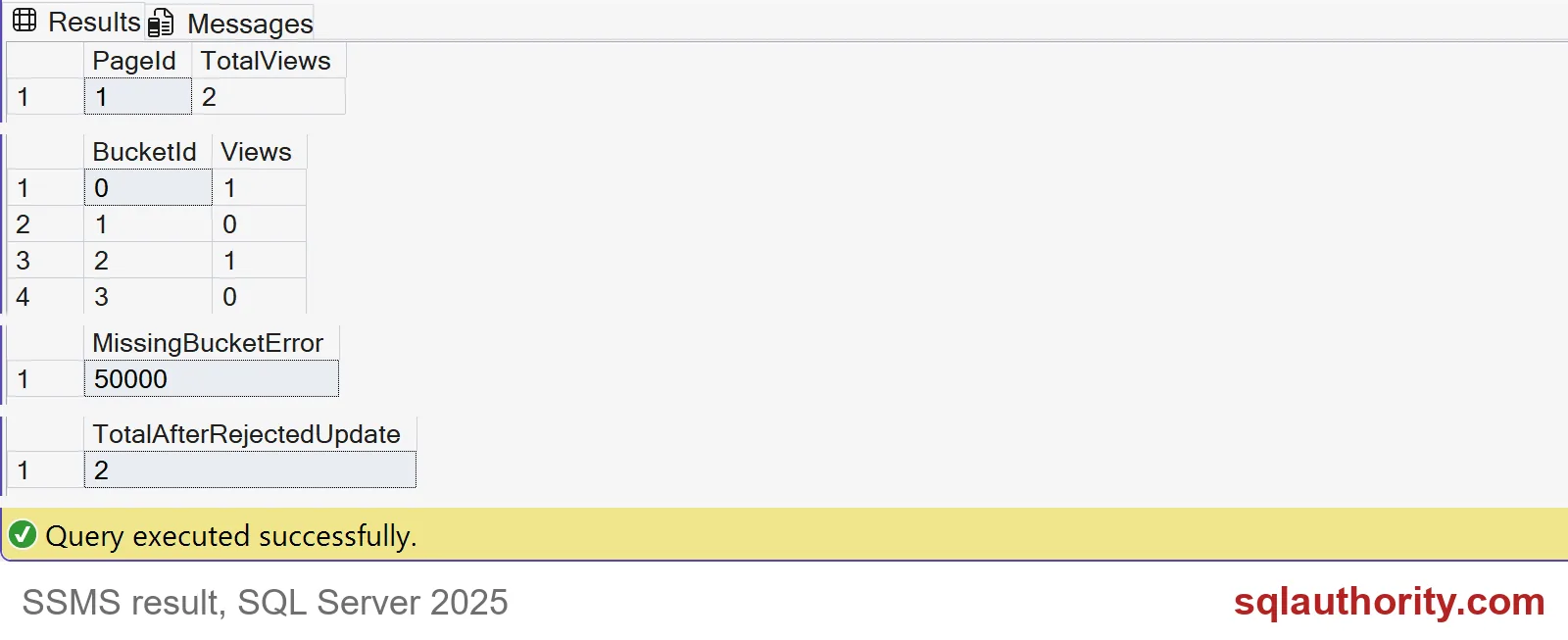
The screenshot shows the results of both blocks. The error is 50000, and the total stays at 2. A failed counter write must never be reported as a successful view.
Look at the locks
I can’t show two visitors waiting in one query window, but I can show what they would fight over. The block below updates a single-row counter twice and counts the distinct key locks held. Then it updates two buckets and counts again. Each transaction rolls back.
DROP TABLE IF EXISTS dbo.PageViewSingle;
CREATE TABLE dbo.PageViewSingle (PageId int NOT NULL PRIMARY KEY, Views bigint NOT NULL);
INSERT dbo.PageViewSingle (PageId, Views) VALUES (1, 0);

DECLARE @Locks TABLE (Design varchar(30), DistinctKeyLocks int);

BEGIN TRANSACTION;
UPDATE dbo.PageViewSingle SET Views = Views + 1 WHERE PageId = 1;
UPDATE dbo.PageViewSingle SET Views = Views + 1 WHERE PageId = 1;
INSERT @Locks
SELECT 'One counter row', COUNT(DISTINCT resource_description)
FROM sys.dm_tran_locks
WHERE request_session_id = @@SPID AND resource_database_id = DB_ID() AND resource_type = N'KEY';
ROLLBACK TRANSACTION;

BEGIN TRANSACTION;
UPDATE dbo.PageViewBuckets SET Views = Views + 1 WHERE PageId = 1 AND BucketId = 0;
UPDATE dbo.PageViewBuckets SET Views = Views + 1 WHERE PageId = 1 AND BucketId = 1;
INSERT @Locks
SELECT 'Two buckets', COUNT(DISTINCT resource_description)
FROM sys.dm_tran_locks
WHERE request_session_id = @@SPID AND resource_database_id = DB_ID() AND resource_type = N'KEY';
ROLLBACK TRANSACTION;

SELECT Design, DistinctKeyLocks FROM @Locks ORDER BY Design DESC;
The single row has one key lock, however many times it is updated. The two buckets have two different key locks. A visitor holding bucket 0 does not block a visitor who needs bucket 1. Two visitors sending updates to one row always do.

Rows can still share a page
Different row locks are only half of the story. Small rows sit together on one 8 KB page, and sessions also take short latches on the page itself. Count the pages that hold our four buckets, and compare with a copy whose rows are padded.
DROP TABLE IF EXISTS dbo.PageViewPadded;
CREATE TABLE dbo.PageViewPadded (
    PageId   int    NOT NULL,
    BucketId int    NOT NULL,
    Views    bigint NOT NULL,
    Padding  char(7000) NOT NULL DEFAULT '',
    PRIMARY KEY (PageId, BucketId));
INSERT dbo.PageViewPadded (PageId, BucketId, Views)
VALUES (1, 0, 0), (1, 1, 0), (1, 2, 0), (1, 3, 0);

SELECT 'Compact rows' AS Design, COUNT(DISTINCT c.page_id) AS PagesUsed
FROM dbo.PageViewBuckets AS b CROSS APPLY sys.fn_PhysLocCracker(%%physloc%%) AS c
UNION ALL
SELECT 'Padded rows', COUNT(DISTINCT c.page_id)
FROM dbo.PageViewPadded AS b CROSS APPLY sys.fn_PhysLocCracker(%%physloc%%) AS c;
The compact buckets all live on 1 page. The padded ones take 4 pages, one each. Padding spends about 7 KB per bucket to give every bucket its own page, so use it only for a counter that is truly hot.
Decide what the number means
Buckets change how you count, not what you count. A live sum and a nightly summary give different freshness. Decide whether a retried request counts twice. Test with real concurrent sessions before you pick a bucket count. And please keep this trick for metrics like page views, not for money. A balance needs a ledger. Now remove the demo tables.
DROP TABLE IF EXISTS dbo.PageViewPadded;
DROP TABLE IF EXISTS dbo.PageViewSingle;
DROP TABLE IF EXISTS dbo.PageViewBuckets;
Spread the writes, but keep the counting rule in one place.
A view counter is not a money ledger, it is a metric with defined freshness.
Published by Pinal Dave on SQLAuthority. More of my work at pinaldave.com.
Discover more from SQL Authority with Pinal Dave
Subscribe to get the latest posts sent to your email.


1 Comment. Leave new
Congratulations Pinal.. Salute your dedication and passion to write every day for past 6.5 yrs (be it ur marriage or daughter born), and share useful sql server knowledge to community worldwide.. i have not followed your blog daily but any of my sql server question leads to your blog and i am always certain that I will find answer through ur blog.