
While preparing for a demo for an upcoming session, I came across an error which I didn’t see earlier. Here is the error in the UI and it is related to Backup Log Operation. The error said the file cannot be reused until after the next BACKUP LOG operation.
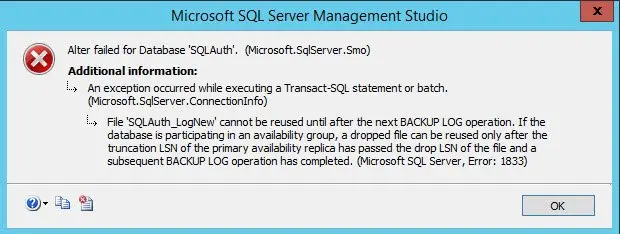
I am also trying to add a file to the database using below command.
USE [master]
GO
ALTER DATABASE [SQLAuth] ADD FILE ( NAME = N'SQLAuth_LogNew', FILENAME = N'F:\DATA\SQLAuth_LogNew.ndf' , SIZE = 8192KB , FILEGROWTH = 65536KB ) TO FILEGROUP [PRIMARY]
GO
And it also failed with following error.
If I change the file name, it works. As mentioned in error message I performed a log backup, and I was able to add the file again.
ROOT CAUSE
While working yesterday, I already added the file and dropped it. As per error message, if I need to reuse the same logical name of the database file, I must take a log backup. Here is the simple reproduction of the error.
CREATE DATABASE [DropFileTest]
GO
USE [master]
GO
-- take a full backup to make it real full else it would act as simple.
BACKUP DATABASE [DropFileTest] TO  DISK = N'DropFileTest.bak'
GO
-- add a new LDF file
USE [master]
GO
ALTER DATABASE [DropFileTest] ADD LOG FILE ( NAME = N'NewLDF',
FILENAME = N'F:\LOG\NewLDF.ldf' , SIZE = 8192KB , FILEGROWTH = 65536KB )
GO
-- reomve the file.
USE [DropFileTest]
GO
ALTER DATABASE [DropFileTest]  REMOVE FILE [NewLDF]
GO
-- Adding same file again and it should fail.
USE [master]
GO
ALTER DATABASE [DropFileTest] ADD LOG FILE ( NAME = N'NewLDF',
FILENAME = N'F:\LOG\NewLDF.ldf' , SIZE = 8192KB , FILEGROWTH = 65536KB )
GO
If you run above, you can notice the same error.
WORKAROUND/FIX
As mentioned in the error message, take a transaction log backup of the database. In the above demo script, we can do below before adding a file and it should work.
BACKUP LOG [DropFileTest] TO  DISK = N'DropFileTest.trn'
GO
-- Adding same file again and it should work this time.
USE [master]
GO
ALTER DATABASE [DropFileTest] ADD LOG FILE ( NAME = N'NewLDF', FILENAME = N'F:\LOG\NewLDF.ldf' )
GO
Have you seen such interesting error?
Published by Pinal Dave on SQLAuthority. More of my work at pinaldave.com.
Discover more from SQL Authority with Pinal Dave
Subscribe to get the latest posts sent to your email.



1 Comment. Leave new
Hi,
Cannot Understand, How the TRN backup have resolved the problem, I mean to ask how it internally works, what Principle is used to resolved it. ?