Column order in CREATE TABLE rarely changes how much space a row takes, and it almost never makes a query faster. SQL Server stores fixed-width columns first and variable-width columns after them, whatever order you typed. There is one small exception, and it is worth knowing before you plan a rebuild.

The question a junior DBA asks
Here is a conversation I have had more than once. A junior DBA looks at a wide table and says, “The important columns are at the bottom. Can we put them first? Maybe rows will get smaller.” Someone suggests a table rebuild over the weekend.
Before anyone books a weekend, measure. A rebuild of a large table is real work, and the reward may be zero. Let me show you with two small tables that hold the same two rows. They differ in one way only: the order in which I declare the columns.
DROP TABLE IF EXISTS dbo.OrderA;
DROP TABLE IF EXISTS dbo.OrderB;

CREATE TABLE dbo.OrderA (Id int PRIMARY KEY, Label varchar(100), Amount int NOT NULL);
CREATE TABLE dbo.OrderB (Label varchar(100), Amount int NOT NULL, Id int PRIMARY KEY);

INSERT dbo.OrderA (Id, Label, Amount) VALUES (1, 'alpha', 10), (2, 'beta', 20);
INSERT dbo.OrderB (Id, Label, Amount) SELECT Id, Label, Amount FROM dbo.OrderA;
Measure the real record size
Don’t guess byte layouts from the CREATE TABLE text. Ask SQL Server. The DETAILED mode of sys.dm_db_index_physical_stats reads the leaf pages and reports the size of the stored records. I filter to index level 0 and in-row data, because that is where the rows live.
SELECT OBJECT_NAME(object_id) AS TableName, min_record_size_in_bytes, max_record_size_in_bytes,
       avg_record_size_in_bytes, page_count
FROM sys.dm_db_index_physical_stats(DB_ID(), OBJECT_ID(N'dbo.OrderA'), 1, NULL, 'DETAILED')
WHERE index_level = 0 AND alloc_unit_type_desc = N'IN_ROW_DATA';

SELECT OBJECT_NAME(object_id) AS TableName, min_record_size_in_bytes, max_record_size_in_bytes,
       avg_record_size_in_bytes, page_count
FROM sys.dm_db_index_physical_stats(DB_ID(), OBJECT_ID(N'dbo.OrderB'), 1, NULL, 'DETAILED')
WHERE index_level = 0 AND alloc_unit_type_desc = N'IN_ROW_DATA';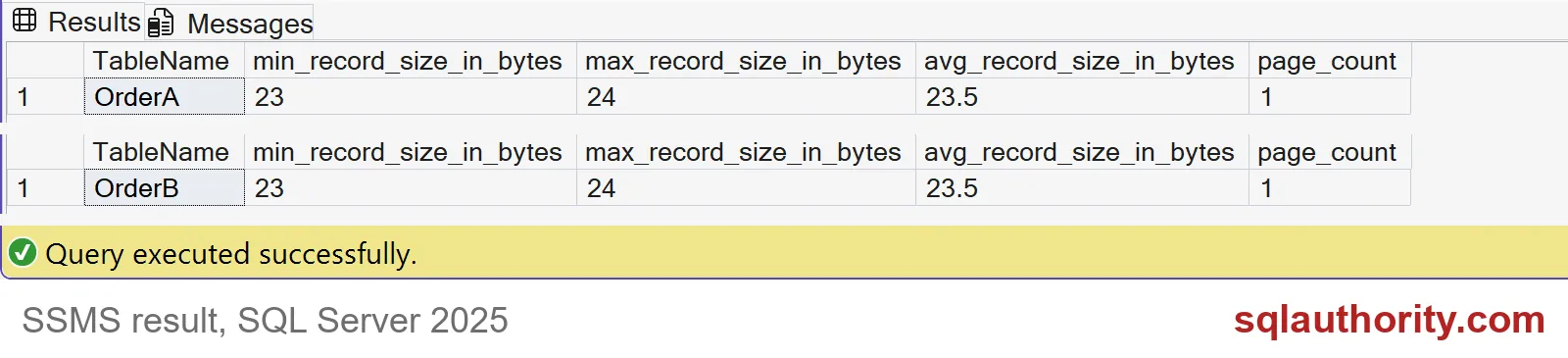
Both tables report the same numbers: a smallest record of 23 bytes, a largest of 24, and an average of 23.5. Both fit on one page. The longer record belongs to ‘alpha’, the shorter to ‘beta’, one character apart.
So where did the rest of the bytes go? The two integers take 8 bytes. The text takes 4 or 5. The remaining 11 bytes are bookkeeping. That means a record header, a column count, a null bitmap, and an offset for the varchar. That bookkeeping is the same whichever column you typed first.
The one case where order does matter
Each variable-width column needs a 2-byte offset entry, but with a twist. SQL Server can skip the offsets for variable columns at the end of the row that are NULL. So a NULL in the middle costs two bytes, and a NULL at the end costs nothing.
Let me prove it. Both tables below have one required varchar and two optional ones that stay NULL. The only change is where the required column sits.
DROP TABLE IF EXISTS dbo.NullLast;
DROP TABLE IF EXISTS dbo.NullFirst;

CREATE TABLE dbo.NullLast  (Id int PRIMARY KEY, Name varchar(100) NOT NULL, Note varchar(100) NULL, Memo varchar(100) NULL);
CREATE TABLE dbo.NullFirst (Id int PRIMARY KEY, Note varchar(100) NULL, Memo varchar(100) NULL, Name varchar(100) NOT NULL);

INSERT dbo.NullLast  (Id, Name) VALUES (1, 'alpha'), (2, 'beta');
INSERT dbo.NullFirst (Id, Name) VALUES (1, 'alpha'), (2, 'beta');

SELECT OBJECT_NAME(object_id) AS TableName, min_record_size_in_bytes, max_record_size_in_bytes
FROM sys.dm_db_index_physical_stats(DB_ID(), OBJECT_ID(N'dbo.NullLast'), 1, NULL, 'DETAILED')
WHERE index_level = 0 AND alloc_unit_type_desc = N'IN_ROW_DATA';

SELECT OBJECT_NAME(object_id) AS TableName, min_record_size_in_bytes, max_record_size_in_bytes
FROM sys.dm_db_index_physical_stats(DB_ID(), OBJECT_ID(N'dbo.NullFirst'), 1, NULL, 'DETAILED')
WHERE index_level = 0 AND alloc_unit_type_desc = N'IN_ROW_DATA';
NullLast shows 19 and 20 bytes. NullFirst shows 23 and 24. That is 4 bytes saved per row, which is two offset entries. Put the columns that are often NULL last, and the row shrinks.

What that means for your rebuild
Four bytes per row sounds tiny, and for most tables it is. It adds up only when you have hundreds of millions of rows and several sparse varchar columns. Even then, you cannot reorder columns in place. You need a new table, a data copy, and a rename. Anything that uses SELECT * or column positions can break.
Index key order is a different matter. It decides sort order and which queries can seek. Do not confuse it with declaration order. My advice is plain: measure the table you actually have, and rebuild only if the numbers justify it.
To check your own table, point the same query at it, and compare against a copy with the columns reordered. Use the same data, the same compression and the same indexes, or the comparison means nothing. The last block removes the demo tables.
DROP TABLE IF EXISTS dbo.OrderA;
DROP TABLE IF EXISTS dbo.OrderB;
DROP TABLE IF EXISTS dbo.NullLast;
DROP TABLE IF EXISTS dbo.NullFirst;
Next time someone wants to reorder columns, ask for a measurement first.
Column order is not a storage tuning knob, it is a schema choice.
Published by Pinal Dave on SQLAuthority. More of my work at pinaldave.com.
Discover more from SQL Authority with Pinal Dave
Subscribe to get the latest posts sent to your email.