Masked values in SQL Server change what a restricted user sees, not what the query engine compares. Filtering and sorting still use the real data. So a user who can write their own queries can learn a lot about a column that displays as zeros.

The question from the security review
Someone in a review meeting says, “We turned on masking for the salary column, so it is protected, right?” It is a fair hope. The mask does its job on the screen. But a mask is a presentation rule, and a person with SELECT permission on the table can do far more than look at the screen.
Let me show you with three employees and one restricted user. The demo creates a table and a user, and the last block removes both.
Set up a masked column
The Salary column gets the default mask. The user, ReportReader, can read the table but has no UNMASK permission. I also read the table as myself first, so you can see the real numbers.
DROP TABLE IF EXISTS dbo.EmployeePay;
DROP USER IF EXISTS ReportReader;
GO
CREATE TABLE dbo.EmployeePay (
    Id     int PRIMARY KEY,
    Salary decimal(12,2) MASKED WITH (FUNCTION = 'default()') NOT NULL);

INSERT dbo.EmployeePay (Id, Salary) VALUES (1, 80000), (2, 40000), (3, 120000);

CREATE USER ReportReader WITHOUT LOGIN;
GRANT SELECT ON dbo.EmployeePay TO ReportReader;

SELECT Id, Salary FROM dbo.EmployeePay ORDER BY Id;
As the table owner, I see 80000, 40000 and 120000. That is the data the mask sits on top of.
See what the restricted user sees
Now read the same table as ReportReader. EXECUTE AS lets me switch identity inside the session, and REVERT switches back.
EXECUTE AS USER = N'ReportReader';
SELECT Id, Salary FROM dbo.EmployeePay ORDER BY Id;
REVERT;
Every salary shows as 0.00. The mask works, and the Id column is not masked at all. So far, so good.
Ask questions about the hidden values
Here is the catch. The WHERE clause and the ORDER BY run against the real salaries. Let the restricted user ask three questions.
EXECUTE AS USER = N'ReportReader';
SELECT Id, Salary FROM dbo.EmployeePay WHERE Salary >= 80000 ORDER BY Id;
SELECT COUNT_BIG(*) AS QualifyingRows FROM dbo.EmployeePay WHERE Salary >= 80000;
SELECT Id, Salary FROM dbo.EmployeePay ORDER BY Salary, Id;
REVERT;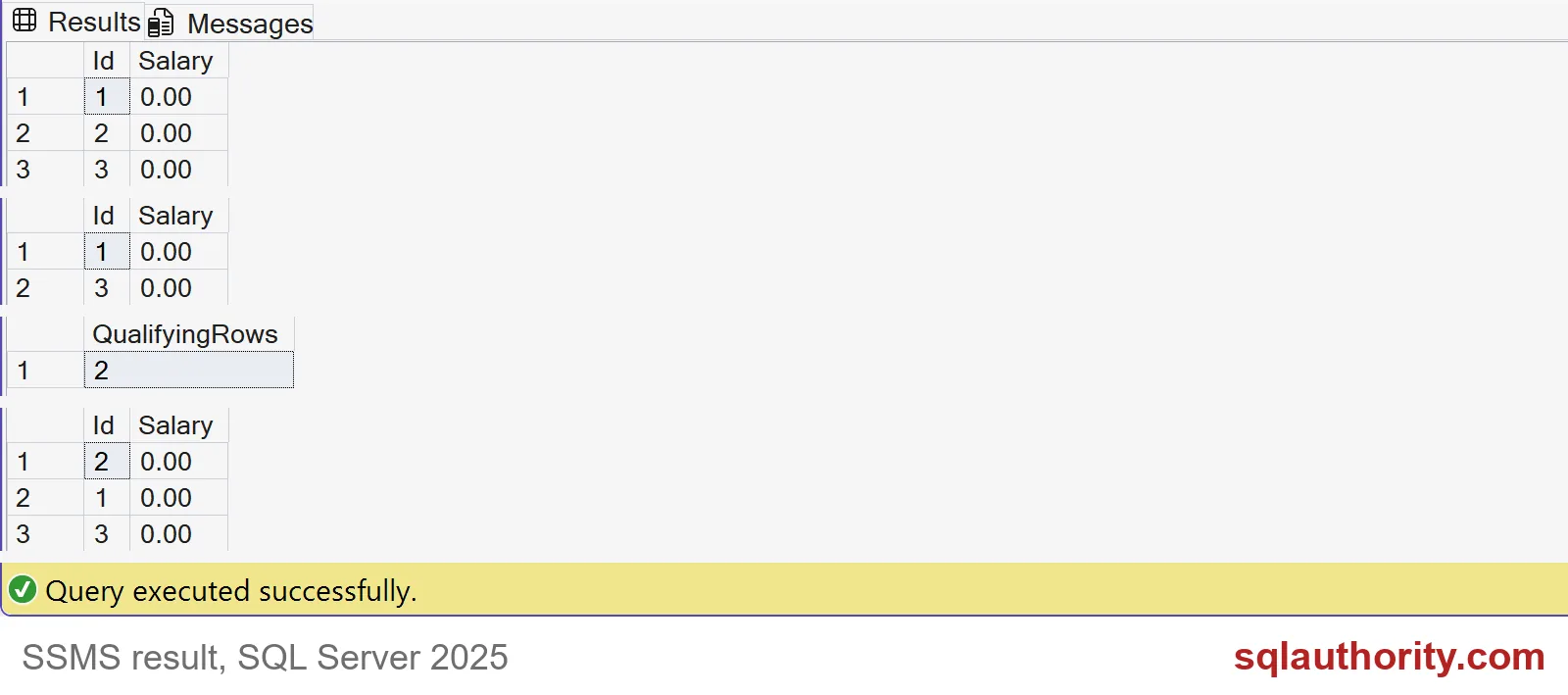
The screenshot shows all four result sets, including the one from the previous block. The threshold query returns IDs 1 and 3, and the count says 2. The sorted query returns IDs 2, 1 and 3, which is lowest salary to highest. Every salary still displays as zero, yet the user now knows who earns at least 80000 and who is lowest.
Guess the exact value
A user can narrow this down further. Ask for an exact value and see whether any row comes back.
EXECUTE AS USER = N'ReportReader';
SELECT Id FROM dbo.EmployeePay WHERE Salary = 40000;
SELECT Id FROM dbo.EmployeePay WHERE Salary = 40001;
REVERT;
The first query returns Id 2. The second returns nothing. With a handful of guesses, anyone can pin down a number, and a short script does it in seconds. The mask never stood in the way.

Put the boundary in permissions
If a user should never ask about salaries, don’t give SELECT on the table. Give SELECT on a view that exposes only the columns they may use. The view and the table have the same owner, so the user needs no rights on the table at all.
CREATE VIEW dbo.EmployeeList AS SELECT Id FROM dbo.EmployeePay;
GO
REVOKE SELECT ON dbo.EmployeePay FROM ReportReader;
GRANT SELECT ON dbo.EmployeeList TO ReportReader;

EXECUTE AS USER = N'ReportReader';
SELECT Id FROM dbo.EmployeeList ORDER BY Id;
BEGIN TRY
    SELECT Id FROM dbo.EmployeePay WHERE Salary = 40000;
END TRY
BEGIN CATCH
    SELECT ERROR_NUMBER() AS ErrorNumber;
END CATCH;
BEGIN TRY
    EXEC (N'SELECT Id FROM dbo.EmployeeList WHERE Salary = 40000;');
END TRY
BEGIN CATCH
    SELECT ERROR_NUMBER() AS ErrorNumber;
END CATCH;
REVERT;
The user can list the Ids. Asking the table directly fails with error 229, permission denied. Asking the view about Salary fails with error 207, because that column does not exist there. The probing is over.
Keep masking for what it does well: it stops casual exposure in reports and screenshots. Then test your design the way I did. Switch to the weakest user, and try to ask what they should not know. Last, clean up.
DROP VIEW IF EXISTS dbo.EmployeeList;
DROP TABLE IF EXISTS dbo.EmployeePay;
DROP USER IF EXISTS ReportReader;
Next time someone says “it’s masked”, ask what the user is allowed to query.
A masked column is not a protected column, it is a display rule.
Published by Pinal Dave on SQLAuthority. More of my work at pinaldave.com.
Discover more from SQL Authority with Pinal Dave
Subscribe to get the latest posts sent to your email.