Grandfather-father-son retention keeps a few recent daily backups, a few weekly ones and a few monthly ones. This post builds that keep list with plain T-SQL, as a read-only list. It deletes nothing, because a history row is not a file.

Why one kind of retention is not enough
Picture a Monday morning. Someone finds that a table was damaged three weeks ago. Your server keeps only the last seven daily backups, so every copy that still has good data is gone.
That is why people mix three tiers. The sons are the recent dailies. The fathers are one backup per week. The grandfathers are one backup per month. You keep many small steps close to today and a few big steps far back.
Make up a small backup history
I use invented timestamps in a temp table, so no real history or file is touched. Seven backups, spread over two months. Notice that backups 4 and 5 finished on the same day. Week start is the Monday of each ISO week.
DROP TABLE IF EXISTS #KeepList;
DROP TABLE IF EXISTS #BackupHistory;

CREATE TABLE #BackupHistory (BackupId int PRIMARY KEY, FinishedAt datetime2);

INSERT #BackupHistory VALUES
(1, '2026-07-31T21:00:00'), (2, '2026-08-31T21:00:00'), (3, '2026-09-13T21:00:00'),
(4, '2026-09-20T20:00:00'), (5, '2026-09-20T22:00:00'),
(6, '2026-09-24T21:00:00'), (7, '2026-09-25T21:00:00');
SELECT BackupId, FinishedAt, DATETRUNC(iso_week, FinishedAt) AS WeekStart
FROM #BackupHistory
ORDER BY FinishedAt, BackupId;Rank inside each day, week and month
The idea is simple. Put each backup into a day, a week and a month. Within each bucket, the newest backup wins. A tie on finish time is broken by BackupId. Then count the buckets from the newest backwards and keep the top few: 3 days, 2 weeks, 2 months.
One rule matters: only completed weeks and months count. The current week and the current month are still in progress, so they get no weekly or monthly backup yet. I pin the as-of date to September 26 so the demo gives the same answer every time. In real use it would be today.
DECLARE @asOf datetime2 = '2026-09-26T00:00:00';

WITH buckets AS (
    SELECT *, DATETRUNC(day, FinishedAt)      AS DayBucket,
              DATETRUNC(iso_week, FinishedAt) AS WeekBucket,
              DATETRUNC(month, FinishedAt)    AS MonthBucket
    FROM #BackupHistory WHERE FinishedAt < @asOf
), ranked AS (
    SELECT *,
        ROW_NUMBER() OVER (PARTITION BY DayBucket   ORDER BY FinishedAt DESC, BackupId DESC) AS d,
        ROW_NUMBER() OVER (PARTITION BY WeekBucket  ORDER BY FinishedAt DESC, BackupId DESC) AS w,
        ROW_NUMBER() OVER (PARTITION BY MonthBucket ORDER BY FinishedAt DESC, BackupId DESC) AS m
    FROM buckets
), reps AS (
    SELECT BackupId, 'Daily' AS Tier, DayBucket AS Bucket FROM ranked WHERE d = 1
    UNION ALL
    SELECT BackupId, 'Weekly', WeekBucket FROM ranked
    WHERE w = 1 AND WeekBucket < DATETRUNC(iso_week, @asOf)
    UNION ALL
    SELECT BackupId, 'Monthly', MonthBucket FROM ranked
    WHERE m = 1 AND MonthBucket < DATETRUNC(month, @asOf)
), positions AS (
    SELECT *, ROW_NUMBER() OVER (PARTITION BY Tier ORDER BY Bucket DESC, BackupId DESC) AS TierPosition
    FROM reps)
SELECT BackupId, Tier, Bucket INTO #KeepList
FROM positions
WHERE TierPosition <= CASE Tier WHEN 'Daily' THEN 3 ELSE 2 END;

SELECT BackupId, Tier, Bucket FROM #KeepList ORDER BY Tier, Bucket DESC, BackupId;
SELECT COUNT(*) AS TierAssignments, COUNT(DISTINCT BackupId) AS DistinctBackups FROM #KeepList;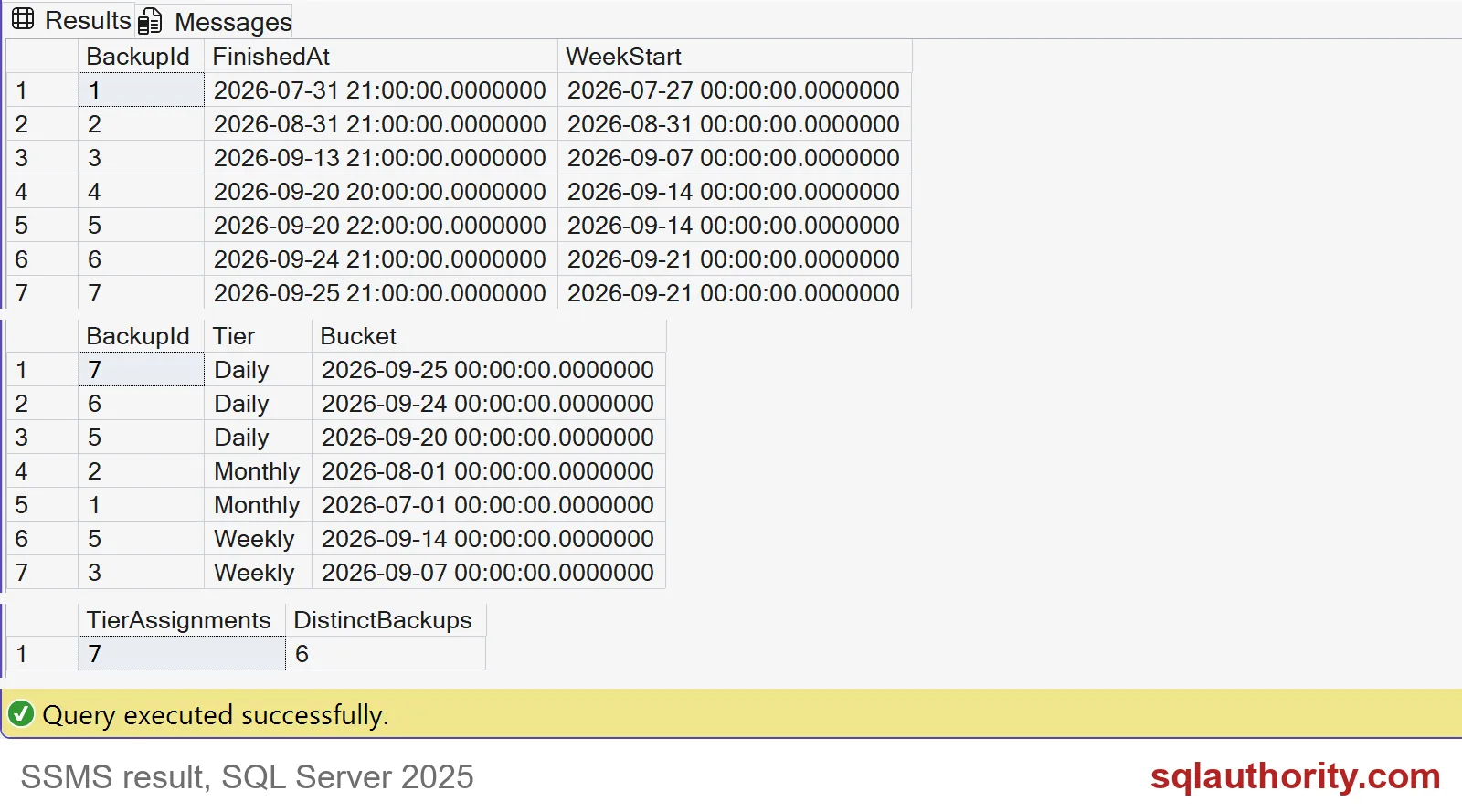

Read the keep list
The daily tier keeps backups 7, 6 and 5. The weekly tier keeps 5 and 3. The monthly tier keeps 2 and 1. That is seven assignments, but only six distinct backups, because backup 5 fills two roles. Do not count tiers when you plan storage. Count distinct backups.
Backup 4 is not on the list. It finished two hours before backup 5 on the same day, so it lost its bucket. Backups 6 and 7 sit in the current week, so they are daily only. Backup 3 is the newest in its week, and backup 2 is the newest in August.
From history rows to real files
In production, the history comes from msdb. This query shows full backups with the file each one was written to. The columns are real, but your rows will differ.
SELECT TOP (5) s.backup_set_id, s.database_name, s.backup_finish_date, m.physical_device_name
FROM msdb.dbo.backupset AS s
JOIN msdb.dbo.backupmediafamily AS m ON m.media_set_id = s.media_set_id
WHERE s.type = 'D'
ORDER BY s.backup_finish_date DESC, s.backup_set_id DESC;
On my test server, several backup sets point to the same file name. Delete that file, and you lose all of them. Never turn the keep list straight into file deletion. History can outlive the files, and one file can hold several backup sets. Check that every file on the list still exists and restores. Protect differential bases, log chains, encryption keys and media shared with other sets. Then clean up the demo.
DROP TABLE IF EXISTS #KeepList;
DROP TABLE IF EXISTS #BackupHistory;
Agree on the recovery dates you promise before you retire any file.
A keep list is not permission to delete, it is a recovery plan to review.
Published by Pinal Dave on SQLAuthority. More of my work at pinaldave.com.
Discover more from SQL Authority with Pinal Dave
Subscribe to get the latest posts sent to your email.