Effective permissions are what a user can do after every GRANT, DENY and REVOKE has been added together. A user collects permissions from direct statements and from every role they belong to. SQL Server combines them with one working rule: a DENY beats a GRANT.
The Sample Setup
A Library schema with two tables, a role named Readers and two users. Nia belongs to Readers. Omar doesn’t. Run this in any test database. Every result in this post comes from SQL Server 2025.
CREATE SCHEMA Library;
GO

CREATE TABLE Library.Books (BookID INT PRIMARY KEY, Title VARCHAR(40) NOT NULL);
CREATE TABLE Library.Loans (LoanID INT PRIMARY KEY, BookID INT NOT NULL, Member VARCHAR(20) NOT NULL);
GO

INSERT INTO Library.Books (BookID, Title) VALUES (1, 'Herb Garden Basics'), (2, 'The Tea Atlas'), (3, 'Map Reading Made Easy');
INSERT INTO Library.Loans (LoanID, BookID, Member) VALUES (1, 2, 'Ravi'), (2, 3, 'Mei');
GO

CREATE ROLE Readers;
CREATE USER Nia WITHOUT LOGIN;
CREATE USER Omar WITHOUT LOGIN;
ALTER ROLE Readers ADD MEMBER Nia;
GO
A Way to Check
Don’t guess what a user can do. Ask SQL Server. HAS_PERMS_BY_NAME returns 1 when the current user holds a permission, and EXECUTE AS makes Nia the current user.
EXECUTE AS USER = 'Nia';
SELECT HAS_PERMS_BY_NAME('Library.Books', 'OBJECT', 'SELECT') AS BooksSelect, HAS_PERMS_BY_NAME('Library.Loans', 'OBJECT', 'SELECT') AS LoansSelect;
REVERT;
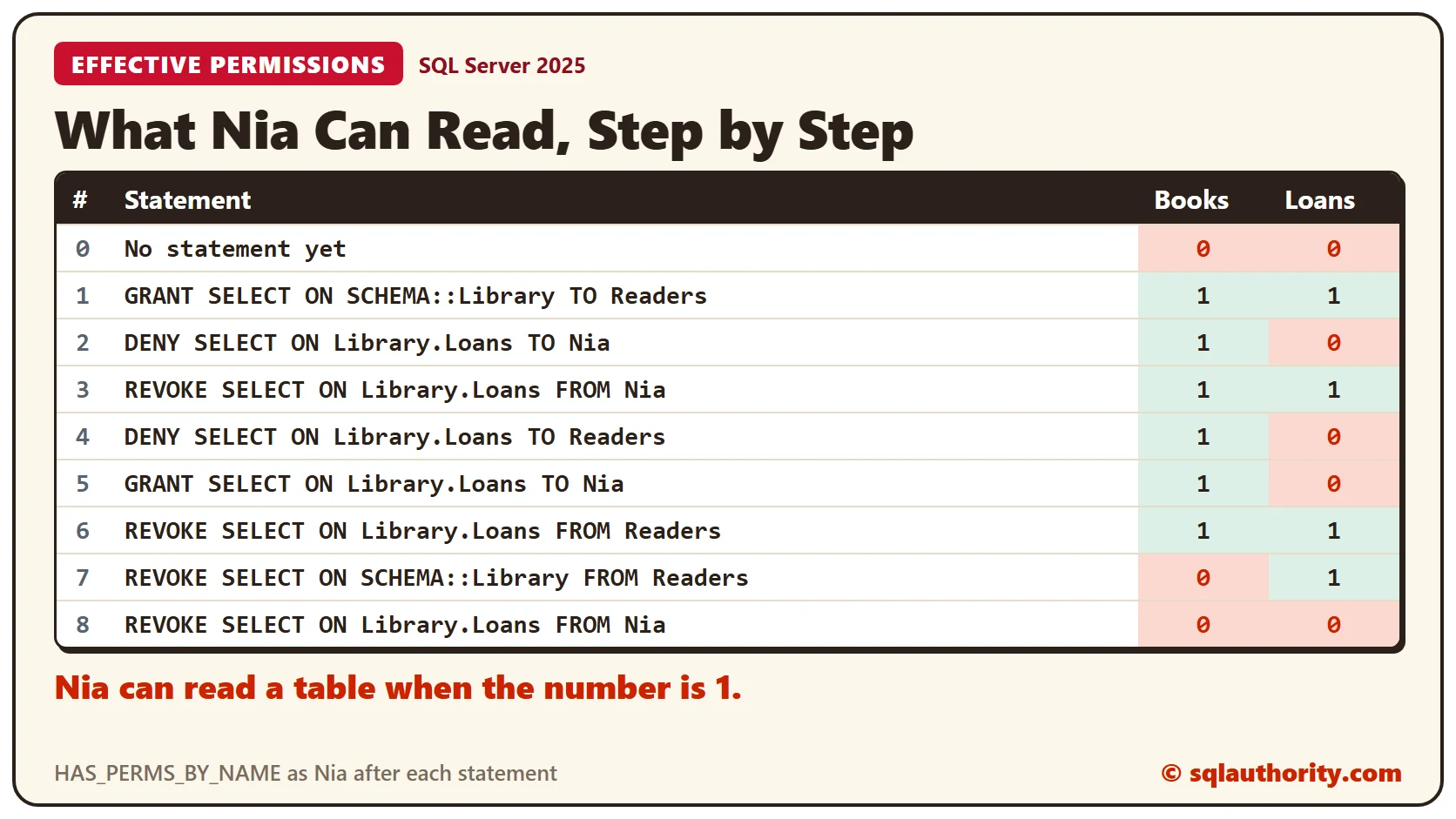
Both columns return 0, because Nia has no permission yet. I run this same query after every step below.
A GRANT Through a Role
Give the SELECT permission on the whole schema to the role, not to Nia.
GRANT SELECT ON SCHEMA::Library TO Readers;The check returns 1 and 1. No statement names Nia. Nia reads both tables because Readers can.
DENY Wins
Now deny SELECT on Loans to Nia directly.
DENY SELECT ON Library.Loans TO Nia;The check returns 1 and 0. Books still works, but a query on Loans fails with message 229, a denied SELECT permission. The role’s GRANT is still in place. The DENY beats it.
REVOKE Erases the DENY
REVOKE doesn’t turn a DENY into a GRANT. It deletes the statement.
REVOKE SELECT ON Library.Loans FROM Nia;The check returns 1 and 1 again. Nia’s DENY is gone, so the role’s GRANT works, and a query on Loans returns 2 rows.
A DENY on the Role Beats a Direct GRANT
It doesn’t matter where the DENY sits. Deny SELECT on Loans to the role, then give Nia a direct GRANT.
DENY SELECT ON Library.Loans TO Readers;

GRANT SELECT ON Library.Loans TO Nia;
The check returns 1 and 0 after the DENY, and still 1 and 0 after the direct GRANT. A DENY on a role reaches every member, and it beats a GRANT given to one of them.
REVOKE Removes Only What You Name
Undo the steps one by one. Revoking the DENY from the role brings Nia back to 1 and 1.
REVOKE SELECT ON Library.Loans FROM Readers;Now revoke the role’s schema GRANT.
REVOKE SELECT ON SCHEMA::Library FROM Readers;The check returns 0 and 1. Books is closed, but Loans stays open, because Nia’s own direct GRANT is still there. Revoke it too, and the check ends at 0 and 0.
REVOKE SELECT ON Library.Loans FROM Nia;CONTROL With One DENY
How do you take away one ability from a user who can do everything? Give Omar CONTROL on the schema, then deny only DELETE on Books.
GRANT CONTROL ON SCHEMA::Library TO Omar;

DENY DELETE ON Library.Books TO Omar;
sys.fn_my_permissions lists what the current user holds on a securable. This query keeps four permissions to keep the list short.
EXECUTE AS USER = 'Omar';
SELECT DISTINCT permission_name FROM sys.fn_my_permissions('Library.Books', 'OBJECT') WHERE permission_name IN ('SELECT', 'INSERT', 'UPDATE', 'DELETE') ORDER BY permission_name;
REVERT;
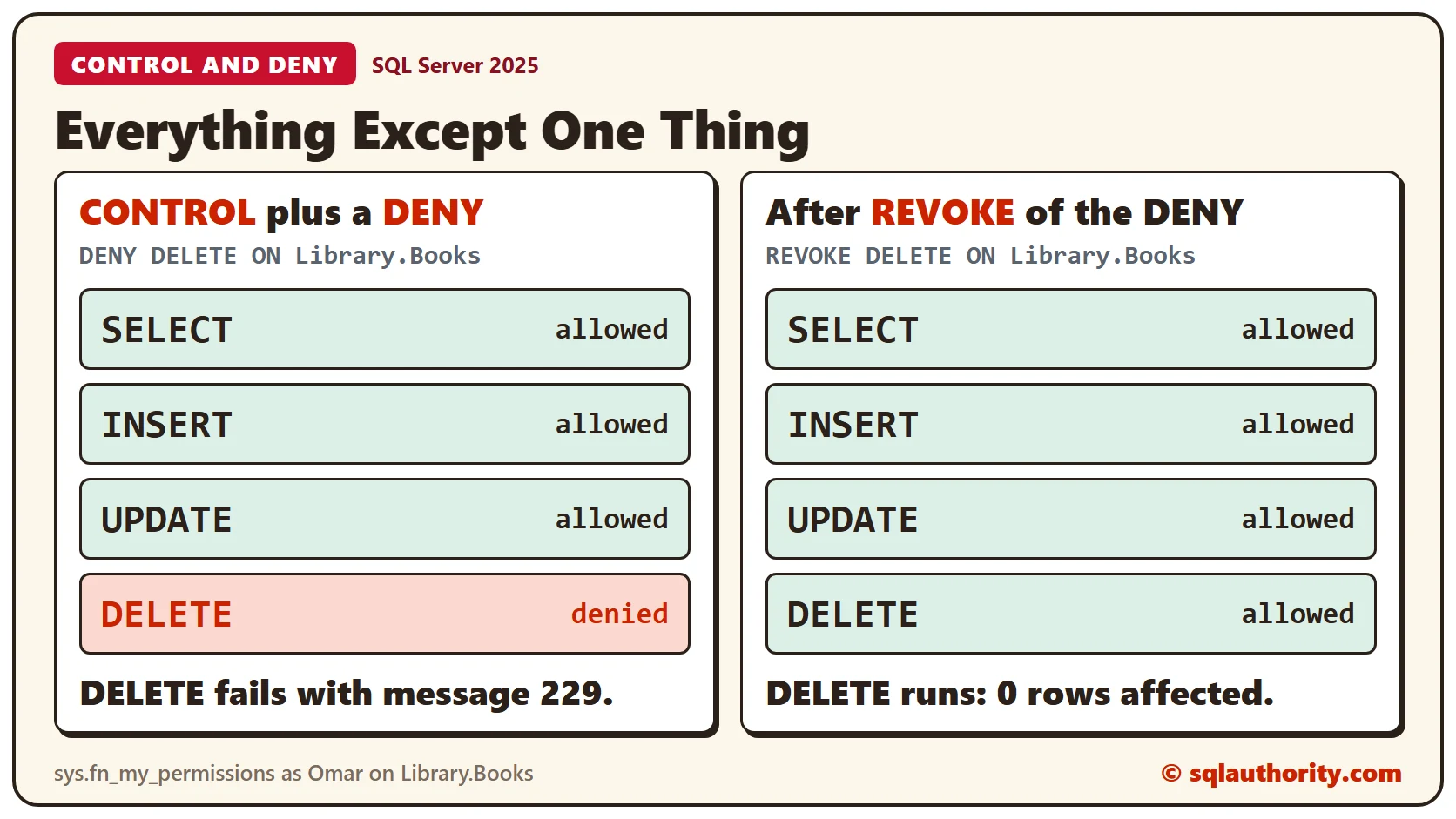
Omar holds INSERT, SELECT and UPDATE, but not DELETE. A real delete as Omar fails with message 229.
EXECUTE AS USER = 'Omar';
DELETE FROM Library.Books WHERE BookID = 0;
REVERT;
Now revoke the DENY and ask again.
REVOKE DELETE ON Library.Books FROM Omar;The list shows DELETE, INSERT, SELECT and UPDATE, and the delete runs and reports 0 rows affected. To remove one ability and keep the rest, use DENY. To give it back, REVOKE the DENY.
Clean Up
Remove the sample objects when you finish.
DROP USER Omar;
DROP USER Nia;
DROP ROLE Readers;
DROP TABLE Library.Loans;
DROP TABLE Library.Books;
DROP SCHEMA Library;
What to Remember
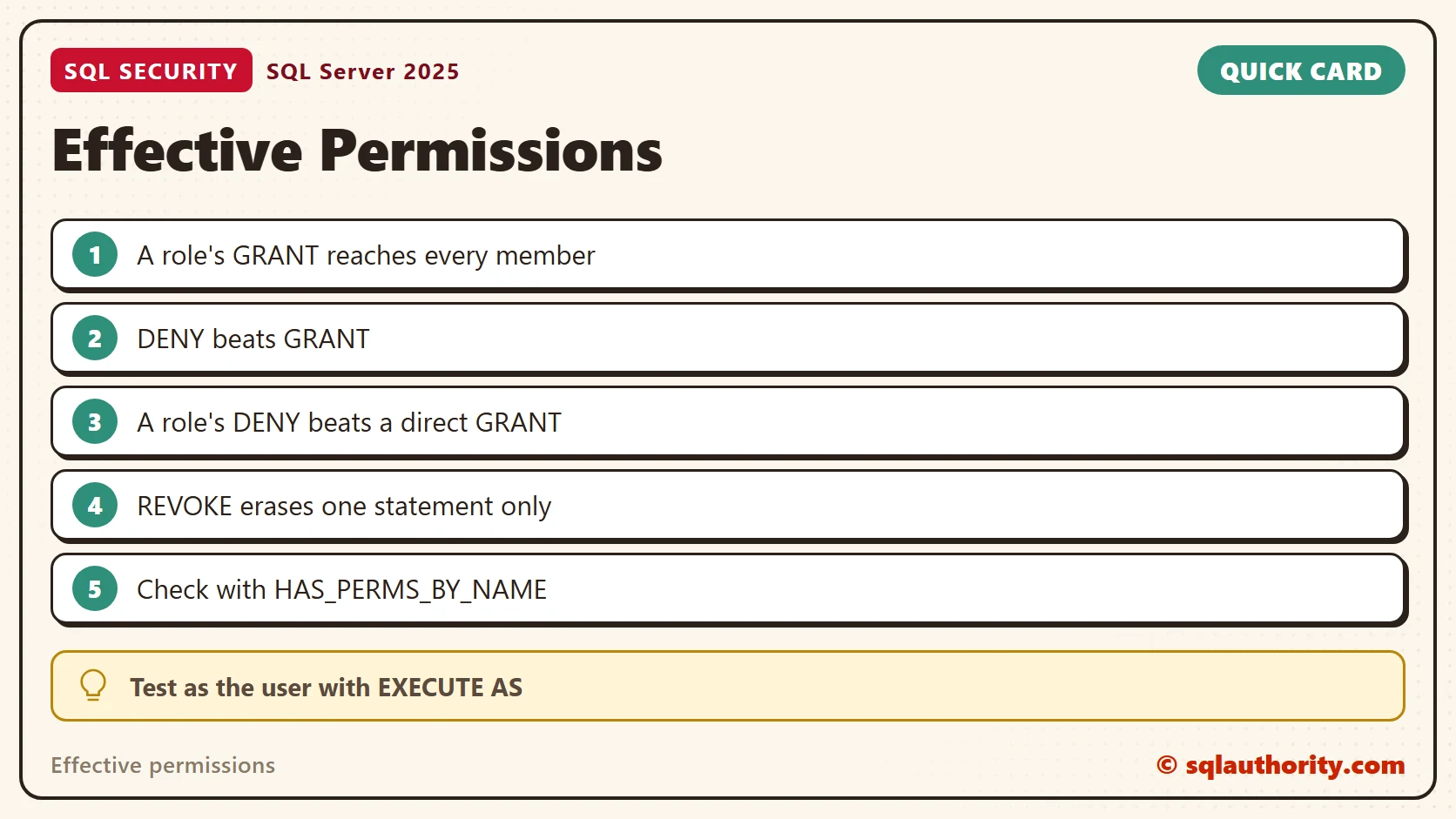
A role’s GRANT reaches every member. A DENY beats a GRANT, wherever it sits. REVOKE erases one statement, so what is left depends on every other statement. One documented exception: a column-level GRANT overrides a table-level DENY. Check the result as the user with EXECUTE AS before you rely on it.
To go further, read Securables and Principals in SQL Server: Who Gets Which Permission, Database Roles: Give Permissions to Groups, Not People and Permissions I Have in SQL Server: Check Database, Server and Object Access.
Effective permissions are not what you granted, they are what is left after every DENY.
Published by Pinal Dave on SQLAuthority. More of my work at pinaldave.com.
Discover more from SQL Authority with Pinal Dave
Subscribe to get the latest posts sent to your email.