
The permissions I have in SQL Server depend on my current database and security context. Checking them is one of my first steps after I get access to a server. I want enough permission to do my work, without unnecessary access.

Build a Small Test First
Reading permissions is easier when you know the right answers. In a scratch database I created two tables, a user without a login, a role and four permission changes. Nothing here needs a real login, so nothing leaks into the server.
CREATE TABLE dbo.Menu (MenuId int PRIMARY KEY, ItemName varchar(50) NOT NULL, Price decimal(6,2) NOT NULL);
CREATE TABLE dbo.Orders (OrderId int PRIMARY KEY, MenuId int NOT NULL, Qty int NOT NULL);
INSERT INTO dbo.Menu VALUES (1, 'Paneer wrap', 7.50), (2, 'Mango lassi', 3.25);
CREATE USER ReportUser WITHOUT LOGIN;
CREATE ROLE MenuEditors;
ALTER ROLE MenuEditors ADD MEMBER ReportUser;
GRANT SELECT ON dbo.Menu TO ReportUser;
GRANT INSERT, UPDATE ON dbo.Menu TO MenuEditors;
GRANT SELECT ON OBJECT::dbo.Orders(OrderId, Qty) TO ReportUser;
DENY UPDATE ON dbo.Menu(Price) TO ReportUser;
Start With the Connection
Select the database you want to check, then run this query. It names the database and the account context. Under impersonation the original login stays visible, and the current login can change.
EXECUTE AS USER = 'ReportUser';
SELECT DB_NAME() AS DatabaseName,
       ORIGINAL_LOGIN() AS OriginalLogin,
       SUSER_SNAME() AS CurrentLogin,
       USER_NAME() AS DatabaseUser;
ORIGINAL_LOGIN() still returned my own login. SUSER_SNAME() returned a long SID string, because this user has no login. USER_NAME() returned ReportUser. I ran every check below in that context and ended it with REVERT.
List the Permissions I Have in This Database
This query lists effective permissions at database scope. It includes permissions that arrive through roles.
SELECT entity_name, subentity_name, permission_name
FROM sys.fn_my_permissions(NULL, 'DATABASE')
ORDER BY permission_name;
For ReportUser it returned only CONNECT and two VIEW ANY COLUMN definition rows. The user can read a table, yet the list shows no SELECT. Database scope is not an inventory of every table and column, so I never stop here.
Check Server and Object Permissions Separately
For server permissions, run the next query from your normal login. Impersonating a database user limits the answer to that database. In my test the list came back empty, and that says nothing about an account’s real server access.
SELECT permission_name
FROM sys.fn_my_permissions(NULL, 'SERVER')
ORDER BY permission_name;
To inspect one object, pass its schema-qualified name. Replace dbo.Menu with the table or view you need to investigate.
SELECT entity_name, subentity_name, permission_name
FROM sys.fn_my_permissions(N'dbo.Menu', 'OBJECT')
ORDER BY subentity_name, permission_name;
The result showed INSERT and SELECT on the table and SELECT on all three columns. UPDATE appeared for MenuId and ItemName but not for Price. The column DENY removed it, and the table-level UPDATE disappeared with it. For columns, subentity_name holds the column name.
Check One Permission Directly
HAS_PERMS_BY_NAME answers one specific question and changes nothing. A result of 1 means the permission is effective. A result of 0 means it isn’t.
SELECT HAS_PERMS_BY_NAME(DB_NAME(), 'DATABASE', 'CREATE TABLE') AS CanCreateTable,
       HAS_PERMS_BY_NAME(DB_NAME(), 'DATABASE', 'ALTER ANY USER') AS CanAlterUsers,
       HAS_PERMS_BY_NAME(N'dbo.Menu', 'OBJECT', 'SELECT') AS CanSelectMenu,
       HAS_PERMS_BY_NAME(N'dbo.Menu', 'OBJECT', 'UPDATE') AS CanUpdateMenu,
       HAS_PERMS_BY_NAME(N'dbo.Orders', 'OBJECT', 'SELECT') AS CanSelectOrdersTable;
The answers were 0, 0, 1, 0 and 0. The last 0 is a good example: the user reads two columns of dbo.Orders but has no table-level SELECT. Ask at column level when the object has column permissions.
SELECT HAS_PERMS_BY_NAME(N'dbo.Menu', 'OBJECT', 'UPDATE', N'Price', 'COLUMN') AS CanUpdatePrice,
       HAS_PERMS_BY_NAME(N'dbo.Menu', 'OBJECT', 'UPDATE', N'ItemName', 'COLUMN') AS CanUpdateItemName,
       HAS_PERMS_BY_NAME(DB_NAME(), 'DATABASE', 'CREATE TABEL') AS MisspelledPermission,
       HAS_PERMS_BY_NAME(N'dbo.NoSuchTable', 'OBJECT', 'SELECT') AS MissingTable,
       IS_MEMBER('MenuEditors') AS InMenuEditors,
       IS_MEMBER('db_owner') AS InDbOwner;
Price returned 0 and ItemName returned 1. A misspelled permission name returned NULL, so don’t turn NULL into zero without looking. A missing table returned 0, which looks the same as a denied one. Confirm the object name before you trust a 0.
REVERT;
SELECT USER_NAME() AS UserAfterRevert;
Find Which Grant Supplied a Permission
fn_my_permissions shows the result, not the reason. To find the source, an administrator can read the grants for the user and for the roles it belongs to. This is how I found the role behind the UPDATE permission.
DECLARE @UserName sysname = N'ReportUser';
SELECT gp.name AS GrantedTo, gp.type_desc AS PrincipalType, p.state_desc AS State,
       p.permission_name AS Permission,
       COALESCE(OBJECT_SCHEMA_NAME(p.major_id) + N'.' + OBJECT_NAME(p.major_id), DB_NAME()) AS OnObject,
       c.name AS ColumnName
FROM sys.database_permissions AS p
JOIN sys.database_principals AS gp ON gp.principal_id = p.grantee_principal_id
LEFT JOIN sys.columns AS c ON c.object_id = p.major_id AND c.column_id = p.minor_id AND p.class = 1
WHERE p.grantee_principal_id = USER_ID(@UserName)
   OR p.grantee_principal_id IN (SELECT rm.role_principal_id
                                 FROM sys.database_role_members AS rm
                                 WHERE rm.member_principal_id = USER_ID(@UserName))
ORDER BY gp.name, OnObject, p.permission_name;
The role MenuEditors supplied INSERT and UPDATE on dbo.Menu. The user’s own rows held the SELECT grants and the DENY on Price. A DENY wins over a grant that comes from a role.
Why Your Results Differ From Mine
The original article compared an administrator with a less privileged account. Here is the original administrator result, for history. Your permission names and row count differ by version and access.
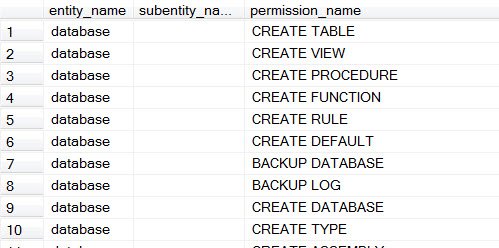
Membership in public doesn’t mean an account has one fixed set of rights. Grants, roles and denies all change effective access. Checking an administrator therefore doesn’t prove what an application account can do.
To check another account, reconnect as that account when you are authorized. Authorized impersonation is the other option, and its scope matters. Always end an impersonated context with REVERT.
I don’t solve every permission error by asking for db_owner. First I identify the operation that failed and the access it needs. Then I ask for the narrowest grant and run the check again.
A permission check is not a request for more access, it is a way to verify the access you need.
Published by Pinal Dave on SQLAuthority. More of my work at pinaldave.com.
Discover more from SQL Authority with Pinal Dave
Subscribe to get the latest posts sent to your email.




3 Comments. Leave new
Hello Pinal,
I tried above code with sa login but i got nothing.
Please see below result.
entity_name subentity_name permission_name
——————————————————————————————————————————– ——————————————————————————————————————————– ————————————————————
(0 row(s) affected)
BR,
Neha
Thanks Pinal. I have learnt something new today!
Thank you Eng PINAL DAVE, very easy, very helpful.