A departed user cannot be dropped while it still owns things, so clean up the ownership first. Find what the user owns, hand each item to an owner you chose, and only then run DROP USER.

The request that sounds simple
The ticket says a colleague left on Friday and the account should go. You type DROP USER and press F5. SQL Server says no. Fine, you think, I will just force it. There is no force. Good, because the next step could break an application.
Schemas, roles and individual objects can all name a user as their owner. Drop the user carelessly and you either get an error or, worse, you hunt for orphans later. Let me build the situation in a small demo so you can see each piece.
Give the user three things to own
The demo creates a database called SqlAuthorityDemo and drops it at the end. DepartedUser owns a schema, a role and a table. The table lives in dbo but is owned directly by the user. A second table, PlainObject, has no explicit owner.
USE master;
DROP DATABASE IF EXISTS SqlAuthorityDemo;
GO
CREATE DATABASE SqlAuthorityDemo;
GO
USE SqlAuthorityDemo;
GO
CREATE USER DepartedUser WITHOUT LOGIN;
GO
CREATE SCHEMA OwnedSchema AUTHORIZATION DepartedUser;
GO
CREATE ROLE OwnedRole AUTHORIZATION DepartedUser;
CREATE TABLE dbo.OwnedObject (Id int);
CREATE TABLE dbo.PlainObject (Id int);
ALTER AUTHORIZATION ON OBJECT::dbo.OwnedObject TO DepartedUser;
See the first drop fail
Now try the drop. I catch the error so you can read its number and text.
BEGIN TRY
    DROP USER DepartedUser;
END TRY
BEGIN CATCH
    SELECT ERROR_NUMBER() AS ErrorNumber, ERROR_MESSAGE() AS ErrorMessage;
END CATCH;
Error 15183 says the principal owns objects in the database and cannot be dropped. The message is short and it does not list what is owned. Finding that out is your job.
Take an inventory of what the user owns
Three small queries cover the direct relationships. One looks at schemas, one at roles and one at objects. All three match on the principal ID, not on the name.
DECLARE @p int = DATABASE_PRINCIPAL_ID(N'DepartedUser');

SELECT name AS SchemaName
FROM sys.schemas
WHERE principal_id = @p
ORDER BY name;

SELECT name AS RoleName
FROM sys.database_principals
WHERE type = 'R' AND owning_principal_id = @p
ORDER BY name;

SELECT SCHEMA_NAME(schema_id) AS SchemaName, name AS ObjectName
FROM sys.objects
WHERE principal_id = @p
ORDER BY name;
The answers are OwnedSchema, OwnedRole and the table dbo.OwnedObject. Notice what is missing. PlainObject does not appear. An object with no explicit owner has a NULL principal ID and inherits the owner of its schema, so the schema check covers it.
A real database may hold far more. Run the same three queries on your own server before you act.
Transfer ownership, then drop the user
Now decide the new owner. I use dbo here to keep the demo short. In real life, choose the owner from how the application is designed. Do not pick whichever personal account happens to be handy, because it will be the next person to leave.
ALTER AUTHORIZATION ON SCHEMA::OwnedSchema TO dbo;
ALTER AUTHORIZATION ON ROLE::OwnedRole TO dbo;
ALTER AUTHORIZATION ON OBJECT::dbo.OwnedObject TO dbo;

DROP USER DepartedUser;

SELECT USER_ID(N'DepartedUser') AS RemainingUserId;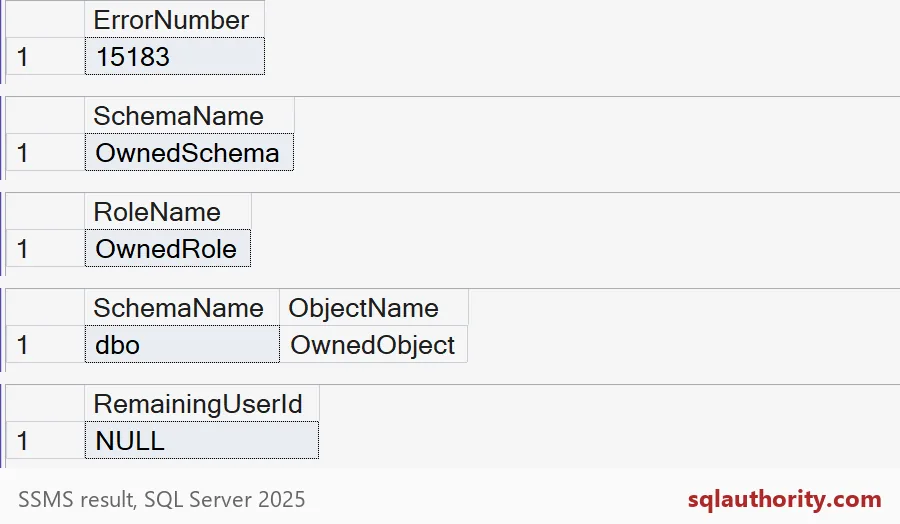
RemainingUserId is NULL, so the user is gone. The picture shows five results. The first is the error number from the failed drop. The next three are the inventory. The last one is this result.
The useful objects are still here. Check with one more query.
SELECT N'schema' AS Kind, name AS Name, USER_NAME(principal_id) AS OwnerName
FROM sys.schemas
WHERE name = N'OwnedSchema'
UNION ALL
SELECT N'role', name, USER_NAME(owning_principal_id)
FROM sys.database_principals
WHERE name = N'OwnedRole'
UNION ALL
SELECT N'table', name, USER_NAME(principal_id)
FROM sys.objects
WHERE name = N'OwnedObject';
The schema, the role and the table are all still there, now owned by dbo. The user left, and the work stayed.

What this does not cover
A database user and a server login are different things. This demo uses a user without a login. For a real departure, also review Agent jobs, credentials and permissions in other databases before you remove the login. Transfer job ownership to a reviewed account, then check the job still runs.
Here is the cleanup for the demo.
USE master;
DROP DATABASE IF EXISTS SqlAuthorityDemo;
The script prints no error of its own, because the failed drop is caught and shown as a result.
Next time a ticket says “remove the account,” start with the inventory.
Dropping a user is not cleanup, it is the last step after the ownership moves.
Published by Pinal Dave on SQLAuthority. More of my work at pinaldave.com.
Discover more from SQL Authority with Pinal Dave
Subscribe to get the latest posts sent to your email.