
Detecting a Leap Year in T-SQL takes one rule or one date trick. This post tests four ways and shows that they agree on 209 years in a row. It also covers the century years that catch people out.

The Calendar Rule in Plain Words
A year is a leap year when it divides evenly by 4. There’s one exception: a year that divides by 100 isn’t a leap year, unless it also divides by 400. So 2024 and 2000 are leap years, while 1900 and 2100 are not.
The exception keeps the calendar in step with the seasons. Any 400 years hold 97 leap years, not 100, which makes the average year 365.2425 days long. A shortcut that checks only for 4 works for every year from 1901 to 2099. After that, it breaks. SQL Server applies this Gregorian rule to every date back to year 1. Real calendars before 1582 followed other rules.
Four Ways to Test a Leap Year in T-SQL
Each method asks SQL Server a different question about the same year.
| Method | The question it asks | Works on |
|---|---|---|
| Calendar rule | Does the year fit the divide by 4, 100 and 400 rule? | Every version |
| EOMONTH | Is the last day of February the 29th? | SQL Server 2012 and later |
| TRY_CONVERT | Is 29 February of this year a real date? | SQL Server 2012 and later |
| DATEDIFF | Does the year hold 366 days? | SQL Server 2012 and later |
The rule uses the % operator, which returns the remainder after a division. A year with a remainder of 0 when divided by 4 divides evenly. EOMONTH returns the last day of the month for a date. DATEFROMPARTS builds the date 1 February from the year, so no text conversion is needed. Older answers glued the year and 0201 into a string first.
TRY_CONVERT returns NULL instead of an error when text isn’t a valid date. Here the text is the year followed by 0229, read with style 112, the plain yyyymmdd layout. RIGHT(CONCAT(‘000’, year), 4) pads a short year to four characters first. The last method counts the days from 1 January to 31 December and adds 1. It’s the plainest to read: a year with 366 days is a leap year.
One inline table-valued function returns all four answers in a single row. An inline function is made of one SELECT. SQL Server expands it into the query that calls it. The script creates a database named LeapYearDemo for this post only, so run it on a test server. The script uses CREATE OR ALTER, which needs SQL Server 2016 SP1 or later. On 2012, use CREATE FUNCTION.
IF DB_ID(N'LeapYearDemo') IS NULL CREATE DATABASE LeapYearDemo;
GO
USE LeapYearDemo;
GO
CREATE OR ALTER FUNCTION dbo.LeapYearChecks (@Year int)
RETURNS TABLE
AS
RETURN
(
    SELECT
        CASE WHEN (@Year % 4 = 0 AND @Year % 100 <> 0) OR @Year % 400 = 0 THEN 1 ELSE 0 END AS ByRule,
        CASE WHEN DAY(EOMONTH(DATEFROMPARTS(@Year, 2, 1))) = 29 THEN 1 ELSE 0 END AS ByEomonth,
        CASE WHEN TRY_CONVERT(date, RIGHT(CONCAT('000', @Year), 4) + '0229', 112) IS NOT NULL THEN 1 ELSE 0 END AS ByConvert,
        CASE WHEN DATEDIFF(DAY, DATEFROMPARTS(@Year, 1, 1), DATEFROMPARTS(@Year, 12, 31)) + 1 = 366 THEN 1 ELSE 0 END AS ByDays
);
The Century Years That Trip People Up
This query sends five years through the function. It also shows each year’s remainder when divided by 4.
SELECT y.Year, y.Year % 4 AS RemainderBy4, c.ByRule, c.ByEomonth, c.ByConvert, c.ByDays
FROM (VALUES (1900), (2000), (2024), (2026), (2100)) AS y(Year)
CROSS APPLY dbo.LeapYearChecks(y.Year) AS c
ORDER BY y.Year;
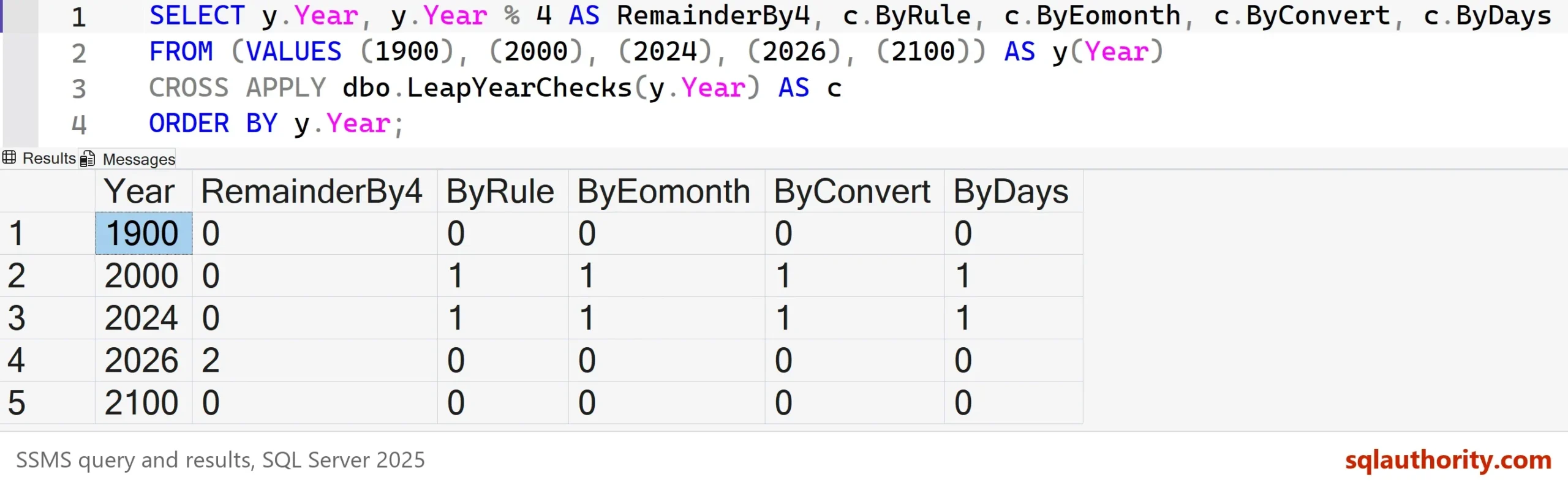
The remainder is 0 for 1900, 2000, 2024 and 2100, yet only 2000 and 2024 are leap years. All four checks agree on that. They return 1 for 2000 and 2024, and 0 for 1900, 2026 and 2100. A divide by 4 shortcut gets 1900 and 2100 wrong.
Proving the Four Agree
Five years prove little. The next query tests 209 of them, from 1896 to 2104. GENERATE_SERIES makes the list of numbers. It needs SQL Server 2022 or later and a database at compatibility level 160 or higher. The query counts the years, the leap years, and the years where any method disagrees with the rule.
SELECT COUNT(*) AS YearsChecked,
       SUM(c.ByRule) AS LeapYears,
       SUM(CASE WHEN c.ByRule = c.ByEomonth AND c.ByRule = c.ByConvert AND c.ByRule = c.ByDays THEN 0 ELSE 1 END) AS Disagreements
FROM GENERATE_SERIES(1896, 2104) AS g
CROSS APPLY dbo.LeapYearChecks(g.value) AS c;| YearsChecked | LeapYears | Disagreements |
|---|---|---|
| 209 | 51 | 0 |
Not one year splits the four methods. Widening the range to 1 through 9999 gives 2,424 leap years and still 0 disagreements.
Which Leap Year in T-SQL Test to Use
Use the rule when the code must run on any version. It accepts any int and converts nothing. The date methods need SQL Server 2012 or later, and they accept only years 1 through 9999. Ask for year 0 and they fail.
SELECT * FROM dbo.LeapYearChecks(0);
Msg 289, Level 16, State 1, Line 1
Cannot construct data type date, some of the arguments have values which are not valid.
Pass the full year as well. DATEFROMPARTS(24, 2, 1) returns 0024-02-01, so a two digit 24 means the year 24, not 2024. A function that must accept short years has to add the century first.
You could argue that four methods are overkill and the rule alone is enough. For a report, that’s right. When I write a date function, I still test it against SQL Server’s own calendar. The date methods are that check.
Leap Years and Date Math
Detecting a leap year in T-SQL is one job, and date math around one is another. Do leap years need special care in SQL Server? Not for date math on the date type, because SQL Server knows the calendar. This query adds a year to 29 February and subtracts a year from 1 March. It also adds a day to 28 February in an ordinary year.
SELECT DATEADD(YEAR, 1, CAST('2024-02-29' AS date)) AS OneYearLater,
       DATEADD(YEAR, -1, CAST('2017-03-01' AS date)) AS OneYearBack,
DATEADD(DAY, 1, CAST('2026-02-28' AS date)) AS DayAfter;| OneYearLater | OneYearBack | DayAfter |
|---|---|---|
| 2025-02-28 | 2016-03-01 | 2026-03-01 |
One year after 29 February 2024 is 28 February 2025, because the 29th doesn’t exist in 2025. The real risk is code that assumes a year has 365 days. Let DATEADD and DATEDIFF count the days for you.
What to Remember
Every way to test for a leap year in T-SQL starts from the calendar rule. Divide by 4, skip the centuries, and keep every fourth century. The date methods ask SQL Server’s own calendar the same question and give the same answer. Test 1900, 2000 and 2100 whichever way you choose.
If you’re on SQL Server 2008 or earlier, the rule is the only option here. When you finish testing, remove the example database.
USE master;
GO
ALTER DATABASE LeapYearDemo SET SINGLE_USER WITH ROLLBACK IMMEDIATE;
DROP DATABASE LeapYearDemo;
A leap year is not a special case to remember, it is a rule to write once and test.
Published by Pinal Dave on SQLAuthority. More of my work at pinaldave.com.
Discover more from SQL Authority with Pinal Dave
Subscribe to get the latest posts sent to your email.



28 Comments. Leave new
Does it only work with 4 digits year ?
For sure try :)
Hi pinal
If i am using Sql Server 2008 then How can i find it.
You can use any of the methods available in this post
Got an error as : ‘CONCAT’ is not a recognized built-in function name.
Try on SQL Server 2012.
Note that this will not work versions prior to 2012
Hi Dear Pinal
can you please seperate “Sql Server 2012” tips and tricks in a tag?finding just Sql Server 2012 tips is difficult in you very good blog.
thanks
Here are different methods to find out the leap year
Hi Pinal,
I just try for other simple method to find leap year… Please check the below query.
/*
Declare
@FromYear as int
set @FromYear=’2012′
select
case when
((@FromYear/4.0) /cast (@FromYear/4 as varchar(5)))= 1 then ‘Leap Year’
else ‘Not Leap Year’ end
*/
Hi Ramesh
The formula you have written is wrong. You have to check the century year as well as year divisible by 400.
Thanks
Sanjay
Very interesting!!! thanks Pinal.
Is it possible to work on SQl 2008, kindly suggest
I used to write some thing similar to this in my javascript date validations. Since I dont have SQL2012 currently, I use ‘if’. Using iif would make the code shorter and I guess this uses less resources.
DECLARE @year int
SET @year = 2012
if (((@year % 4 = 0) AND (@year % 100 != 0)) OR (@year % 400 = 0))
print ‘1’
ELSE
print ‘0’
I know you wanted to showcase the SQL2012 functions, but another solution that doesn’t depend on SQL2012 and is much shorter and easier to understand is to just use the IsDate() function as in this example:
declare @Year int = 2012
select isdate(‘2/29/’ + cast(@Year as char(4)))
Note that besides being very simple to read and understand, this works correctly for null, 2 digit years and all of the whole centuries too. Unlike some of the solutions I’ve seen, this one does not cause a divide-by-zero error when the year = 0. Most of this SQL is test cases. The real code is all on one short line.
;with TestData (Y) as (
select cast(null as int)
union select 0
union select 1
union select 2
union select 3
union select 4
union select 5
union select 48
union select 52
union select 1900
union select 1996
union select 1999
union select 2000
union select 2001
union select 2004
union select 2011
union select 2012
union select 2013
union select 2100
union select 987654321
)
select Y as [Year],
/*
Careful – According to SQL BOL,
ISDATE is deterministic only if you use it with the CONVERT function,
if the CONVERT style parameter is specified, and style is not equal to 0, 100, 9, or 109.
The return value of ISDATE depends on the settings set by
SET DATEFORMAT, SET LANGUAGE and default language option.
The date string may need to be formatted differently depending on your SQL server configuration.
This next column is the one that determines if the specified year is a leap year.
*/
isdate(‘2/29/’ + cast(Y as char(4))) as IsLeapYear,
— This next column is unnecessary.
— It just shows that this works with 1 & 2 digit years
case when isdate(‘2/29/’ + cast(Y as varchar(4))) = 1
then cast(‘2/29/’ + cast(Y as varchar(4)) as date)
else null
end as LeapDay
from TestData
order by Y
Thanks for posting even more info on SQL Server 2012 features and please keep them coming as this is a great place to learn.
And well done to David for your excellent 2008 version. I really like what you did there. Whenever I see a bit of 2012 code I always wonder how to acheive the same thing in 2008 and its usually not too hard to work out but it is usually longer and slightly more difficult to follow. Yours isn’t in-fact it proves that sometimes new features are just there for the more obvious issues and not always better (like CONCAT – which is pretty simple to mimick in 2008).
(incidentally – Another approach would be to take one day off March 1st and see if it is 29)
Thanks to both of you.
Dave (are we collectively all SQL Dave?)
Thank you DAVE – we all are SQL Dave for sure!
Just divide year by 4. If the remainder of the division returns 0, its leap year.
select 2012 % 4
returns 0
simple
create function fncLeapYear
(@date smalldatetime) returns bit
as
begin
declare @r bit
set @r = case year(@date)%4 when 0 then 1 else 0 end
return @r
end
select dbo.fncLeapYear (getdate())
fbncs: your function is incorrect for adjustment years.
Admittedly the next adjustment year is 2100 so many of us will not actually care about this but fact remains that we cannot just check if the year is divisible by 4.
This is why MS saw fit to put the function in to SQL so that developers do not have to worry about it. I think we should avoid re-inventing the wheel and check a date against what Microsoft has done for us (even in 2008 the functionality exists as it knows if there are 29 days if you ask it that question directly) hence I think it works to take one off 1st march and test if its 29 in SQL Server 2008 and use the function Pinal spoke of for 2012.
Personally I would always recommend using a date (calendar) table in your database ratherthan a date calculation as you allow not oly for leap years but also all other special dates, company financial year etc.
Check out this excerpt from wikipedia page
https://en.wikipedia.org/wiki/Leap_year
“most years that are evenly divisible by 4 are leap years…”
“…Some exceptions to this rule are required since the duration of a solar year is slightly less than 365.25 days. Years that are evenly divisible by 100 are not leap years, unless they are also evenly divisible by 400, in which case they are leap years. For example, 1600 and 2000 were leap years, but 1700, 1800 and 1900 were not. Similarly, 2100, 2200, 2300, 2500, 2600, 2700, 2900 and 3000 will not be leap years, but 2400 and 2800 will be.”
Excellent David
JUST USE ISDATE() FUNCTION like:-
CREATE FUNCTION dbo.IsLeapYear (@year INT)
RETURNS INT
AS
BEGIN
RETURN ISDATE(’02/29/’+ Cast(@year AS varchar(4)))
END
GO
SELECT dbo.IsLeapYear(2012)
Many more methods to find out a leap year
Hi Pinal,
I’m facing one problem from last 5 days. I need your help. I’m creating sp to calculate Gratuity of employee, but I’m unsle to calculate the @DayCount due to leap year. Can you please see the below stored procedure,
ALTER PROCEDURE [Hrms].[Usp_CalculateGratuity]
(
@GratuityDate Datetime,
@EmployeeID varchar(20),
–@EMPLOYEE_NUMBER VARCHAR(20),
@Gratuity INT OUTPUT
)
As
BEGIN
— Get salary drawn
DECLARE @LastSalary DECIMAL(10,4)
SELECT @LastSalary = BasicPay from ALLSec.dbo.tblAllSecLeaveSync where EmployeeID=@EmployeeID
— Get First working date
DECLARE @HireDate DATETIME
SELECT TOP 1 @HireDate = First_Hire_date FROM Hrms.dbo.Hrms_Employee_Detail where EMPLOYEE_NUMBER = @EmployeeID
ORDER BY Hrms_Employee_Detail.First_Hire_date DESC
— Get last working date
DECLARE @LWD DATETIME
SELECT @LWD= [Approved LWD] FROM hrms.tblEmployeeDetails WHERE EmployeeNumber=@EmployeeID
— Get total completed years
DECLARE @CompletedYears INT
SELECT @CompletedYears = DATEDIFF(YEAR,@HireDate,@LWD)
— Calculate days in years
DECLARE @DayCount INT
SET @DayCount = @CompletedYears*365
— Get total days
DECLARE @CompletedDays INT
SET @CompletedDays = DATEDIFF(DAY,@HireDate,@LWD) – @DayCount
— Get total Months
DECLARE @TotalMonths INT
SET @TotalMonths = (@CompletedYears * 12)- DATEDIFF(MONTH,@HireDate,@LWD)
— when number of years >= 4 years and days >= 239 days then return calculated Gratuity otherwise Gratuity = 0
IF(@CompletedYears >= 4)
IF ((@CompletedYears = 4) AND (@CompletedDays >= 239))
BEGIN
— If months >= 6 then total years should be increment by 1
— Need not this condition here
IF (@TotalMonths >= 6)
BEGIN
SET @CompletedYears = @CompletedYears + 1
END
— Finally calculate the Gratuity of employee
SET @Gratuity = 15/26 * @LastSalary * @CompletedYears
END
— If completed years > 4
ELSE
BEGIN
— If months >= 6 then total years should be increment by 1
IF (@TotalMonths >= 6)
BEGIN
SET @CompletedYears = @CompletedYears + 1
END
— Finally calculate the Gratuity of employee
SET @Gratuity = 15/26 * @LastSalary * @CompletedYears
END
ELSE
BEGIN
SET @Gratuity = 0
END
— Get Calculated Gratuity
SELECT @Gratuity
END
is there any reason to mention in concat ‘0201’ can u explain that
Hi Pinal, Does leap year effect SQL servers in any way do we have to take any precautions a head..
Thanks In Advance
This works for both 2/4 digit years: @Year/4.0 LIKE ‘%.0%’
Samples:
DECLARE @Year2 INT = 00
SELECT
CASE WHEN @Year2/4.0 LIKE ‘%.0%’ THEN ‘LEAP’ ELSE ‘NORMAL’ END
DECLARE @Year4 INT = 2000
SELECT
CASE WHEN @Year4/4.0 LIKE ‘%.0%’ THEN ‘LEAP’ ELSE ‘NORMAL’ END
I just want to get end quarter date list between two dates where two dates are not constant
The output should be in given below format:
start date End date
20160701 20161231
20160930 20170331
output :
start date End date End quarter date
20160701 20161231 20160930
20160701 20161231 20161231
like wise .I need it
Please help !
Pinal, I want to show the date of yesterday from last year based on today’s date. So 2017 is not a leap year but 2016 was, that being said when we reach 3/1/2017 my calendar returns 2/28/2016 when it should be 2/28/2016. Here is the code i currently have dateadd(yy,-1,dateadd(d,-1,DC.DateKey)). DC is my DimCalendar from my Data warehouse and datekey is the date.