A check constraint on existing data fails if even one row already breaks the rule. So you clean the bad rows first, then add the constraint, and every later INSERT and UPDATE is checked. This post walks through that order on a small table of lakes with a few wrong values.
What a Constraint Does
A constraint is a rule that the database enforces for you. SQL Server offers NOT NULL, DEFAULT, PRIMARY KEY, UNIQUE, FOREIGN KEY and CHECK. A data type says which kind of value fits a column. A check constraint adds your own logic on top. A decimal column accepts -12.5, but no lake has a negative area.
The Sample Table
Lakes stores the area of each lake in square kilometers. Two areas are negative, and one is NULL. Run this in any test database. Every result below comes from SQL Server 2025.
CREATE TABLE Lakes (LakeID INT NOT NULL PRIMARY KEY, LakeName VARCHAR(30) NOT NULL, AreaSqKm DECIMAL(12,2) NULL);
GO

INSERT INTO Lakes (LakeID, LakeName, AreaSqKm) VALUES
  (1, 'Willow Lake', 68.00), (2, 'Clearwater', -12.50), (3, 'Stone Basin', 410.75),
  (4, 'Maple Pond', -3.40), (5, 'Long Reach', 1250.00), (6, 'Mirror Tarn', NULL);
GO
Find the Bad Rows
Start by looking for the values the rule will reject.
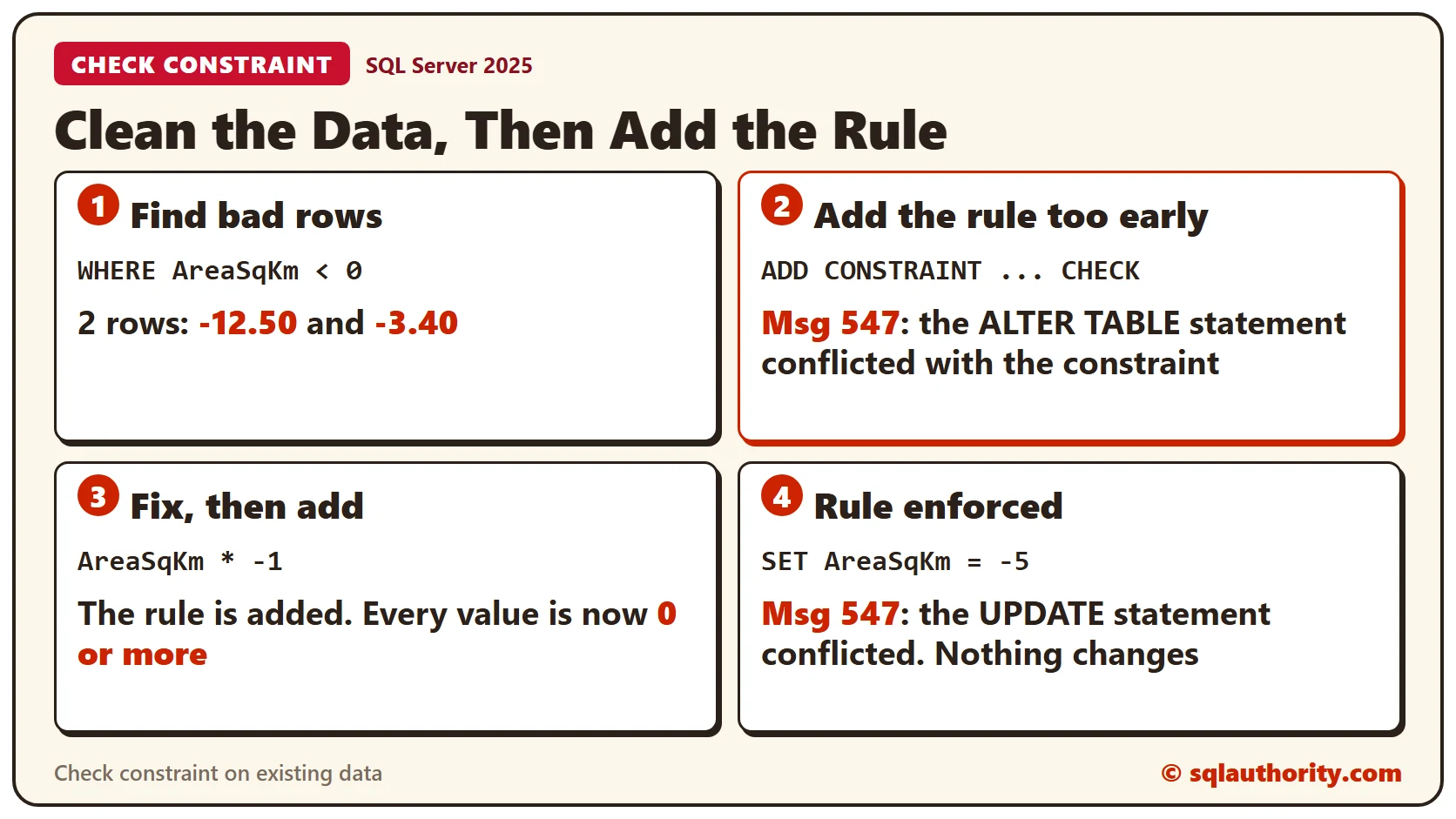
SELECT LakeID, LakeName, AreaSqKm FROM Lakes WHERE AreaSqKm < 0;Clearwater and Maple Pond have negative areas. The minus signs look like typing errors, so the fix is to flip them. In your own data, confirm the right value before you change anything.
Why Not Add the Rule First?
Try it. SQL Server checks the existing rows when it adds a constraint. The two negative rows stop it with Msg 547.
ALTER TABLE Lakes ADD CONSTRAINT CK_Lakes_AreaSqKm CHECK (AreaSqKm >= 0);Clean the Data, Then Add the Rule
Multiply the negative areas by -1, then add the constraint again. The usual name is CK, the table and the column, joined by underscores.
UPDATE Lakes SET AreaSqKm = AreaSqKm * -1 WHERE AreaSqKm < 0;ALTER TABLE Lakes ADD CONSTRAINT CK_Lakes_AreaSqKm CHECK (AreaSqKm >= 0);The five areas that have a value are now 0 or more, and the NULL stays. The constraint checks every new INSERT and UPDATE from now on.
Test the Rule
An update that makes an area negative is rejected, and the message names the constraint. A valid update goes through.
UPDATE Lakes SET AreaSqKm = -5 WHERE LakeID = 1;

UPDATE Lakes SET AreaSqKm = 70.25 WHERE LakeID = 1;
Add a Ceiling
The rule blocks negative numbers, but a typo with extra zeros still passes. This update gives Long Reach an area of 125 million square kilometers, and it succeeds. Put the real value back before you go on.
UPDATE Lakes SET AreaSqKm = 125000000 WHERE LakeID = 5;

UPDATE Lakes SET AreaSqKm = 1250.00 WHERE LakeID = 5;
SQL Server has no statement that edits a check constraint. Drop it and create it again with both conditions. The ceiling here is 100,000 square kilometers.
ALTER TABLE Lakes DROP CONSTRAINT CK_Lakes_AreaSqKm;
GO

ALTER TABLE Lakes ADD CONSTRAINT CK_Lakes_AreaSqKm CHECK (AreaSqKm >= 0 AND AreaSqKm < 100000);
GO
Run the 125 million update again. It now fails with Msg 547. The catalog view shows the stored rule and whether the constraint is trusted.
SELECT name AS ConstraintName, definition AS RuleText, is_not_trusted AS NotTrusted FROM sys.check_constraints WHERE parent_object_id = OBJECT_ID('Lakes');NULL Passes the Test
A check constraint rejects a row only when the test is false. NULL makes the test unknown, so the row gets in. This insert succeeds, even though the rule says AreaSqKm must be 0 or more. Add NOT NULL to the column if you want to block it. The related post CHECK Constraints and NULL: Why Unknown Passes the Test goes deeper.
INSERT INTO Lakes (LakeID, LakeName, AreaSqKm) VALUES (7, 'Reed Lake', NULL);When You Skip the Check
The WITH NOCHECK option adds a constraint without testing the old rows. The bad rows stay, and SQL Server marks the constraint as not trusted. Treat it as a last resort.
CREATE TABLE LakesLoaded (LakeID INT NOT NULL PRIMARY KEY, AreaSqKm DECIMAL(12,2) NULL);
INSERT INTO LakesLoaded (LakeID, AreaSqKm) VALUES (1, 68.00), (2, -12.50);
ALTER TABLE LakesLoaded WITH NOCHECK ADD CONSTRAINT CK_LakesLoaded_AreaSqKm CHECK (AreaSqKm >= 0);

SELECT name AS ConstraintName, is_not_trusted AS NotTrusted FROM sys.check_constraints WHERE parent_object_id = OBJECT_ID('LakesLoaded');
NotTrusted is 1 for the new constraint. Future changes are still checked, but the optimizer can’t rely on the rule for old rows.
A Rule Across Two Columns
Some rules need two columns. A review has a Complaint flag, 1 for a complaint and 0 for none. A customer who complains can give a score from 0 to 90. Anyone else can give 1 to 100. Write each case in parentheses and join the cases with OR.
CREATE TABLE Reviews (
  ReviewID INT IDENTITY(1,1) PRIMARY KEY,
  Complaint BIT NOT NULL,
  Rating INT NOT NULL,
  CONSTRAINT CK_Reviews_Rating CHECK ((Complaint = 1 AND Rating BETWEEN 0 AND 90) OR (Complaint = 0 AND Rating BETWEEN 1 AND 100))
);
Four test inserts show the result. A complaint with a rating of 100 is rejected, and so is no complaint with a rating of 0. The other two are accepted.
INSERT INTO Reviews (Complaint, Rating) VALUES (1, 100);

INSERT INTO Reviews (Complaint, Rating) VALUES (1, 85);

INSERT INTO Reviews (Complaint, Rating) VALUES (0, 100);

INSERT INTO Reviews (Complaint, Rating) VALUES (0, 0);
Joining the two cases with AND is a common mistake. Complaint can’t be 1 and 0 at once, so the rule is never true. Both test inserts below are rejected.
CREATE TABLE ReviewsAnd (
  ReviewID INT IDENTITY(1,1) PRIMARY KEY,
  Complaint BIT NOT NULL,
  Rating INT NOT NULL,
  CONSTRAINT CK_ReviewsAnd_Rating CHECK ((Complaint = 1 AND Rating BETWEEN 0 AND 90) AND (Complaint = 0 AND Rating BETWEEN 1 AND 100))
);
GO

INSERT INTO ReviewsAnd (Complaint, Rating) VALUES (1, 85);
INSERT INTO ReviewsAnd (Complaint, Rating) VALUES (0, 50);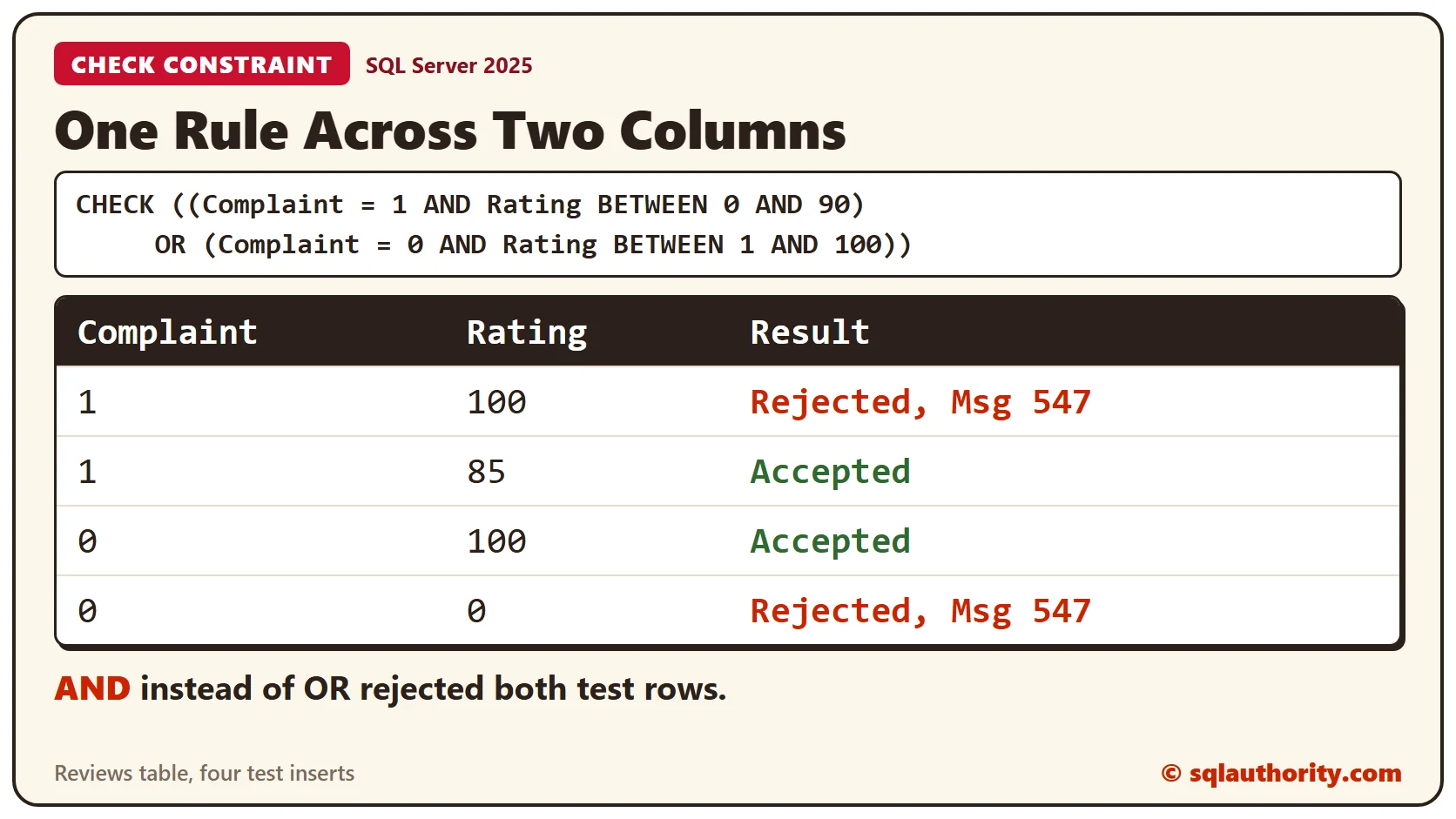
Clean Up
Remove the sample tables when you finish.
DROP TABLE ReviewsAnd;
DROP TABLE Reviews;
DROP TABLE LakesLoaded;
DROP TABLE Lakes;
What to Remember
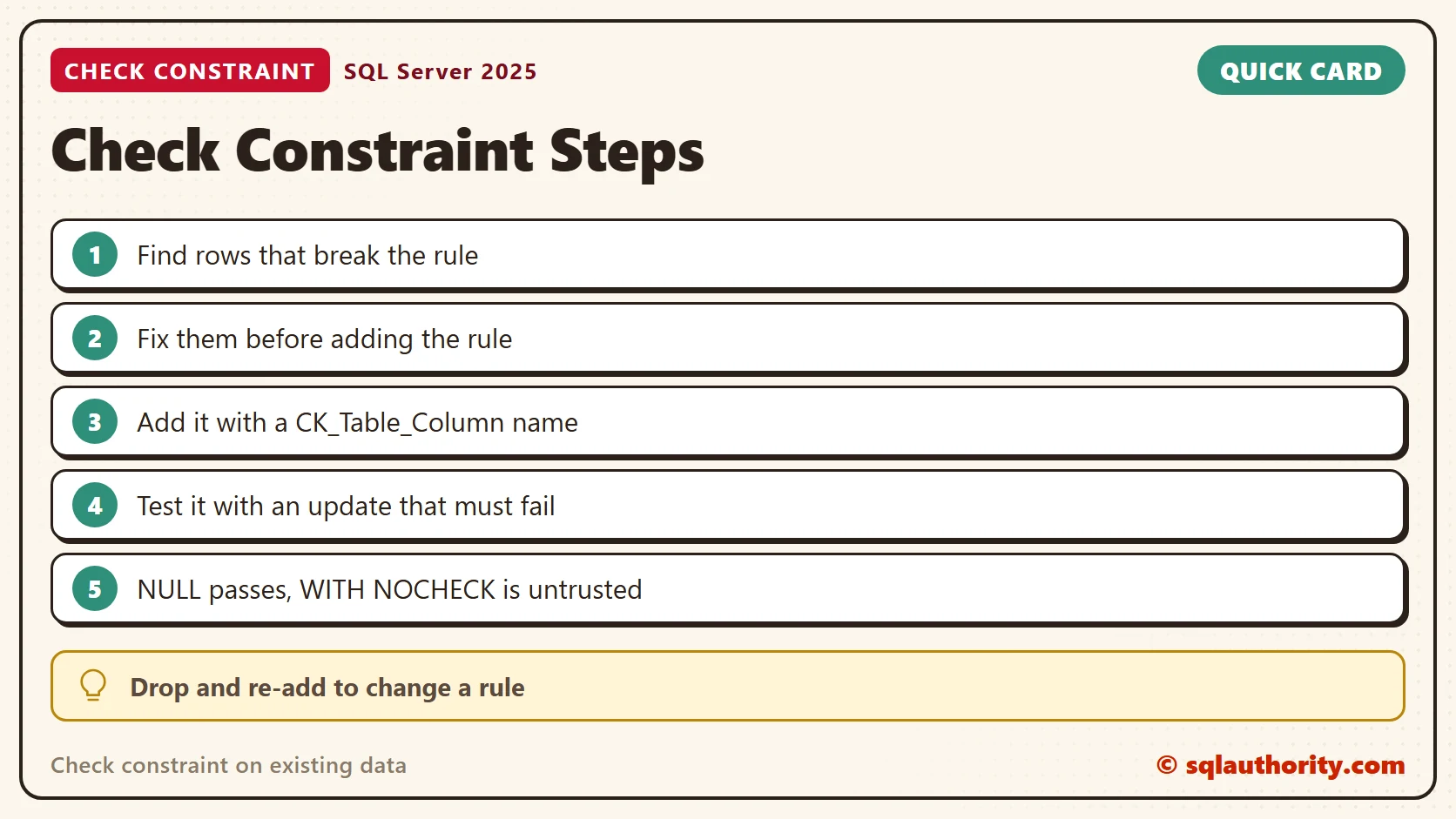
Look for bad rows, fix them, and then add the constraint, because the check runs against old rows first. Name the constraint, test it with an update that should fail, and think about NULL. WITH NOCHECK skips the old rows and leaves the constraint not trusted.
To go further, read What is Trusted Constraint in SQL Server? – Interview Question of the Week #210 and NOCHECK CONSTRAINT: Loading Data and Trusting Foreign Keys Again.
A check constraint is not a cleanup tool, it is a gate that only works on clean data.
Published by Pinal Dave on SQLAuthority. More of my work at pinaldave.com.
Discover more from SQL Authority with Pinal Dave
Subscribe to get the latest posts sent to your email.